193
OVEN LIGHT
Required Tools
• 3 mm hex wrench
• Small flathead screwdriver
Removing the Oven Light
1. Power OFF the printer. See “Powering Off” on page 169.
2. Open the oven door.
3. Remove the top gasket pins on both sides of the oven light above the oven enclosure.
Temporarily displace the top of the oven door gasket to access the oven light.
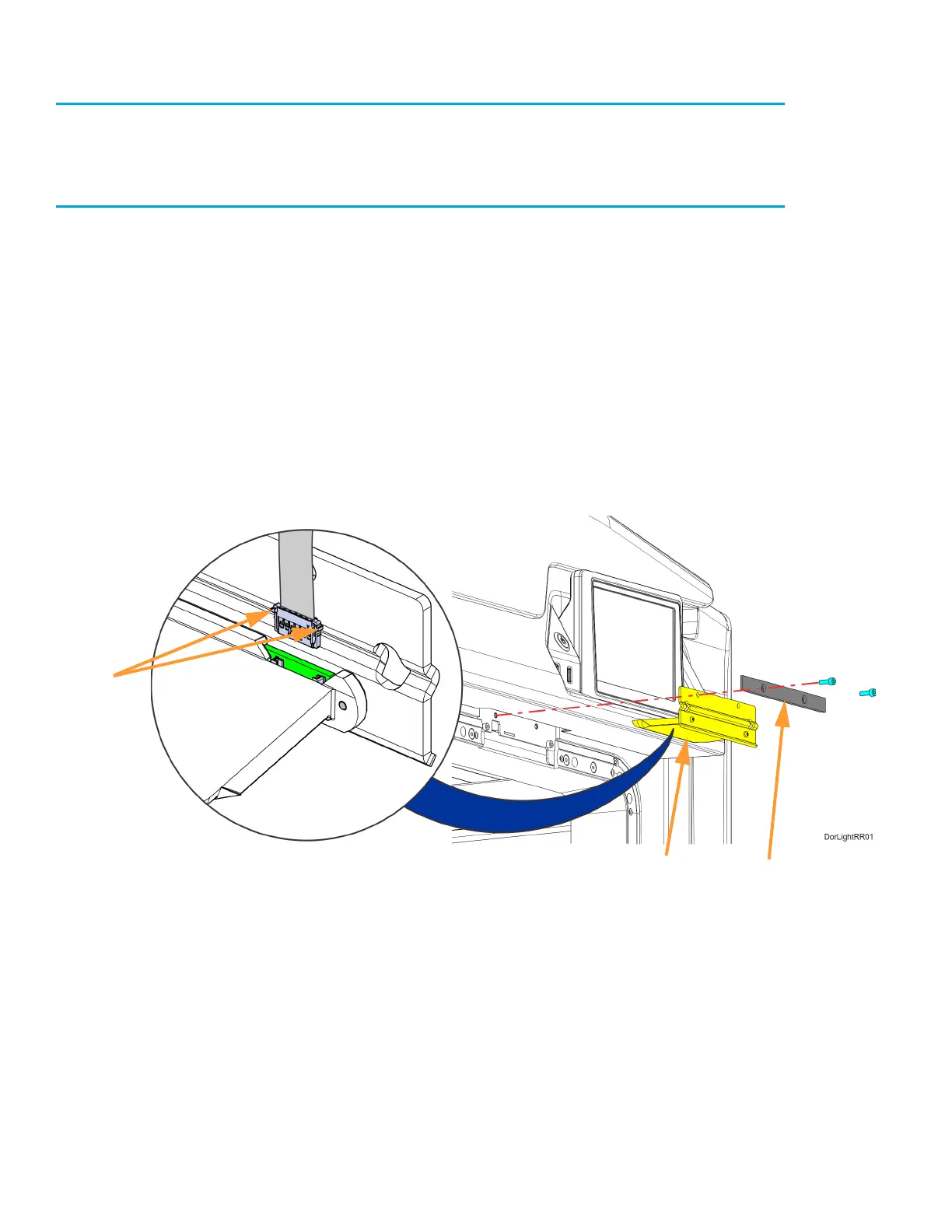
4. Using a 3mm hex wrench, remove the oven light mounting screws (2) and the retaining bracket.
See Figure 7-34.
5. Move the oven light out a small distance to access the oven light cable connector.
6. Disconnect the oven light cable connector and remove it from the printer. If necessary, use a
small flathead screwdriver to disengage the cable connector tabs. See Figure 7-34.
Figure 7-34: Oven Light Detail
Cable
Connector
Tabs
Oven light
Retaining
Bracket














 To Next Page