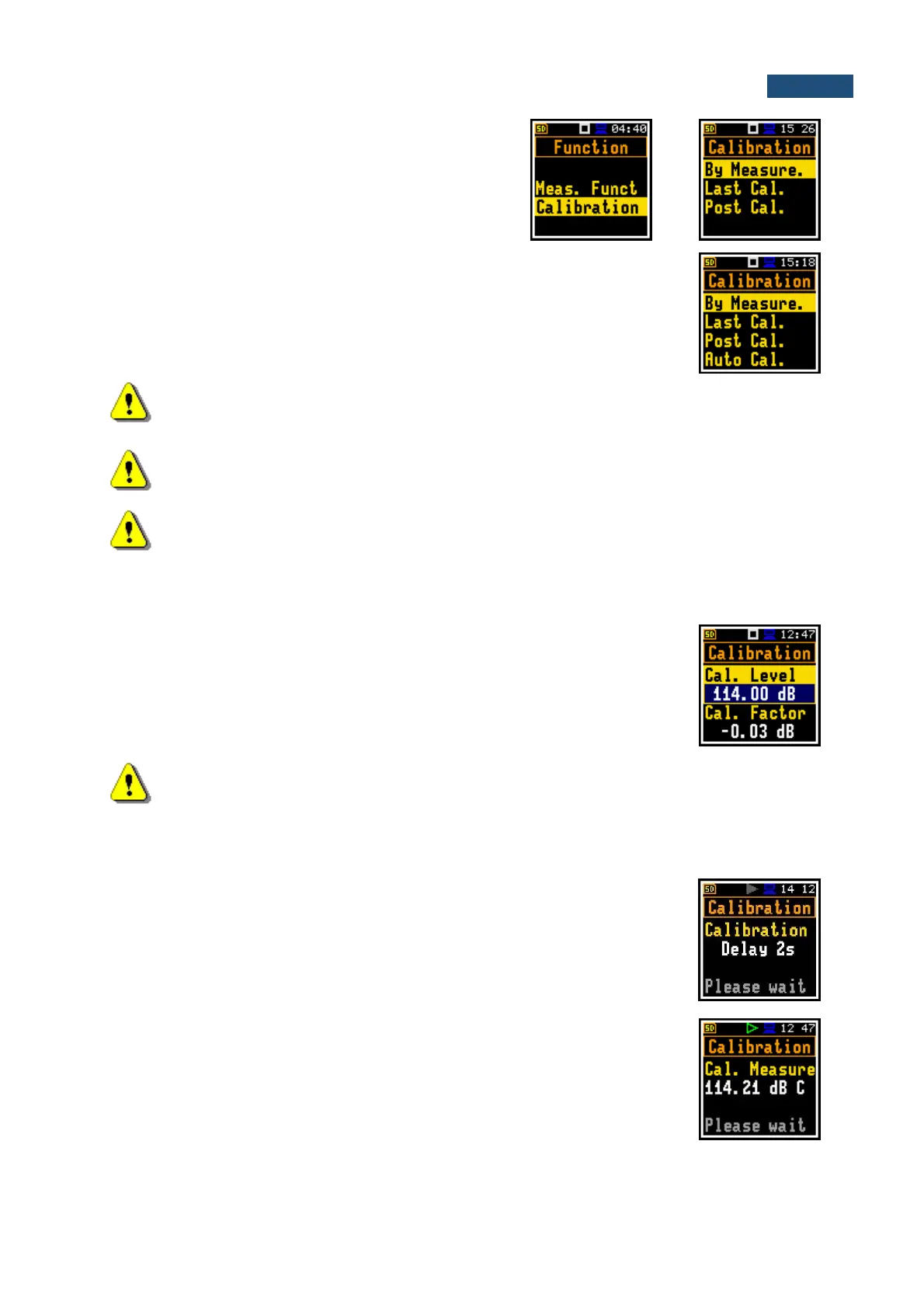
The Calibration list comprises positions enabling:
calibration with the use of the sound calibrator
(By Measure.), checking previous calibrations
(Last Cal.), adding current calibration results to the
logger file (Post Cal.).
In the Advanced user interface, there is additional position in the Calibration list
- Auto Cal., which allows you to switch on the auto calibration function.
Note: It is advised to perform calibration of the instrument each time before the
measurements begin. A single calibration at the start of each day is usually sufficient for most
regulations.
Note: The calibration factor is always added to measurement results and measurement range
limits of the Lev. Met., 1/1 Oct., 1/3 Oct. and Dosimeter functions.
Note: The recommended factory calibration interval is 12 months for instruments to be
confident in their continuing accuracy and compliance with the international specifications.
Please contact your local Svantek distributor for further details.
4.2.1 Calibration - By Measurement
To calibrate the instrument:
1. Set the calibration level (Cal. Level) appropriate to the used calibrator. The
default level is 114 dB at 1000 Hz. Remember to change this level if using an
alternative reference sound signal source.
2. Attach the sound calibrator (SV 35A or equivalent 114 dB/1000 Hz) carefully
over the microphone of the instrument.
Note: It is also possible to use an electro-mechanical pistonphone, which generates the
signal (ca 124 dB) or different type of sound calibrator dedicated for ½” microphones. In any
case, before starting the calibration measurement, you should set the level of the signal
generated by the given calibrator (Cal. Level position), which is stated in the calibrator’s
certificate (the value of the Cal. Level set by the manufacturer of SVAN 971 is equal to
114 dB). It is also necessary to switch the instrument Range to the High level.
3. Switch on the calibrator (if the used calibrator doesn’t have auto run function)
and wait ca 30 seconds for the tone to stabilise before starting the calibration
measurement.
4. Start the calibration measurement by pressing the <Start/Stop> key.
The calibration delay time is set to 3 seconds. While waiting for the start of the
measurement the Delay is counting down on the display.
During the calibration measurement, the level of the measured calibration signal
is displayed. If the maximal difference between three 1-second consecutive
results (Leq(C)) is less than 0.05dB, the calibration measurement will be stopped,
and the calibration factor will be calculated. The measurement can be always
stopped by the <Start/Stop> key.



 To Next Page