5.5.4 Event recording settings – Event Recording
The Event Rec. position enables activating and setting
parameters of a waveform signal recording in the logger
file. Event records are placed in the logger file together
with Summary Results and Logger Results. All records
are synchronized in time that enables synchronous post
measurement processing of all measured data.
In the Simple instrument interface mode, the Event Rec.
position doesn’t appear in the Logging list.
Note: In the Simple interface mode, the Event Recording position is hidden, but the
instrument will use settings previously defined in the Advanced mode or default settings
(Recording: Off).
Note: The Event Recording function is optional and should be unlocked by entering the
activation code in the text editor screen, opened by the ► key. Once unlocked this option will
be ready to use permanently.
The Recording position, if it is not Off, defines the way a
signal recording should be done, continuously during the
measurement (Continuous) or on the trigger: Slope +,
Slope -, Level +, Level -, Gradient +, Trig.manual or
Integr. Period.
Slope type trigger
The Slope + trigger starts an event recording under the condition: rising value of
the RMS result (Source) averaged by 0,5 ms passes above the threshold level
(Level).
After pressing the <Start> key the instrument checks the trigger condition with intervals, defined by the
Tr. Period parameter, and if condition is met starts the event recording. The recording lasts minimum
time, defined by the Rec. Time parameter, and during this time the instrument continues to check the
trigger condition (provided that the Tr. Period is shorter than the Rec. Time). If next trigger condition is
met during the Rec. Time the instrument triggers recording again, so it will be continued from this
moment by additional Rec. Time and so on. If during next recording time there are no triggers, the
recording will be stopped after the last trigger plus Rec. Time. Assuming, that after first recording the
trigger conditions continue to be checked, and new event recording may start during the same
measurement time.
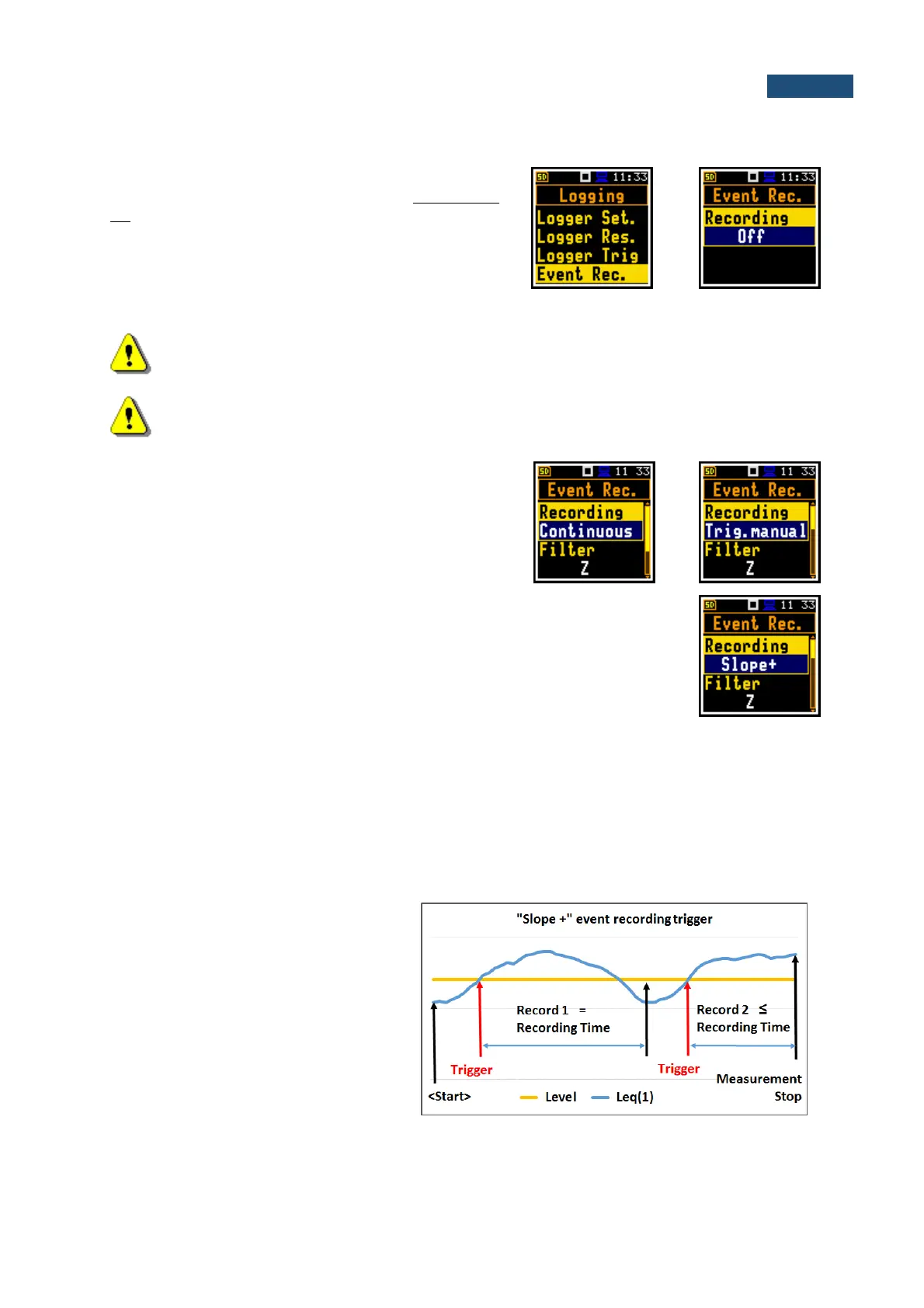
The example shows that between
measurement start and stop two records
were created. The first record is equal to
the Rec. Time, because during this period
no second trigger condition has been met.
The second recording is stopped by the
measurement stop and this record can be
shorter than the Rec. Time.



 To Next Page