Operating the Equipment 37
ID: um_t2gateway CP560 DVB-T2 Gateway User’s Manual Rev. 2.2 (3686)
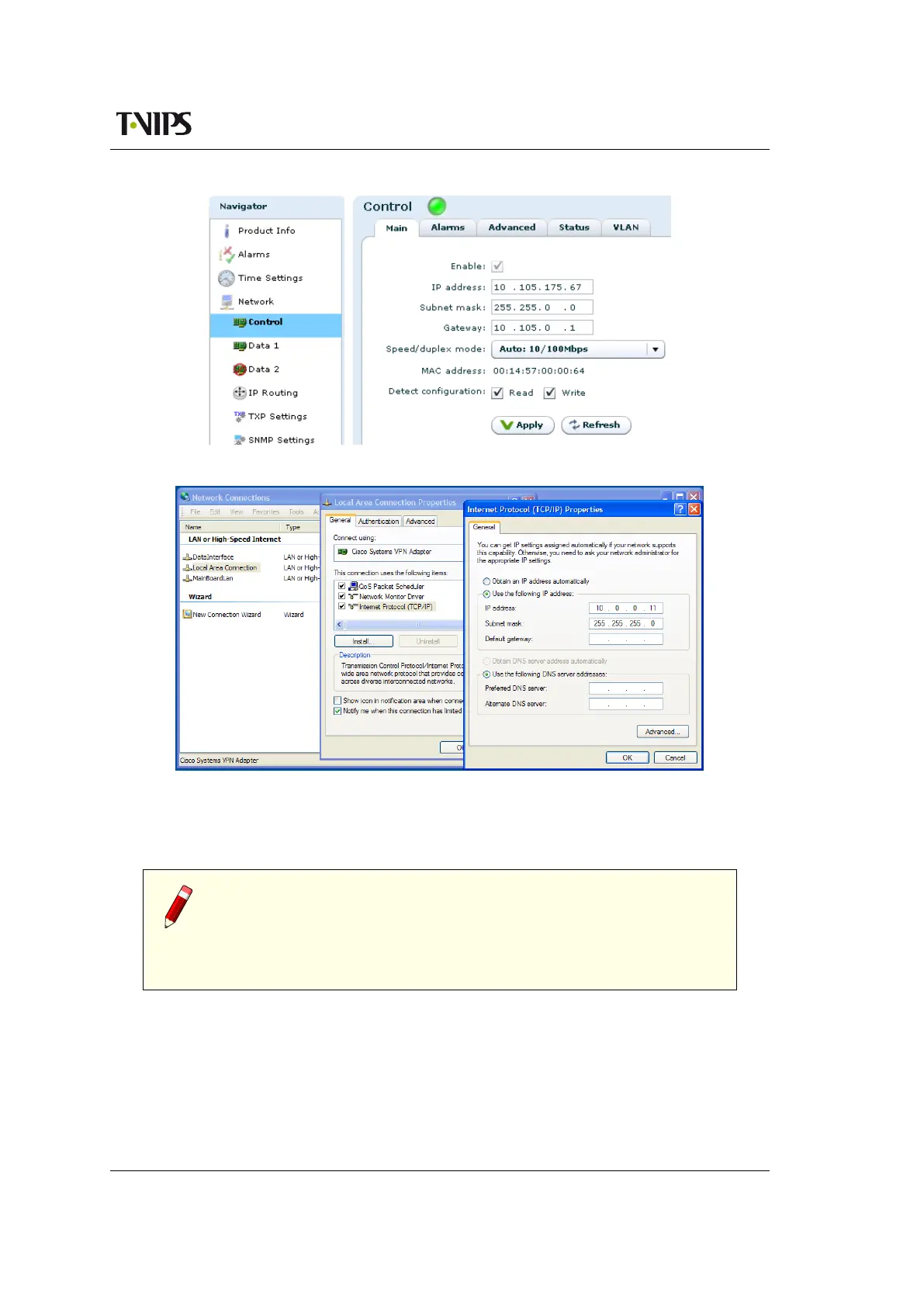
Figure 7.1 Configuring network settings via the Web GUI
Figure 7.2 Setting static IP address 10.0.0.11 in Windows XP
is set to 10.0.0.11/255.255.255.0 which is on the same sub net as the CP560, and does not
conflict with the IP address of the device.
Note: If several new devices are accessed, one after another, the ARP
cache of the computer from which the devices are being accessed may
have to be flushed between each device, since the same IP address will be
used for different MAC addresses. On Windows XP this is done on the command
line typing the command ’arp -d *’
7.3.2 Changing the management port IP address via terminal interface
If a static IP address cannot be configured on your computer, follow the procedure below to
configure the IP address via the terminal interface.



 To Next Page