60 WEB Interface
CP560 DVB-T2 Gateway User’s Manual Rev. 2.2 (3686) ID: um_t2gateway
Alignment errors
Number of packets detected with alignment errors (non-integer number of bytes).
Receive errors
Number of erroneous packets received.
Missed packets
Number of packets missed.
Link symbol errors
Number of link symbol errors detected.
Carrier extension errors
Number of carrier extension errors detected.
Receive length errors
Number of packets with invalid size.
The SFP Info field is only shown if the SFP interface is active. It displays information provided
by the SFP module installed.
8.4.5.1.5 VLAN
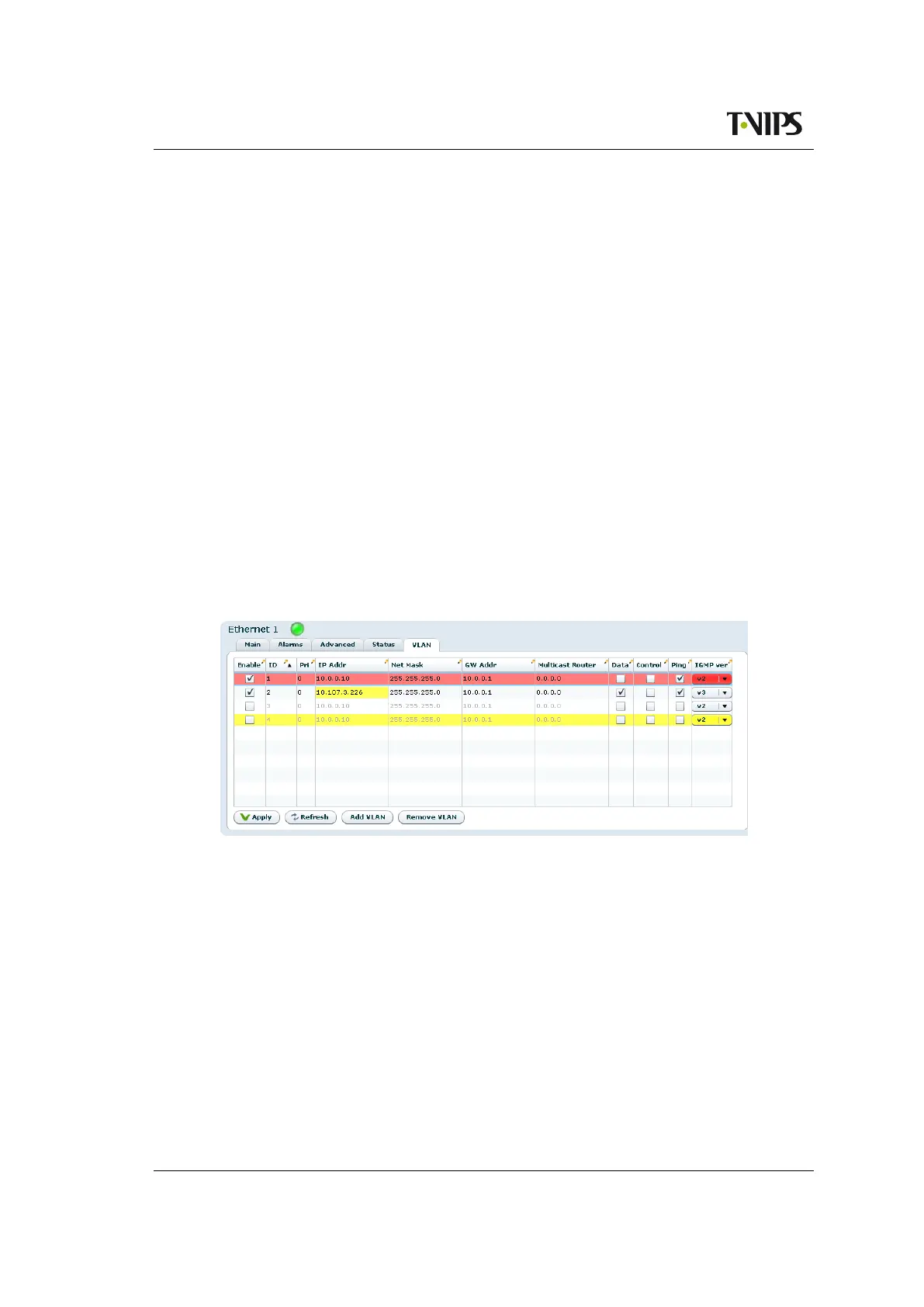
Figure 8.20 VLAN configuration
This page is only shown on interfaces with VLAN (virtual interface) support. The page allows
adding, removing and editing virtual interfaces (VLAN) using the selected physical interface.
Editing is done directly in the table. Edited fields are shown as yellow. Pending deletions are
shown in red.
Once editing is finished, clicking the Apply button will commit all the changes. Hitting Refresh
will cancel all changes.
Enable
Enable/disable the virtual interface.
ID
The VLAN id of this virtual interface. Must be in the range 1-4094. All virtual interfaces
on one physical interface must have a unique id.



 To Next Page