WEB Interface 109
ID: um_t2gateway CP560 DVB-T2 Gateway User’s Manual Rev. 2.2 (3686)
These views contain almost exactly the same information as the corresponding view on the PIDs
page, section Section 8.5.2.5. The only difference is that in grid view a list of descriptors may
be displayed below the Components table when clicking on a component. A tree structure of
descriptors is displayed, if present, in the selected component.
8.5.2.5 PIDs
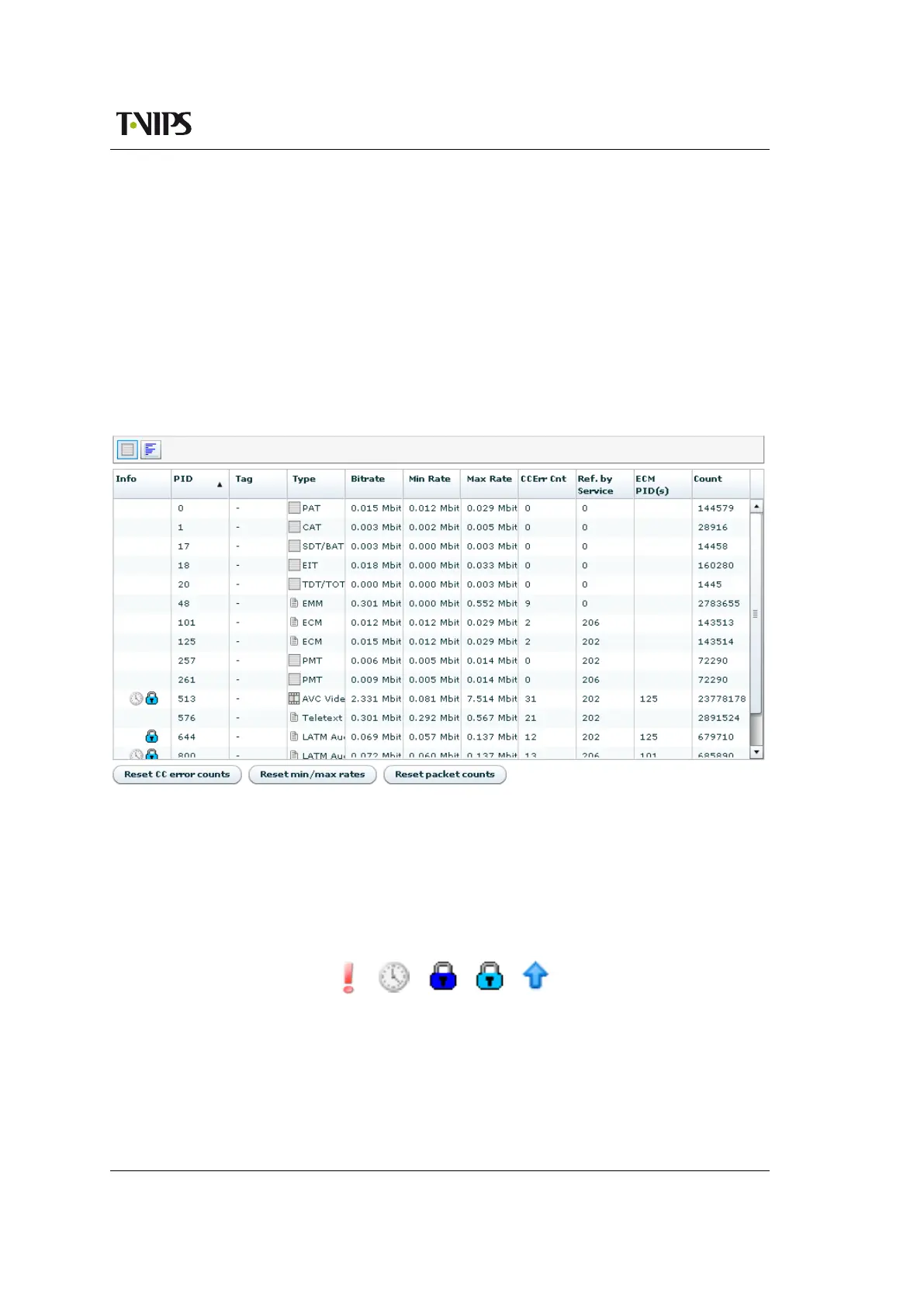
This page gives detailed information about the PIDs present on the input. Two different PID
views may be selected with buttons on the tool bar at the top of the page. The Grid button
selects a listing of the PIDs in table form, the Rate button selects a bar graph representation,
indicating dynamically the bit rate of each PID.
Figure 8.58 PID Details, table view
The PID table contains the following columns:
Info
This column shows icons describing some aspects of the PID. The significance of the icons
is given below.
Figure 8.59 Status
icons in PID details



 To Next Page