56 WEB Interface
CP560 DVB-T2 Gateway User’s Manual Rev. 2.2 (3686) ID: um_t2gateway
8.4.5.1 Interfaces
Each available network interface has an entry in the Navigator list. Selecting an interface brings
up pages where it is possible to configure the interface and view its status. Accessible para-
meters vary with the interface selected since the functionality of the available interfaces are not
necessarily identical.
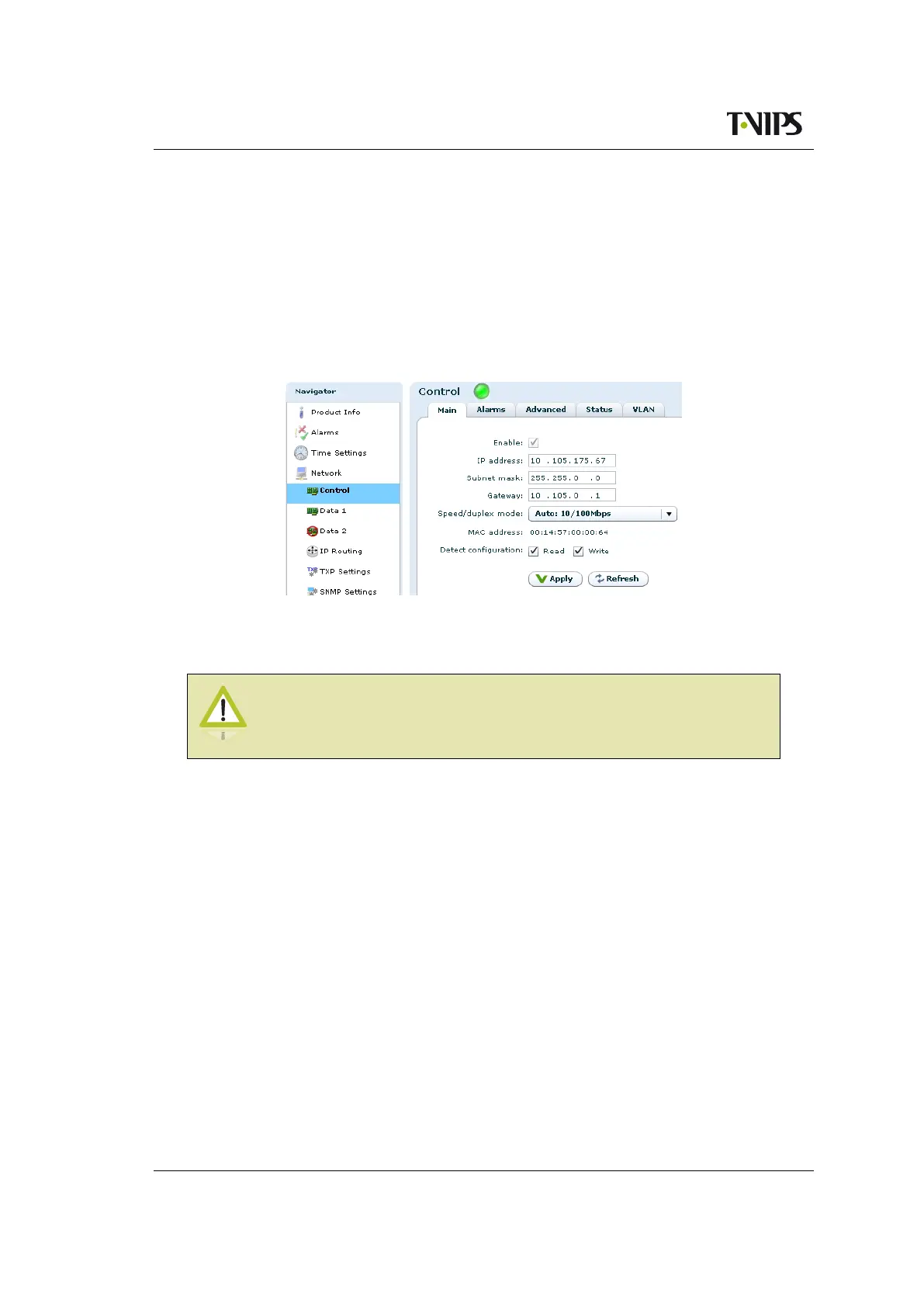
8.4.5.1.1 Main
Figure 8.16 Main IP settings
This page provides the main configuration settings for the physical interface.
Caution: Modifying the settings of the interface you are currently using
for the GUI application may cause loss of contact with the unit. Make sure
you will still be able to contact the unit before applying changed settings.
Enable
Enables/disables the interface. It is not possible to disable the currently used management
interface.
IP address
IP address of the interface.
Subnet mask
The subnet mask of the interface.
Gateway
The default gateway address for the interface.
Media Select
Provides a choice between network port Data 2 and the SFP module for the second data
interface. Select RJ-45 to use the data port marked Data for data traffic. Select SFP to use
the SFP module for data traffic.



 To Next Page