WEB Interface 95
ID: um_t2gateway CP560 DVB-T2 Gateway User’s Manual Rev. 2.2 (3686)
For ATSC services, the service name displayed is a concatenation of the short channel
name, and the major/minor channel number.
The icon prefixing the service name indicates the alarm status of the service and, if the
SDT table is analysed, the type of service. A list of active alarms (if any) on the service is
displayed by holding the mouse pointer over this icon.
Detailed information about the service is displayed by holding the mouse pointer over the
"I" icon to the right.
Service Bitrate
The current bitrate of the service, i.e. the aggregate bitrate of all the service components.
Double clicking on a service will navigate to the Services page, with the folder for the service
at hand being expanded.
8.5.2.2 Alarms
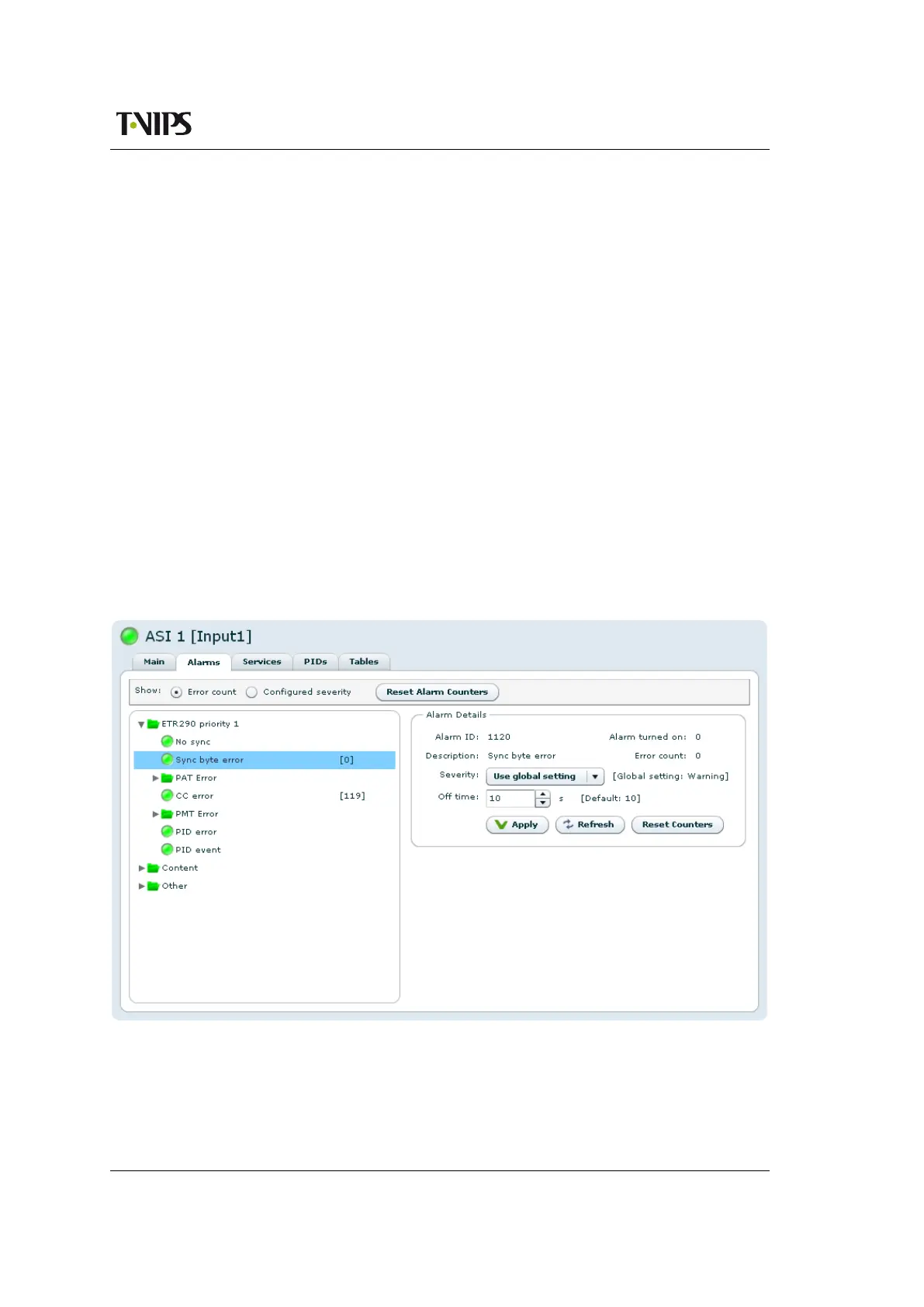
The Alarms page lets the user configure and view the status of all alarms belonging to the
selected input.
In figure
8.48 the Alarm Config page is shown. Note that the alarms are organised hierarchically
and that only the branches in focus need to be expanded.
Figure 8.48 Input alarm configuration
The following configuration options are available:



 To Next Page