90 WEB Interface
CP560 DVB-T2 Gateway User’s Manual Rev. 2.2 (3686) ID: um_t2gateway
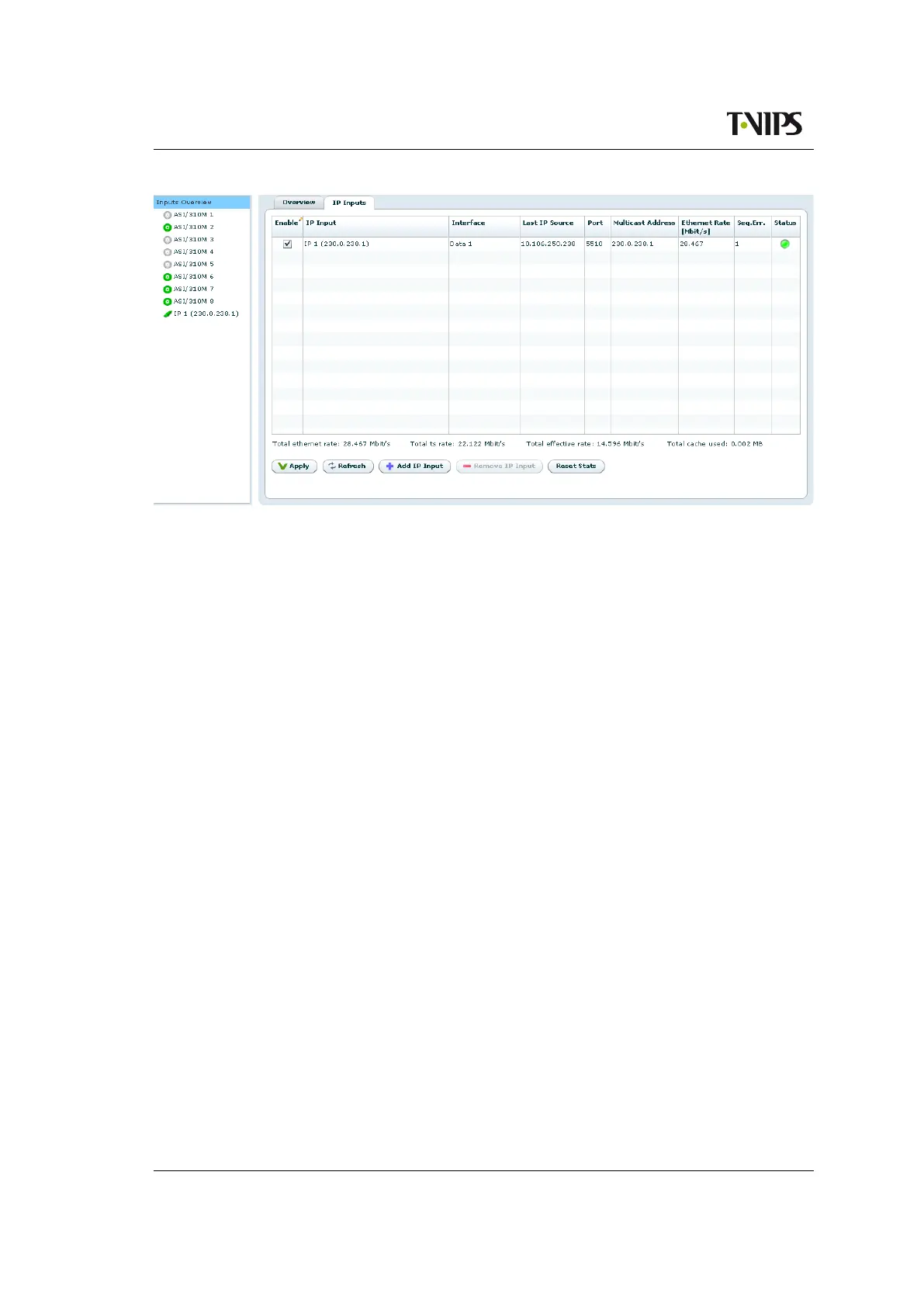
Figure 8.44 Inputs Overview - IP Inputs
Interface
The interface that this IP input is configured to receive data through.
Last IP Source
The IP address that this IP input last received data from. If the input has never received
any data the IP address is shown as 0.0.0.0.
Port
The UDP port this IP input is configured to receive data on.
Multicast Address
If the IP input is configured to receive data through a multicast the multicast address is
shown here.
Ethernet Bitrate
The currently received bitrate in Mbit/s, measured at the Ethernet level.
Seq.Err.
The number of RTP sequence errors reported by the input since the last reset of statistics.
RTP sequence error measurements requires the RTP protocol is present in the received
stream.
Status
The current alarm status of the input is shown as a coloured indicator; the colour indicating
the highest severity level of the active alarms. If the port is disabled the indicator is grey.
Below the table four values are shown. The first one is the total Ethernet bitrate received. The
last three are identical to the three values for ASI inputs described in the previous section.
The Add IP and Remove IP buttons at the bottom of the page lets the user add or remove IP
inputs.



 To Next Page