Machine overview
12 11/2020 243343V03_EN
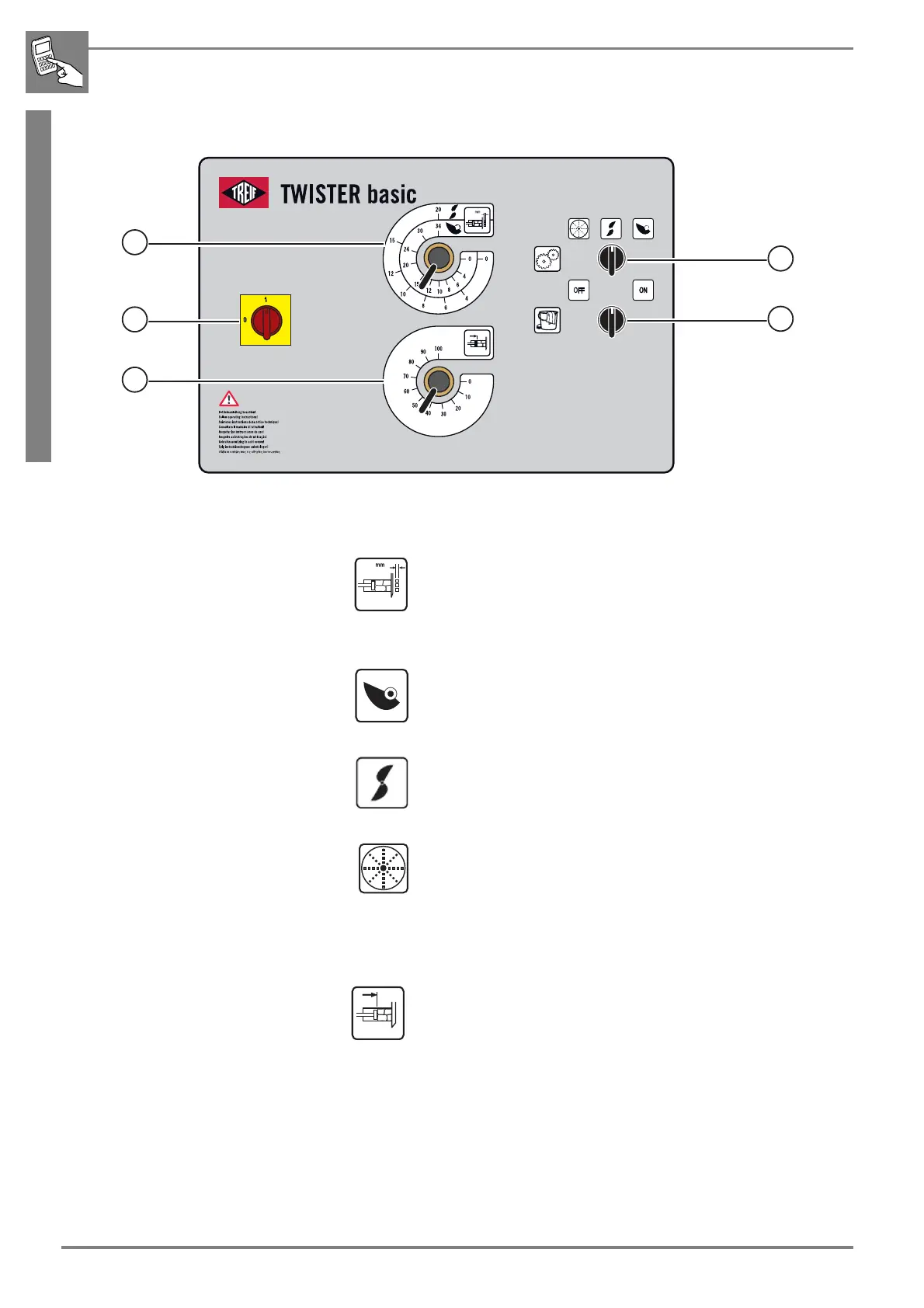
2.1.4 Control panel
1. Main switch
2. Cut thickness adjustment
Continuous adjustment of the cut-off length
between 0 and 34 mm -> for single knife
0 and 20 mm -> for double knife
3. Operating modes selector switch
Single knife mode
for operation with single blade cut-off knife
Cycle feed
Double / multiple knife mode
for operation with multi-blade cut-off knife
Continuous feed
Grating mode
for operation with grating disk
Continuous feed
4. Pre-compression setting
(continuously adjustable pre-compression from 0 - 100%
Pre-compression "0":
The product is pushed through the running cutting unit without
pre-compression.
The cutting unit l
starts up immediately.
Pre-compression "1 - 100%":
The product is first pre-compressed at the set pressure before
starting up the cutting unit.



 To Next Page