SonixTouch Q+ Service Manual 00.053.204, Revision A Chapter 7: Field Service Components
7-27
To Open the Front Block/Ultrasound Module:
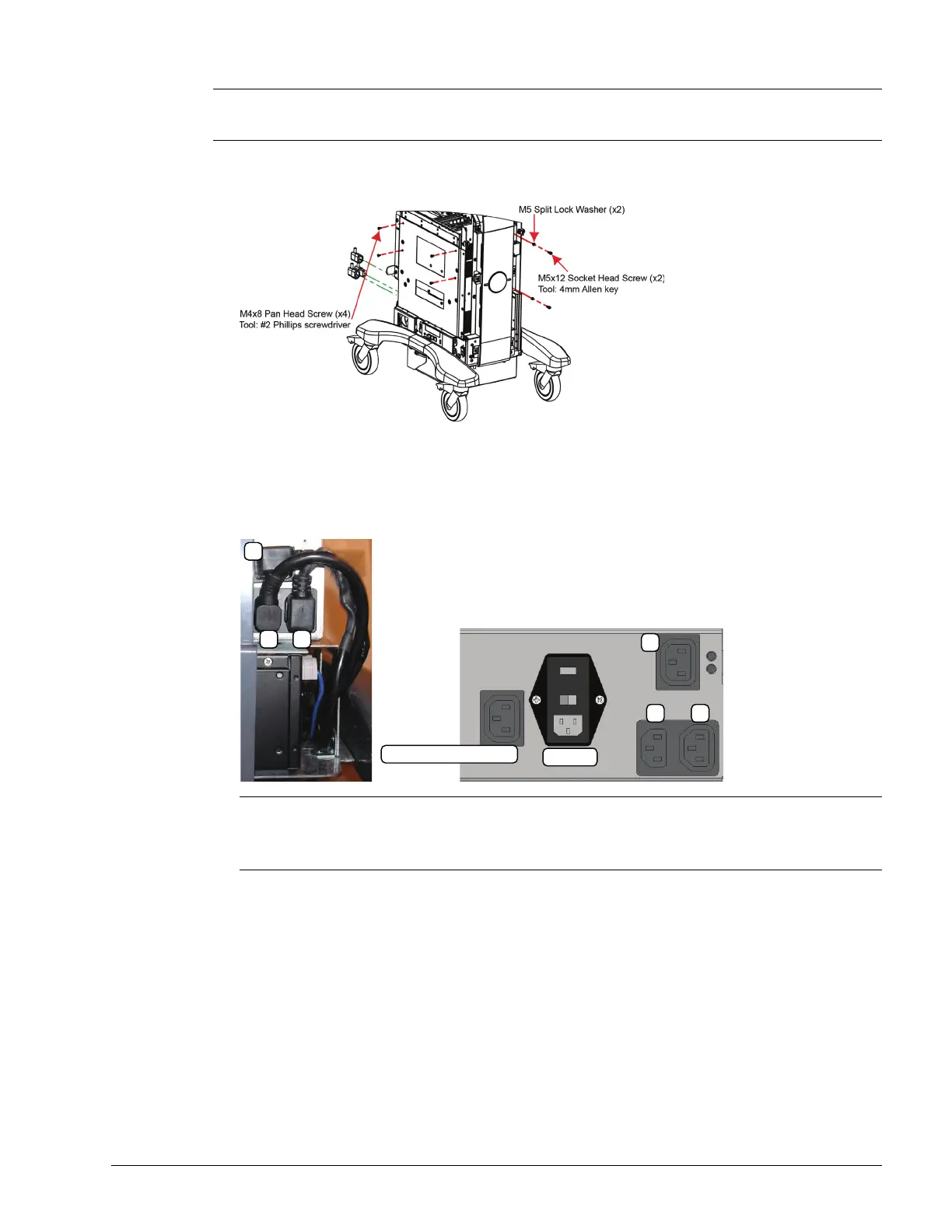
1. Using the 4mm Allen key, undo the two screws and washers securing the modulo to the front of the system
frame.
2. Using the #2 Phillips screwdriver, undo the four screws and washers securing the modulo to the side of the
system frame.
3. Disconnect the three (bottom left rear) power cables connected to the modulo: LCD display power cable (1),
UPS input power cable (2) and UPS output power cable (3). Once disconnected, make sure the cables are
moved out of the way.
4. Gently pull the modulo forward about an inch until the Service Access screws are accessible.
Note: In order to access the screws holding the Front Block/Ultrasound Module closed, the modulo must be
"detached" from the cart and slid forward about an inch or so. While three power cables will have to be
unplugged, the System Case Connectivity Panel (7.3.3.1) can be left untouched.
Note: The modulo power cable (1) is color coded with green tape.
The first time the LCD display power cable is unplugged in the field, it will be held in place with a soft, hot
melt glue. After working the plug loose, remove any residual glue from the around the connector and the
plug.
System Power Connection
EMI Filter
1
2 3
1
2 3



 To Next Page