118
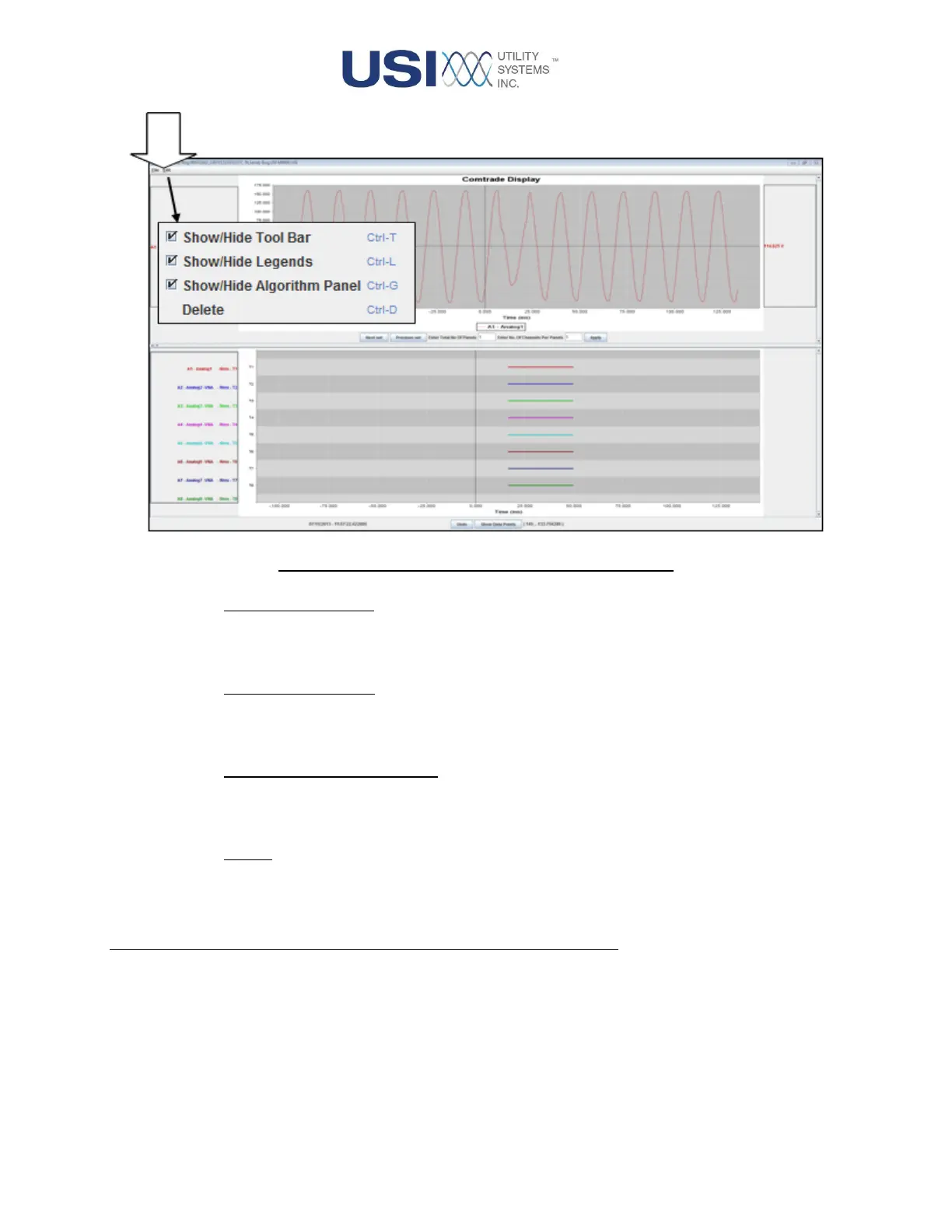
Figure 4-5 Comtrade Display Screen – Edit Menu
o Show/Hide Tool Bar:
This selection controls the display of the tool bar on the COMTRADE Display window. The
hotkey for this function is Ctrl+T.
o Show/Hide Legends:
This selection controls the display of the analog channels legend on the analog panel. The
hotkey for this function is Ctrl+L.
o Show/Hide Algorithms Panel:
This selection controls the display of the Algorithms panel on the COMTRADE Display
window. The hotkey for this function is Ctrl+G.
o Delete:
This selection deletes the selected analog channel from the COMTRADE Display window.
The hotkey for this function is Ctrl+D.
4.2 Channel Description Panel
This panel displays the description of all analog and digital channels plotted on the COMTRADE Display.
The color of the description text matches the color of the corresponding channel plot.


 To Next Page