SYSTEM/ACTUATOR TESTS
For technical questions, please call 1-888-866-5797.
71
5. Choose Off to disable the selected fuel
injector. Choose On to enable the
selected fuel injector.
n The display refreshes to show the
results. Repeat as desired.
6. Choose Exit to return to the PCM
Actuator Test and Special Function
Menu.
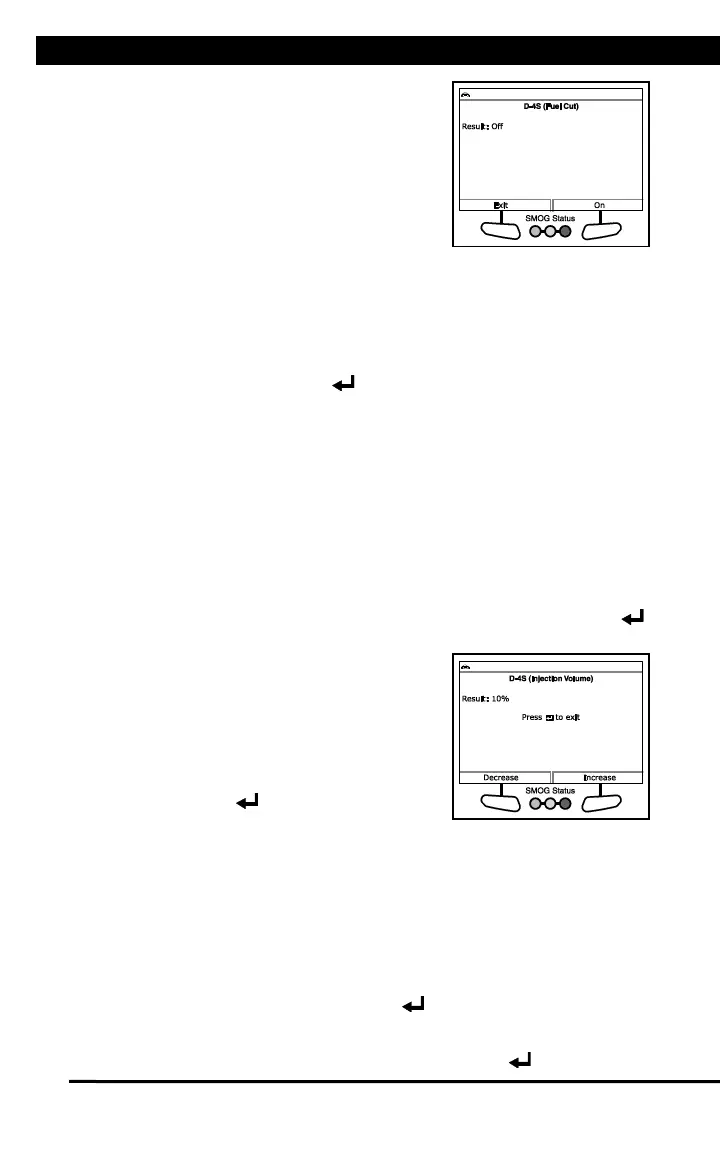
D-4S Injection Volume
The D-4S Injection Volume function lets you modify the fuel injection
process and increase or decrease fuel injection volume.
1. Select D-4S Injector in the PCM Actuator Test and Special Function
Menu, then press ENTER .
n An “instructional” screen displays. Prepare the vehicle for test as
directed:
- Start and run the engine at 3000 RPM maximum.
- Place the transmission in PARK.
- Make sure engine coolant temperature is 80°C before proceeding.
2. Choose Continue to proceed.
n The Select Injection Type screen displays.
3. Select PORT (Port Injection), DIRECT (Direct Injection, or EITHER
(Engine control dependency), as appropriate, then press ENTER .
n The Control Injection Volume screen
displays.
4. Choose Decrease to decrease injection
volume. Choose Increase to increase
injection volume.
n The display refreshes to show the
results. Repeat as desired.
5. Press Enter to return to the PCM
Actuator Test and Special Function
Menu.
O2S/RPM Check
The O2S RPM Check lets you perform an O2 sensor / engine speed
check.
1. Start and run the engine.
2. Select O2S/RPM Check in the PCM Actuator Test and Special
Function Menu, then press ENTER .
n The Select Sensor screen displays.
3. Select the desired O2 sensor, then press ENTER .


 To Next Page
 Loading...