fixed this problem in over 15 years, so it probably won't be fixed. If you experience this problem, often a restart
will resolve it. Otherwise there is a tool available at
http://www.stentec.com/anonftp/pub/wingps/pnpblockersetup.exe that can fix the issue.
If the serial port does not show up when you plug in the FTDI USB to RS232/RS422 adaptor cable, you may
need to install the drivers from www.ftdichip.com/Drivers/VCP.htm.
When operating Boreas on Windows at a high data rate, data can be lost due to the latency of the FTDI driver.
To resolve this problem the latency of the driver should be reduced to 1 ms:
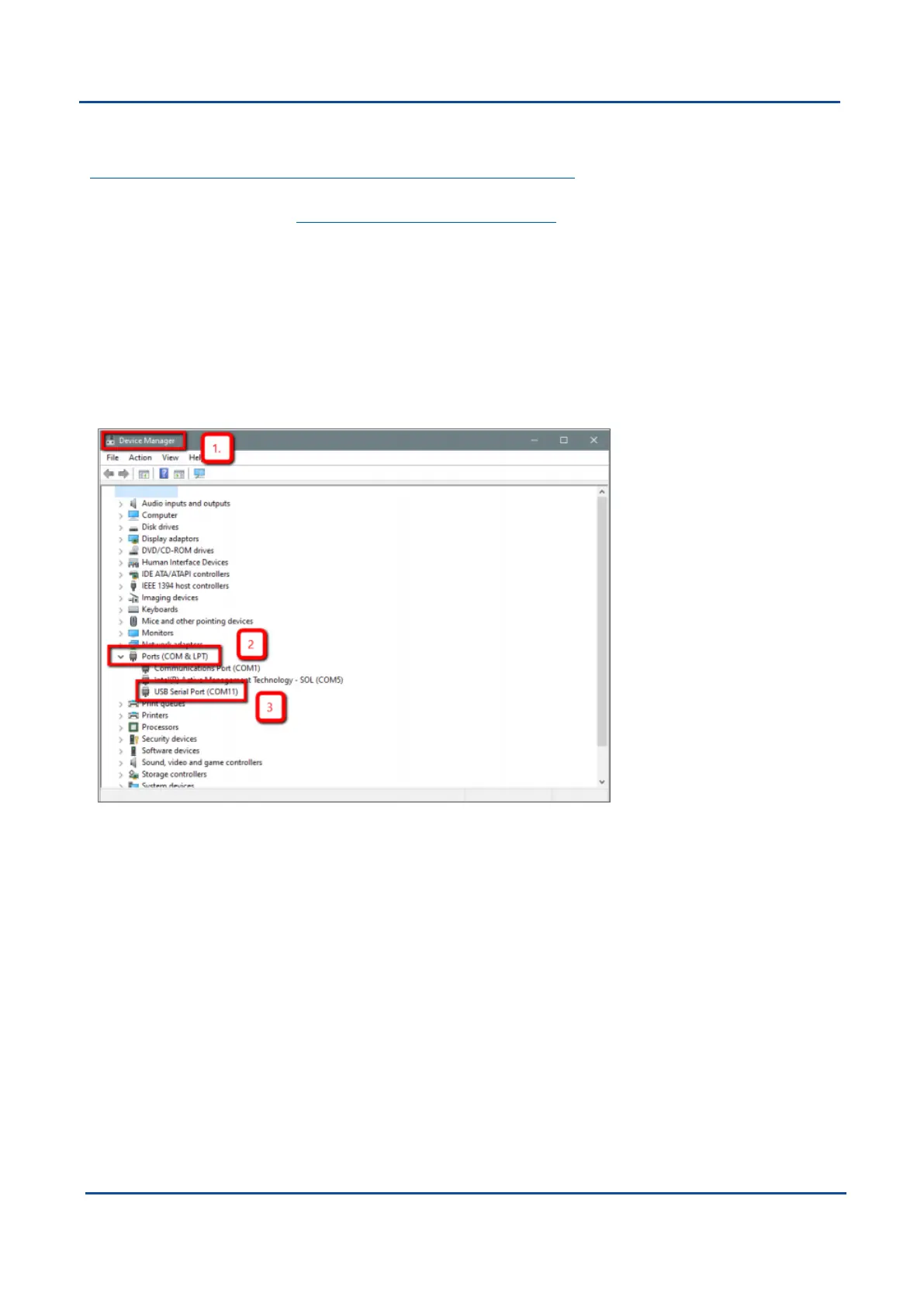
1. Start the Windows Device Manager (1) and find the Ports section (2).
2. Identify the specific COM port being used (3) by dis-connecting and re-connecting the USB to RS232 /
RS422 adaptor cable.
3. Right click on the identified COM port and select Properties. Select the Port Settings tab (4) and select
Advanced (5).
4. Change the Latency Timer value (6) to 1 msec then press OK (7), and OK again for the previous window.
Figure 55: Setting the Windows Port Latency Value - 1
v1.2 Page 75 11 Oct 2022
Boreas Reference Manual • Configuring and Monitoring Boreas


 To Next Page