6-58
387366-389 Operator Manual Sterilizer Operation
5. Press Level button. The text changes to OPERATOR MODE,
SUPERVISOR MODE, and SERVICE MODE. Select access level
for username.
NOTE: Modes have the following access:
0 = Operator Mode – operator mode only
1 = Supervisor Mode – operator and supervisor modes
2 = Service Mode – operator, supervisor and service modes
3 = Disable Passwords – no username or password required
NOTE:
• First username is limited to access Mode 2 or Mode 3.
• Only first username can access Mode 3.
NOTE:
6. Press top/lighter region of TIMEOUT to set password time out
period (in minutes). A numeric screen appears to enter value.
NOTE: Time out period is as follows: If user does not press a
button within the time out period, control logs-out user and
display; user must log back in. A value of 0 is no timeout.
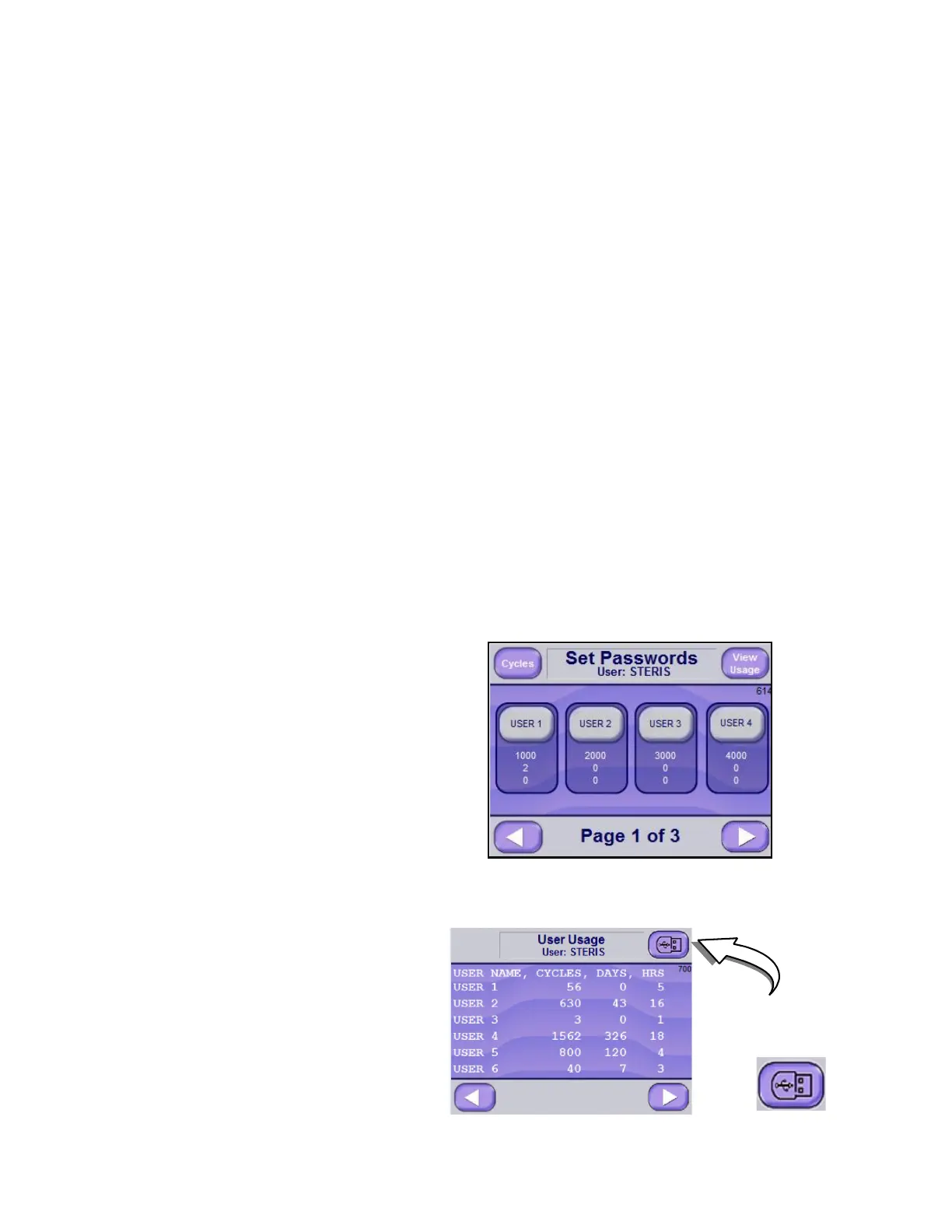
7. User Usage may also be set/determined as follows:
NOTE: The Sterilizer control is setup to record the number of
cycles and cycle time of the users. There are twelve possible
users that can be programmed on the control and the control
keeps track of each user's cycle operation. The number of cycles
and total time are recorded for each user. The cycle time is an
accumulation of cycle time in days and hours.
a. On Set Passwords Screen (Screen 614), press
VIEW USAGE
to display User Usage Screen (Screen 700) as follows:
Press USB button
to save User Usage
to USB Drive.






 To Next Page