6-60
387366-389 Operator Manual Sterilizer Operation
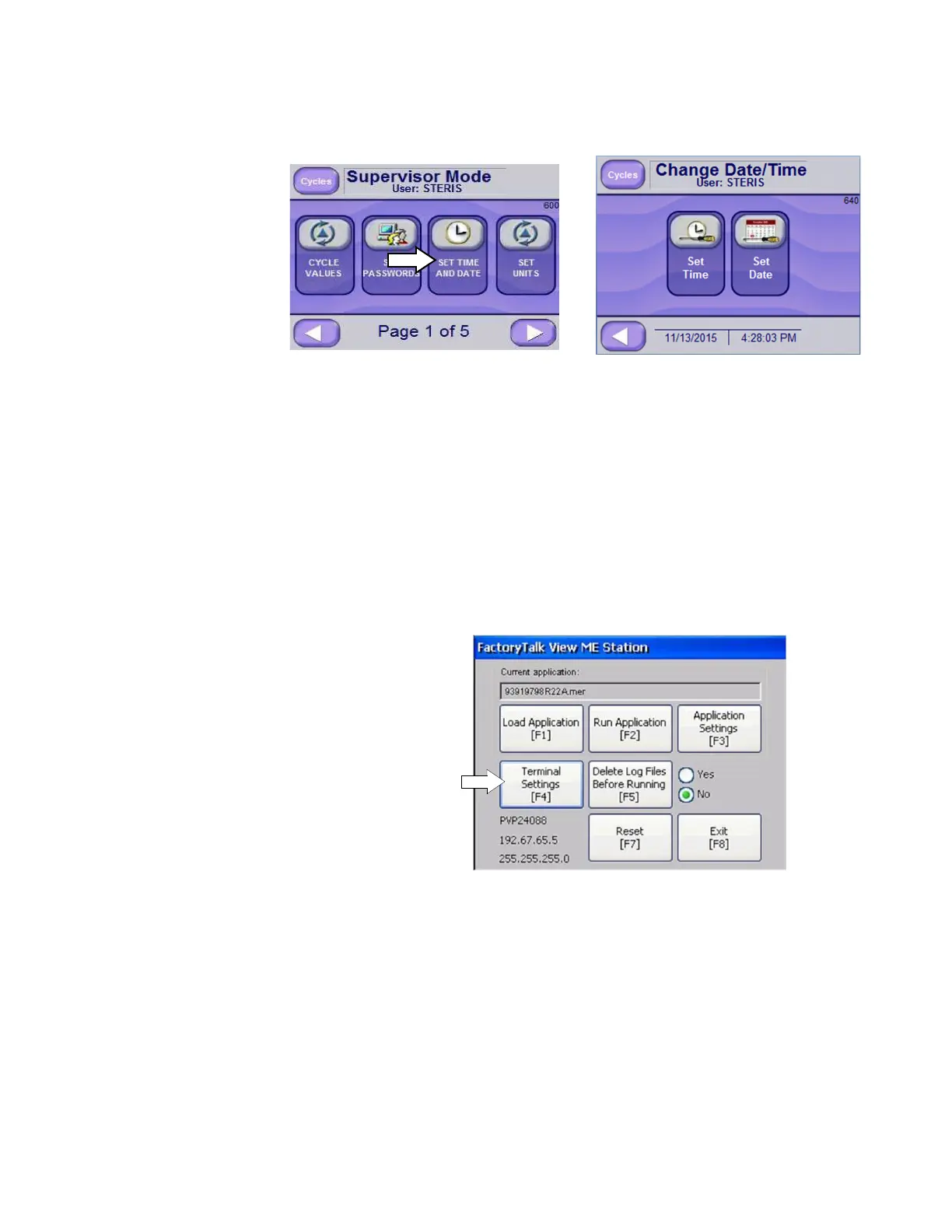
6.20.4 Set Date and Time From Supervisors Mode Screen (Screen 600), press SET TIME AND
DATE button. Change Date/Time Screen (Screen 640) is displayed.
From Screen 640, press Set Time to enter time. A new screen appears
allowing Hours, Minutes and Seconds to be set. Pressing LEFT
ARROW returns user to Supervisors Mode Screen (Screen 600).
From Screen 640, press Set Date to enter a new date. A screen
appears allowing the Month, Day and Year to be set.
Press LEFT ARROW to leave Date/Time Screen (Screen 640).
6.20.5 Set Date and Time
(Formats)
To set hour and date formats on the display and printouts, follow these
steps.
1. Access FactoryTalk View ME Station (see following image). To
access initial screen, press on the upper right section of the
Standby screen (screen 1).
2. Press Terminal Settings [F4] button.
Terminal Settings screen displays (following image).






 To Next Page