6-57
Sterilizer Operation Operator Manual 387366-389
6.20.3 Set Passwords/
User Names
Set Passwords and/or User Name as follows:
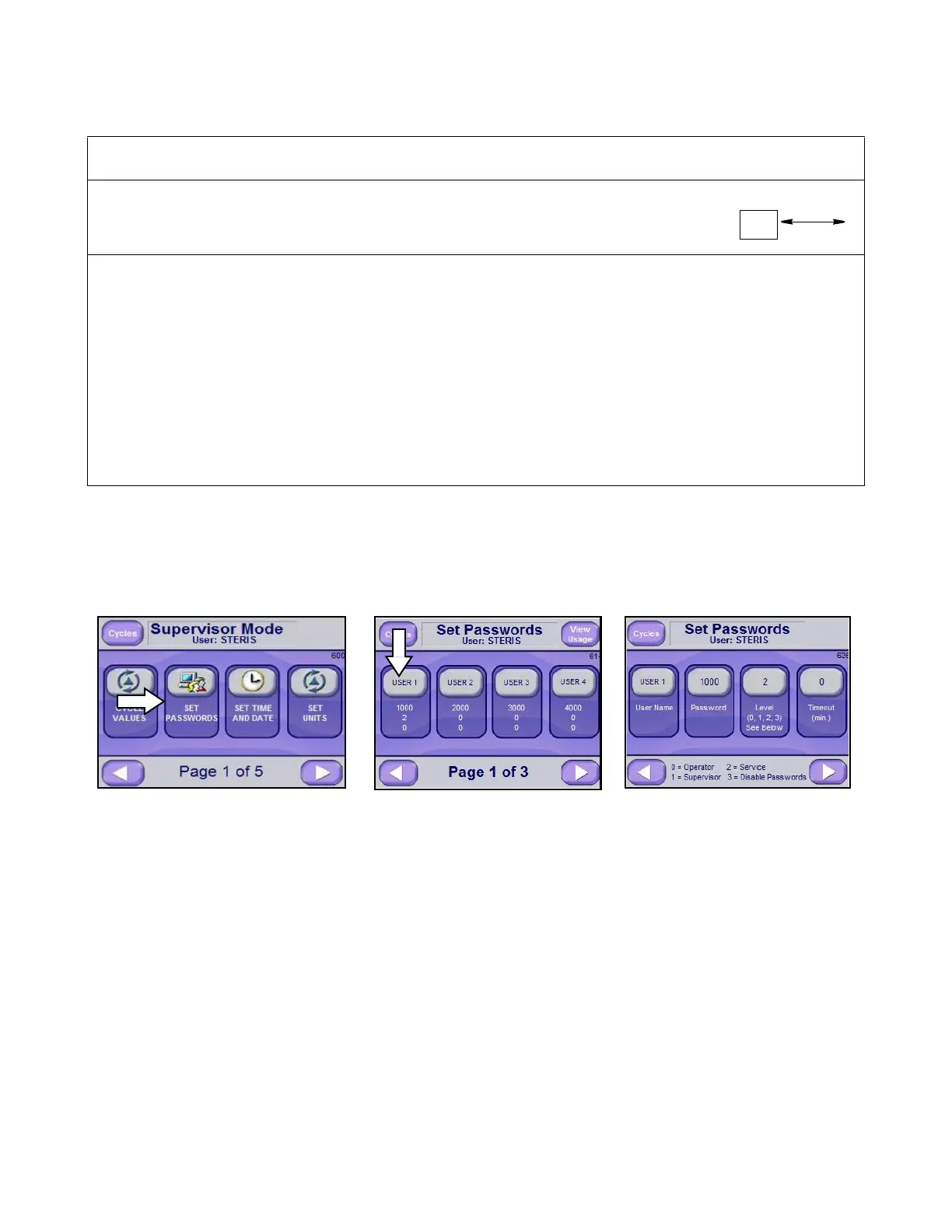
1. From Supervisor Mode Screen (Screen 600), press SET
PASSWORDS button to enable Set Passwords and change
User Name functions. The Set Passwords Page 1 of 3 Screen
(Screen 614) is displayed.
2. Press desired button (User 1 through User 12) on screen to
display Set Passwords Screen (Screen 626).
NOTE: Press RIGHT ARROW button on Screen 614 to see
additional usernames and passwords (up to 12; Pages 2 of 3 and
3 of 3). Press LEFT ARROW button to return to Supervisor Mode
screen (Screen 600).
3. Press User Name button to add/change a user name using the
resulting alphanumeric keyboard display. Press ENTER button
to save value and return to previous screen. Added or changed
User Name is visible on the User Name button.
4. Press Password button to add/change password using the
resulting alphanumeric keyboard display. Press ENTER button
to save value and return to previous screen. Added or changed
password is visible on the Password button.
6
B
Locked
Out
• Door B is designated as Non-Sterile end.
• Door A is locked out.
• Sterilizer must be loaded/unloaded from Door B.
• At end of cycle Door B automatically unseals.
* Once Non-Sterile end door is opened, Sterile end door cannot be opened until a complete cycle has been
run. If Sterile door is opened, Non-Sterile end door cannot be opened until Sterile end door is closed, sealed
and another complete Sterilization cycle run to transfer interlock to Non-Sterile end door.
† Door Interlock Settings (Codes “1” and “3”) require UNSEAL DOOR button to be pressed.
‡ Once Sterile end door is opened, Non-Sterile end door cannot be opened until a complete cycle has been
run. If Non-Sterile end door is opened, Sterile end door cannot be opened until Non-Sterile end door is
closed, sealed and another complete Sterilization cycle run to transfer interlock to Sterile end door.
**Option Setting (Code “5”) is used for Test Cycles, for example, Leak Tests.
NOTE: If interlock setting other than default (“2”) is desired, a separate interlock type must be set for each
cycle.
Table 6-2. Interlock Codes and Functionality
Code
Non-Sterile
Door
Sterile
Door
Comments Concept Image
Selecting “Set Passwords” Press this button to edit password Password Parameters
parameters (next screen)






 To Next Page