6-2
387366-389 Operator Manual Sterilizer Operation
The following steps must be performed prior to daily sterilizer usage.
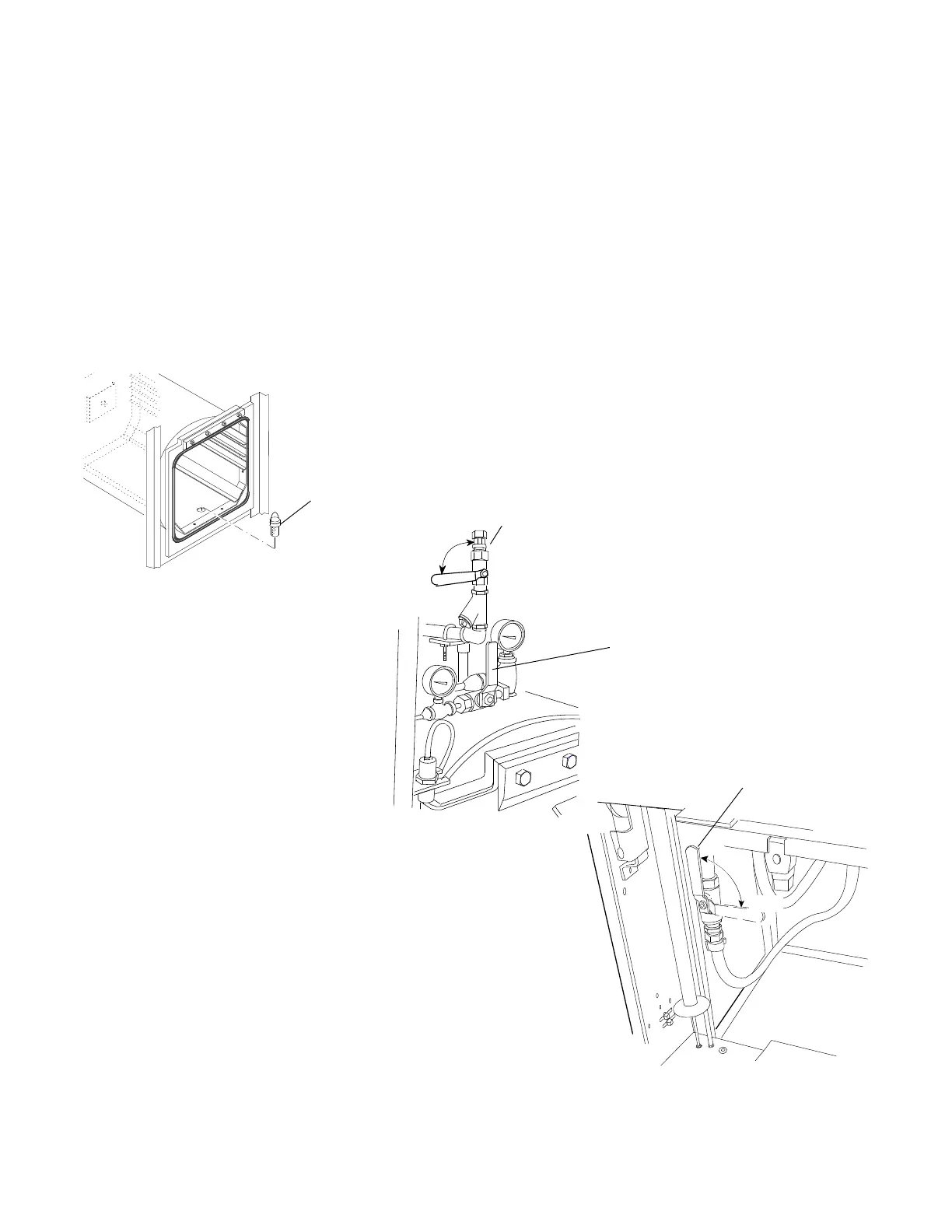
1. Open chamber door and check drain strainer is clean and in
place (see F
IGURE 6-1).
2. Verify chamber interior is clean and close chamber door. Refer
to S
ECTION 8, ROUTINE MAINTENANCE, if cleaning is
necessary.
3. Open front cabinet panel on load end of sterilizer. Verify steam
and water supply valves to sterilizer are ON (F
IGURE 6-2). Close
cabinet panel.
4. For Manual Flush option only, if sterilizer is equipped with an
integral electric steam generator, flush and start up generator as
outlined in S
ECTION 4.7, GENERATOR FLUSH OPERATION, in this
manual.
5. Open printer access door and verify amount of printer paper is
sufficient. A colored warning stripe is visible when paper roll is
near end. Refer to S
ECTION 8, ROUTINE MAINTENANCE, if paper
roll needs replaced.
Figure 6-2. Steam and Water Supply Valves
Drain
Strainer
Figure 6-1. Check Chamber
Drain Strainer
Steam Supply
Valve
Steam Valve Located
Above Chamber Door
ON
OFF
Manual Chamber
Exhaust Valve Should
Remain Closed
Remain Closed Water Supply Valve
ON
OFF
Water Valve Located
Below Chamber Door






 To Next Page