PREPARATION AND BASIC USAGE
21
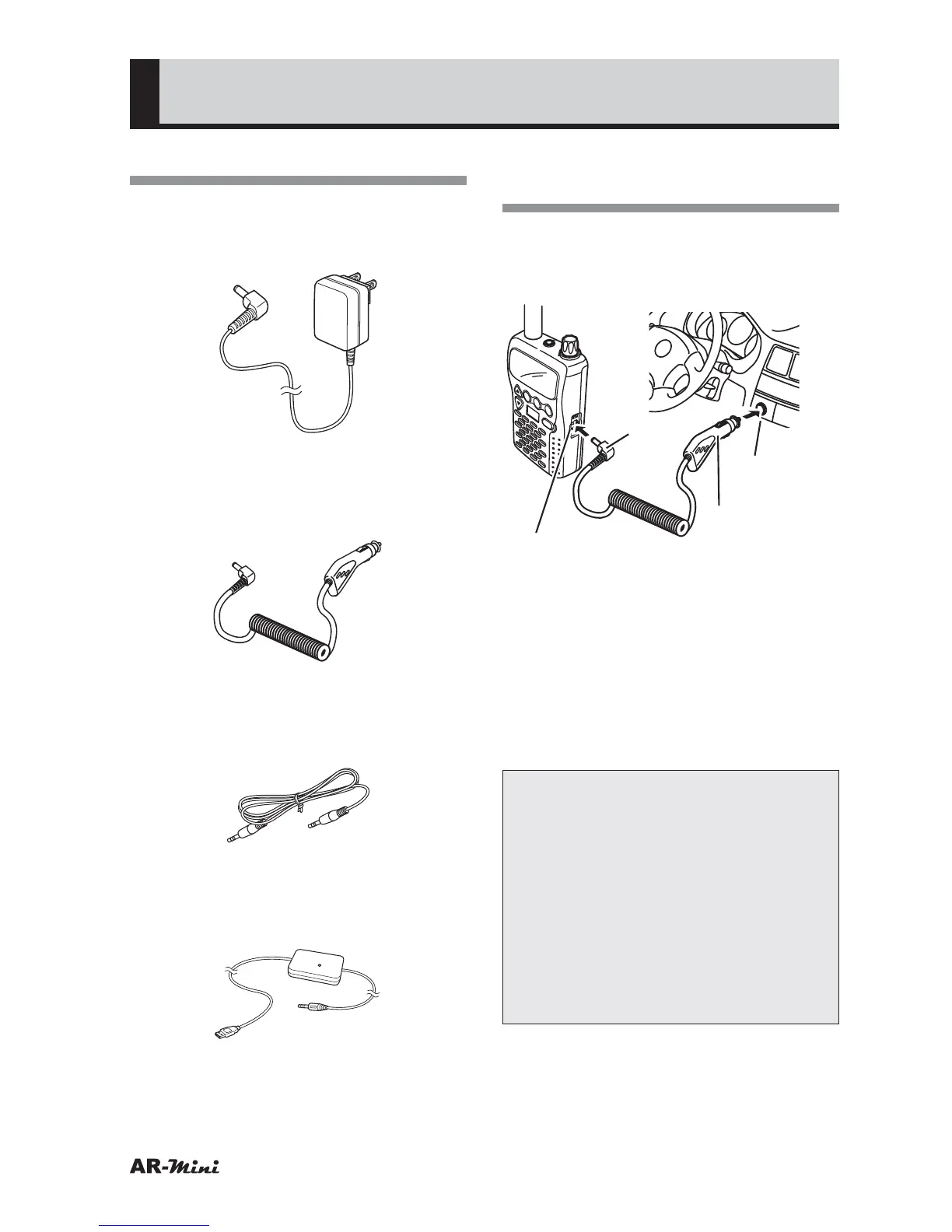
Options List
●
AA-mini
“A” plug type AC adapter
(6 VDC, 500mA for 100 – 240 VAC)
●
DC-mini
DC cable with cigar-lighter plug
(6 VDC, 500 mA for 12/24V socket)
●
CO-mini
Data cloning cable
(AR-mini to AR-mini)
●
PC-mini
PC cable
(USB only)
Using the DC-mini DC
Adapter
1
Insert the cigar lighter plug into the
cigar lighter receptacle (12 or 24
VDC) of the vehicle.
V/M
SCAN
MODE
PWR
ATT
DW
SKIP
COMMUNICATIONS RECEIVER AR-mini
SEL
PW
L.SRCH
TONE
MW
EXT DC jack
Plug
Cigar lighter
plug (DC-mini)
Cigar lighter
receptacle
2
Remove the AR-mini EXT DC jack
cap.
3
Insert the DC-mini plug into the
EXT DC jack.
4
To charge the supplied Ni-MH
battery, AR-mini’s settings are
changed.
Note:
• Do not remove the plug by
tugging at the cable. The cable
may become disconnected and
thereafter malfunction.
• Never use this unit with wet hands.
Doing so may result in an electric
shock.
• Noise that results from AR-mini
being operated with this unit is not
necessarily a sign of malfunction.



 To Next Page