30
(IF100k)
25 MHz
(IF 200k)
25 MHz
25 MHz
(IF 200 k)
25 MHz
25 MHz
FM
25 MHz
AM
20 0, 500 Hz
Above 25 MHz
25 MHz
Selectable bandwidth
4 ADDITIONAL SETTINGS
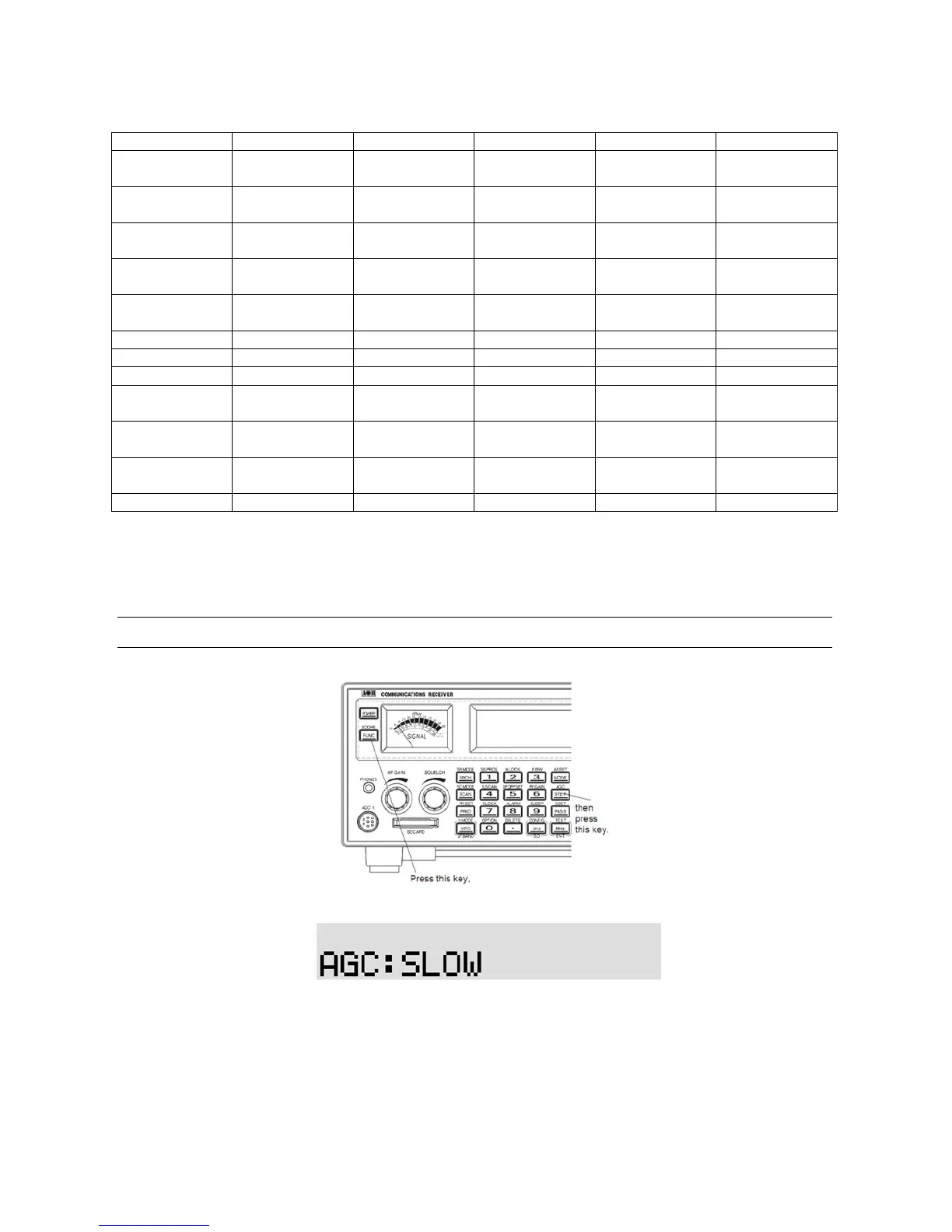
4-1 AGC (AUTOMATIC GAIN CONTROL)
To change the AGC parameter setting, press the [FUNC] key and then press the [STEP] key.
Select a new AGC parameter from the list of “FAST”, “MIDDLE”, “SLOW”, or “OFF (MANUAL)” by
rotating the sub dial.
To accept the new AGC parameter, press the [MHz] key.
Usually, FAST is used to receive CW, MEDIUM for AM and FM, and SLOW fo r SSB mode.
However, this option cannot be configured in FM mode.
When AGC is set to OFF, two horizontal bars are displayed on the LCD above “KHz” or “MHz”.



 To Next Page