34
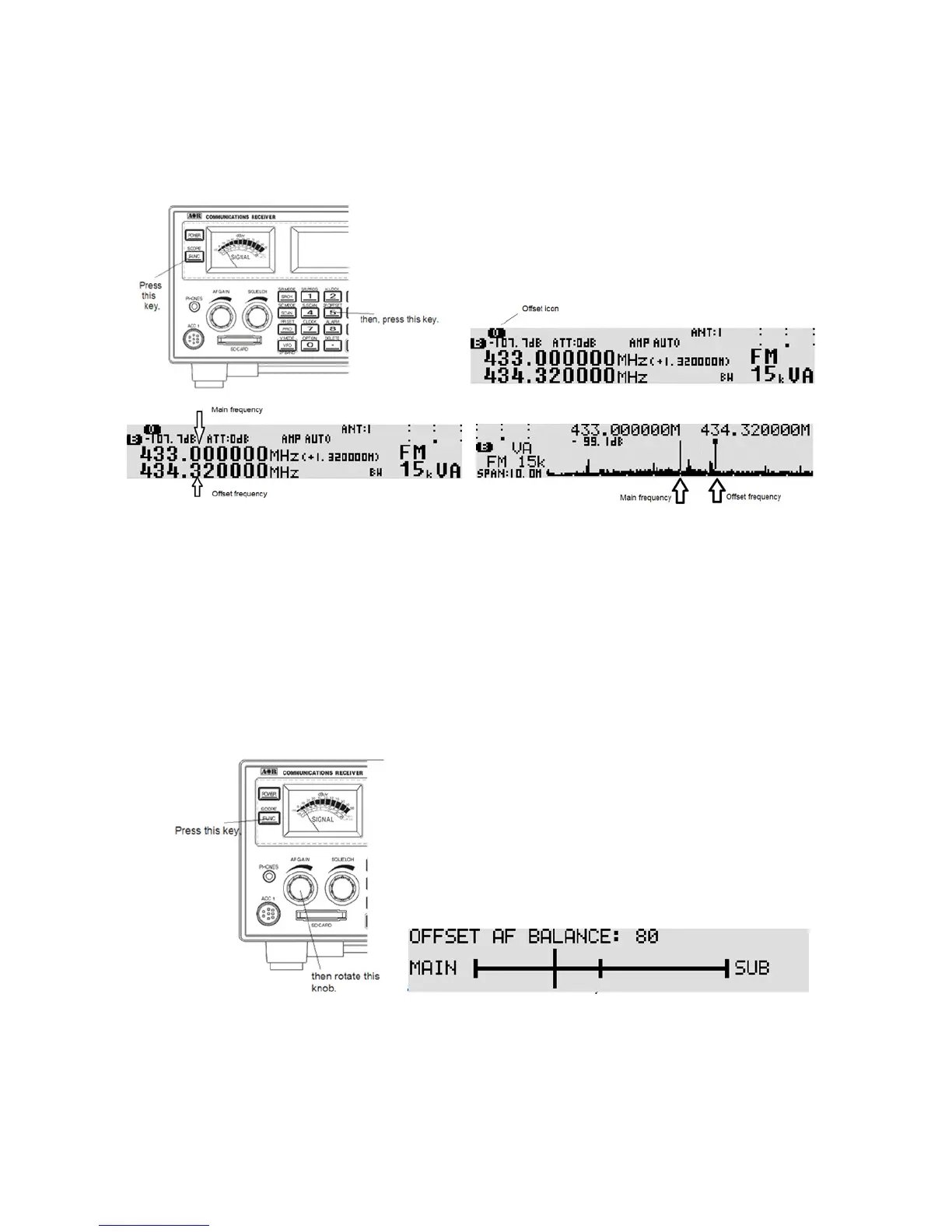
5-2-1-1 ACTIVAT ING DUAL CHANNEL IN OFFSET MODE
In VFO mode, press the [FUNC] key, then press the [5] key. The dual frequency display screen
appears on the LCD.
Dual frequency display
The offset frequencies can also be displayed in the spectrum display mode by pressing and holding the
[FUNC] key for two seconds.
5-2-1-2 CHANGING THE OFFSET FREQUENCY
To change the offset frequency, rotate the sub dial. The frequency will cha nge according to the step
frequency of the sub dial.
5-2-1-3 CHANGING THE AUDIO BAL ANCE
Press the [FUNC] key, and then rotate the AF GAIN (Volume). The balance adjustment screen
appears.
Rotate the AF gain (volume) to the desired audio level for both frequencies.
Press the [FUNC] key to accept setting.
5-2-1-4 DEACTIVATING DUAL CHANNEL RECEIVE
Press the [FUNC] key, then press the [5] key.



 To Next Page