47
7-5-2 DELETE SELECT SCAN CHANNELS IN MEMORY READ MODE
To delete all s elected sc an channe ls , perform the following steps:
1. Press the [FUNC] key, and then press and hold the [. (period)] key for two seconds.
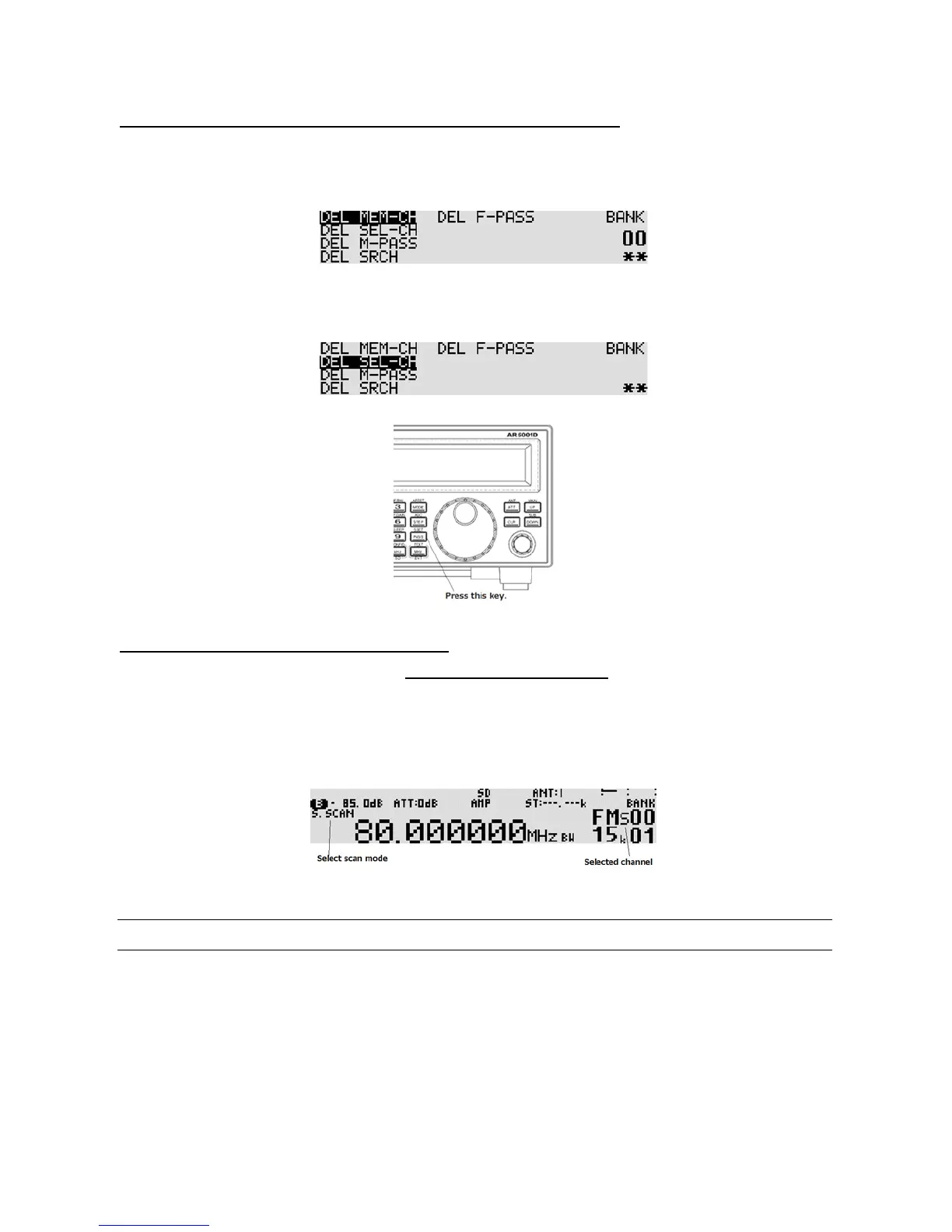
2. The following delete menu will appear with “DEL MEM-CH” in reverse contrast.
3. Press the [DOWN] key to move the cursor downward. Select “DEL SEL-CH” in reverse contrast.
4. When the select scan memory has registered channels, “**” will be displayed on the bottom
right corner of the LCD. If there is no registered channel, “- -“ will appear.
5. To delete all selected scan channels, press the [PASS] key. To cancel, press the [CLR] key.
6. Press the [MHz] key to exit from this menu.
7-5-3 STARTING / STOPPING SELECT SCAN
To start se lect scan, you mus t first have at least two memory channe ls tagged for select scan.
Press the [FUNC] key, and then press the [4] key to start select scan.
The direction of the scan can be reversed using the sub dial.
To stop sele ct scan, press the [VFO] key.
7-6 LOCKING OUT UNWANTED ACTIVE MEMORY CHANNELS (PASS)
It is possible to lock out (PASS) unwanted memory channe ls while in scan mode. This is useful to
eliminate unwanted permanent transmissions. It is important to understand the PASS function before
taking action or transmissions may be missed.



 To Next Page