77
2. Press the [
DOWN
] key several times to select “VIDEO IMG” in reverse contrast.
3. Rotate the sub dial to select normal or reverse.
4. Press the [
MHz
] key to accept the entry and return to a standard display.
Alternatively, press the [
CLR
] key to abort entry, or press the [
DOWN
] key to move to the next item
on the configuration menu.
11 MISCELLANEOUS FUNCTIONS
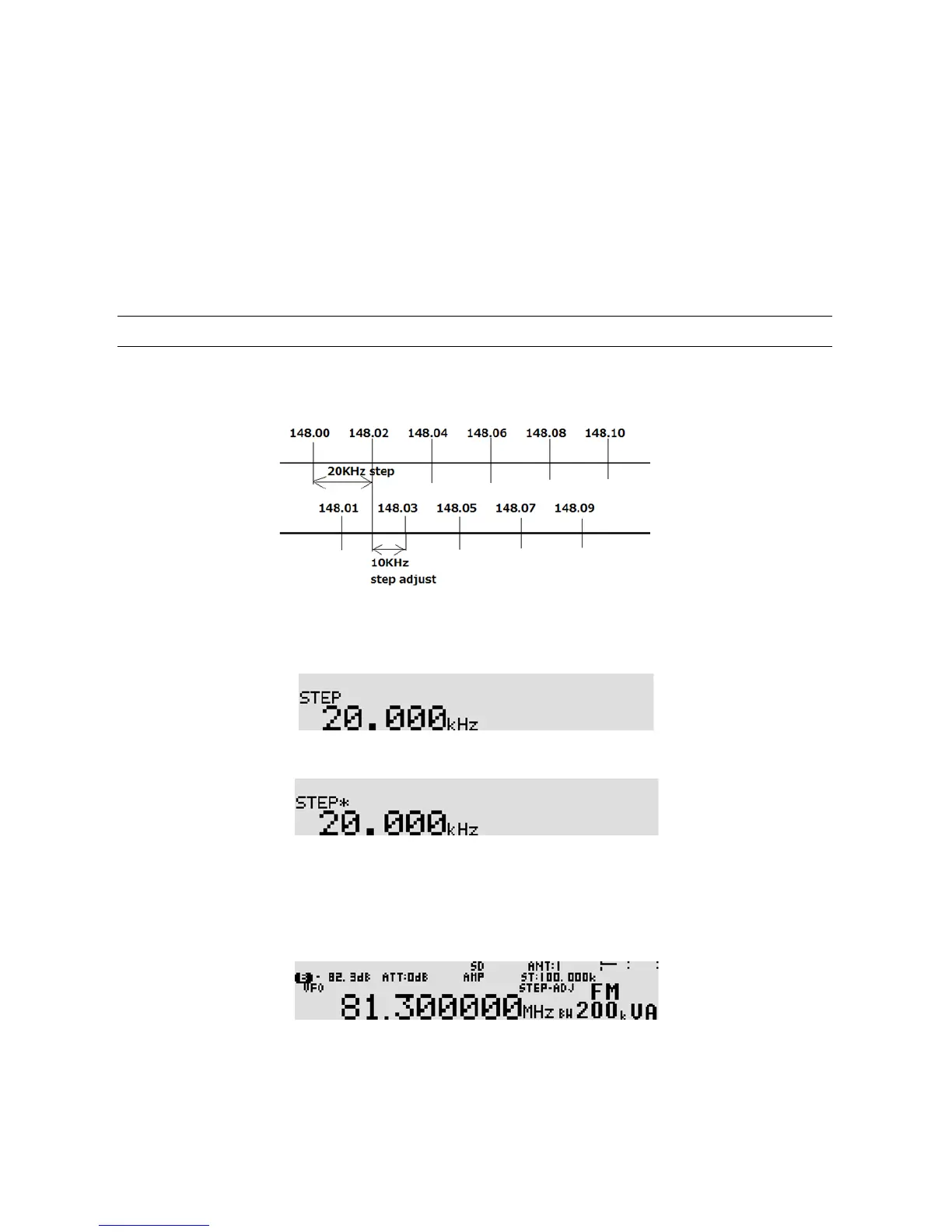
11-1 STEP ADJUST
Step adjust function is used when the receiving frequency is not divisible by the current step size to follow
unusual bandplans. (It is automatically adjusted in the auto mode.)
(Example):
To activate the step adjust func tion, perform the fo llowing steps:
1. Press the [
STEP
] key.
2. Press the [
PASS
] key. “
*
” (asterisk) appears right next to “STEP”.
3. Enter the new step frequency using a numeric keypad or rotating the sub dial.
4. Press the [
MHz
] key to accept the entry and return to a standard display.
Alternatively, press the [
CLR
] key to abort entry.
5. “STEP-ADJ” will appear right above the frequency.
6. To cancel step adjust, repeat above steps.



 To Next Page