35
5-2-2 DUAL BAND RECEIVE
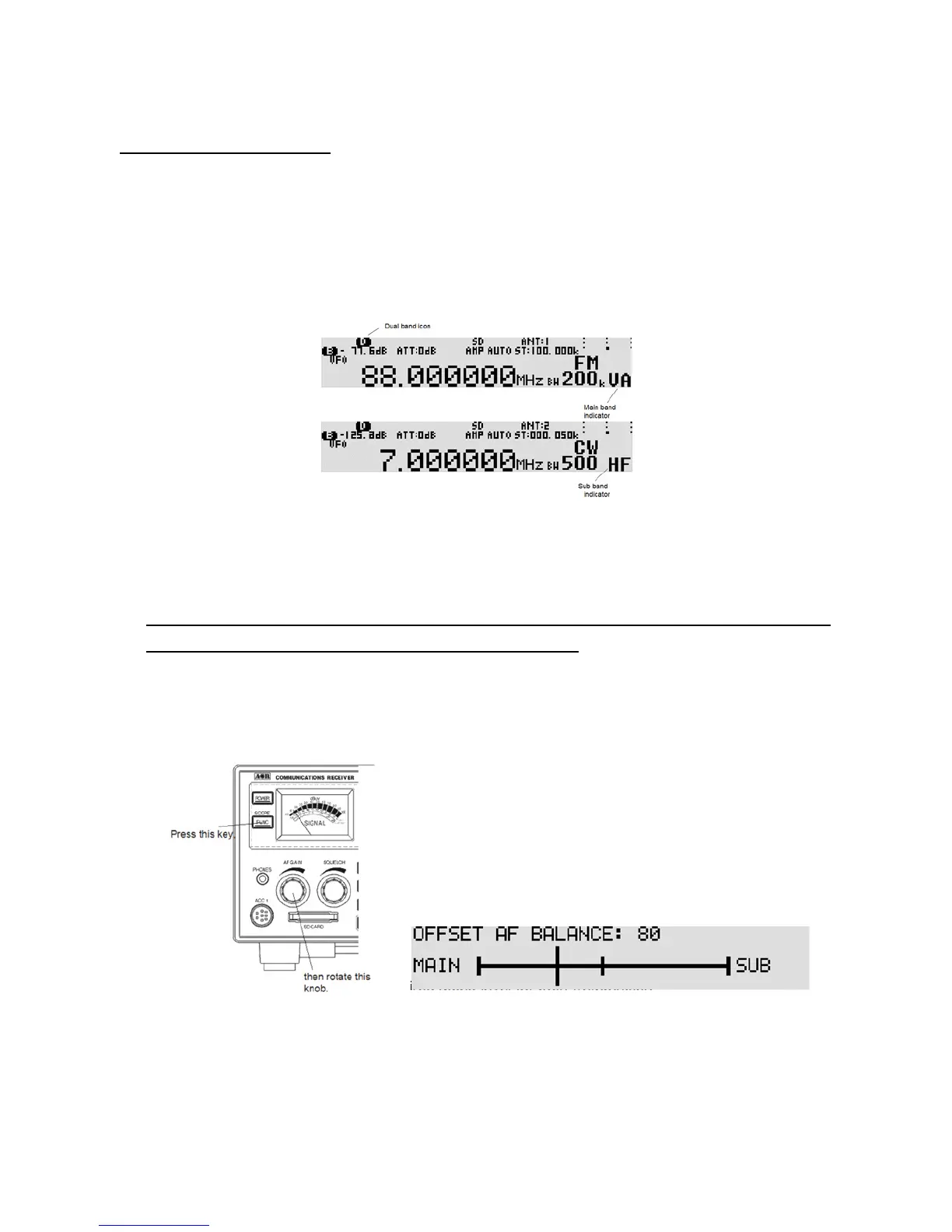
In VFO mode, one frequency below 25 MHz (defined as Sub frequency) and another frequency above 25
MHz (defined as Main frequency) can be received simultaneously.
5-2-2-1 ACTIVAT ING DUAL BAND RECEIVE
In VFO mode, press the [FUNC] key, and then press and hold the [VFO] key for two seconds. The dual
band screen appears on the LCD.
5-2-2-2 SETTING THE FREQUENCIES
To set the main frequency, press the [UP] key and enter the frequency using the numeric keypad.
To set the sub frequency, press the [DOWN] key and enter the frequency using the numeric keypad.
Note: The main frequency must be above 25 MHz, and the sub frequency must be below 25 MHz.
However, separate modes can b e selected for both frequencies.
5-2-2-3 CHANGING THE AUDIO BAL ANCE
Press the [FUNC] key, and then rotate the AF GAIN (Volume). Bala nce adjustment screen shown
below appears.
Rotate the AF gain (volume) to the desired audio level for both frequencies.
Press the [FUNC] key to accept setting.
5-2-2-4 DEACTIVATING DUAL BAND RECEIVE
Press the [FUNC] key, then press and hold the [VFO] key for two seconds.



 To Next Page