Disassembly and Replacement Procedures
DISASSEMBL
Y
AND REPLACEMENT
137
6-5-10. Replacing the CCFL Inverter
(1) Remove the rear panel.
See (1) ~ (2) in “6-5-3. Replacing the Front Panel.”
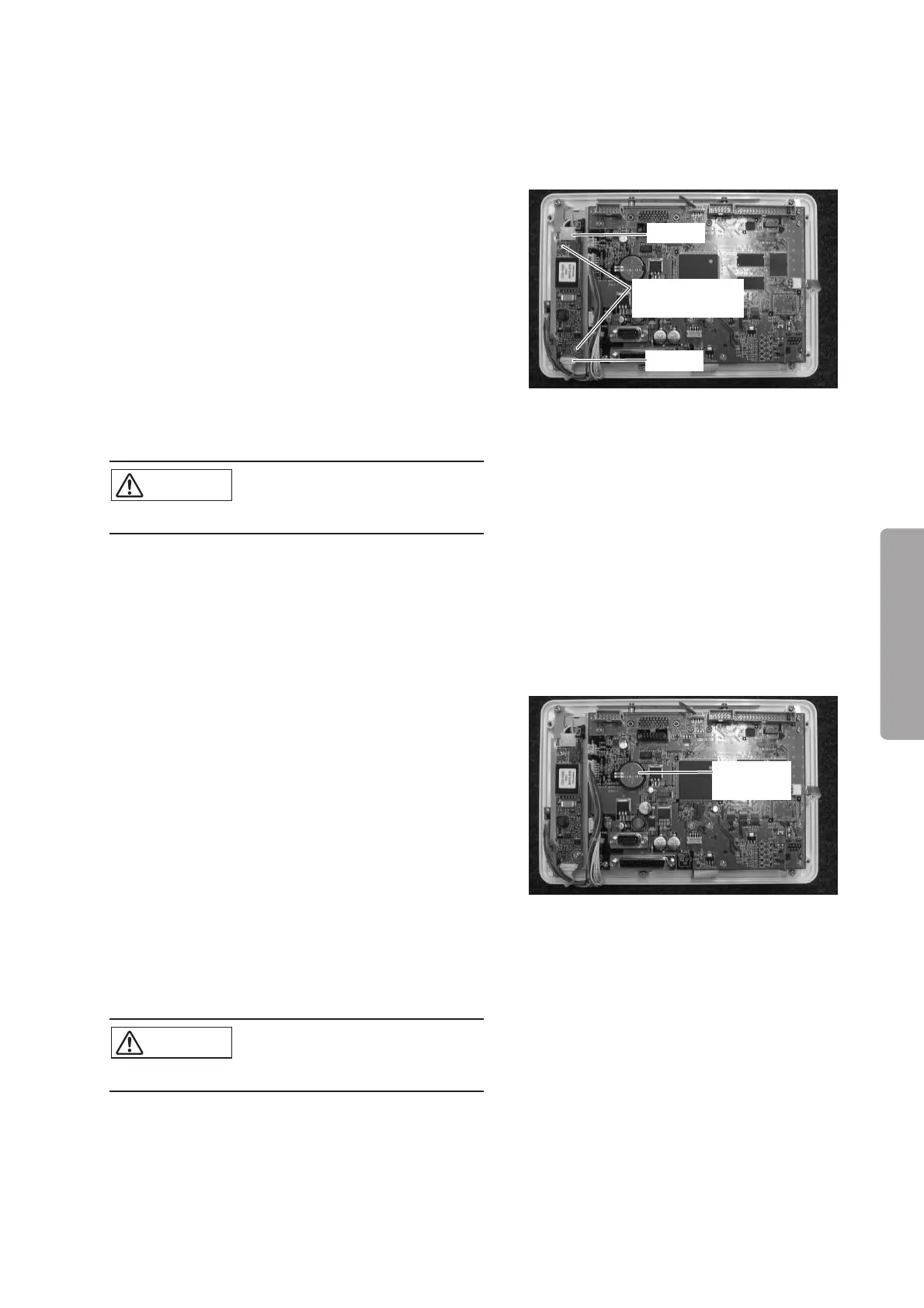
(2) Remove the CCFL inverter.
Remove the two cables (upper and lower). Remove
the two double sems screws (M3 x 8) with a Phillips
screwdriver.
Double sems
screw (M3x8)
Cable
Cable
(3) Reassembly: Reassemble in the reverse order of dis-
assembly.
CAUTION
쎲 Take care not to get the cable caught.
6-5-11. Replacing the Button Cell Battery for the Control Panel
(1) Remove the rear panel.
See (1) ~ (2) in “6-5-3. Replacing the Front Panel.”
(2) Remove the button cell battery.
Button cell
battery
(3) Reassembly: Reassemble in the reverse order of dis-
assembly.
(4) After reassembling, set the time and the date on the
control panel.
CAUTION
쎲 Take care not to get the cable caught.


 To Next Page