Maintenance Inspection
48
3-2. Quarterly Inspection
Check the following items every three months.
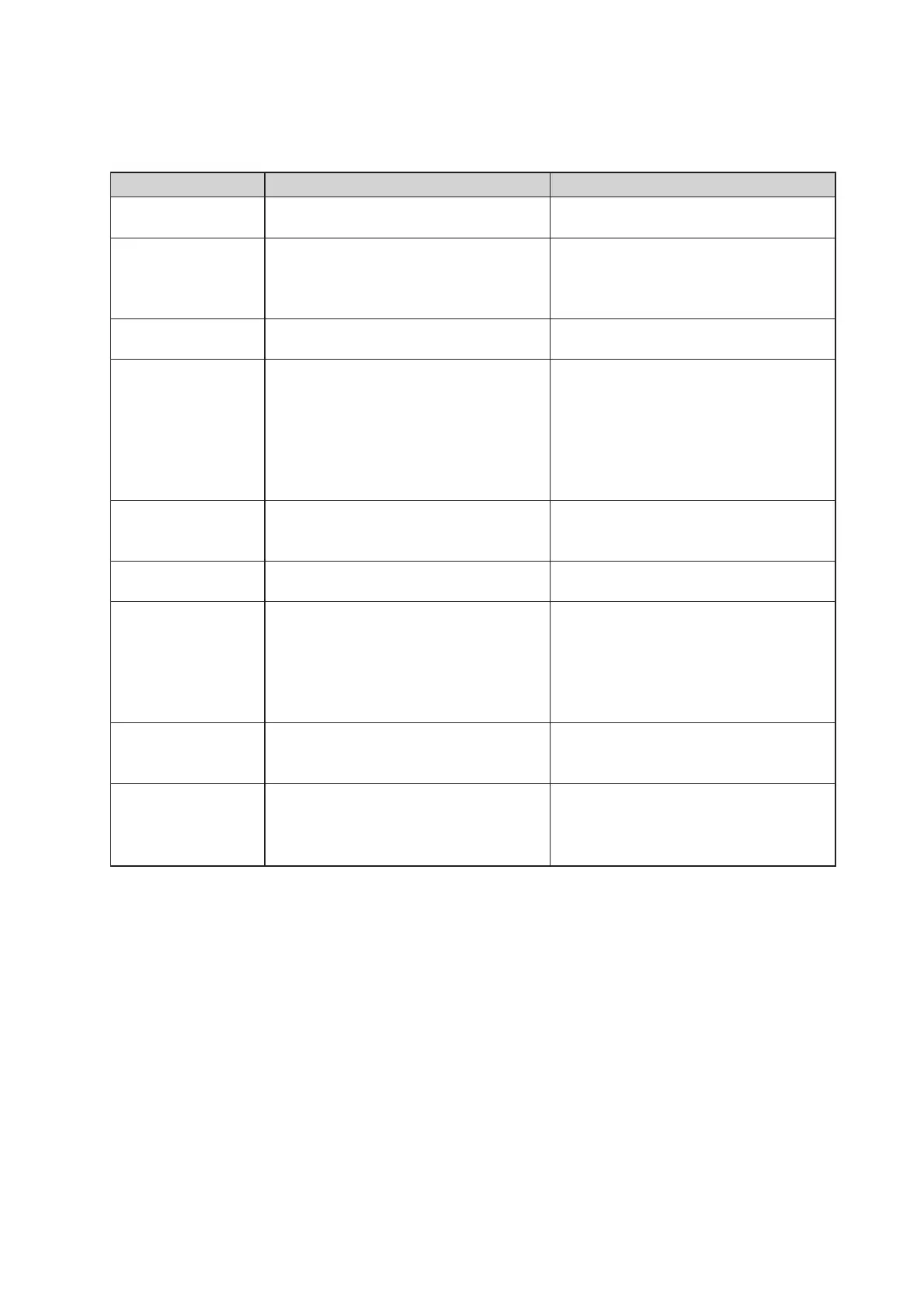
Item to check
Incubator air
temperature control
Skin temperature
control
Humidity control
Oxygen concentra-
tion control
Pulse oximeter
Fan
Humidifier
Power failure alarm
Weight monitor
(The unit equipped
with the weight
monitor unit)
Procedure
Set the temperature to 36.0˚C in manual
control.
Place the skin temperature probe at about
10cm above the center of the mattress
surface in the incubator and set the tem-
perature to 36.0˚C in servo control.
Set RH to 90% with the incubator air tem-
perature set to 32.0˚C.
q
When the oxygen controller is not
used: Supply oxygen at 10L/min from
the oxygen supply port 1.
w
When the oxygen controller is used:
Connect oxygen to the oxygen supply
port 2 and, after 21% calibration, set the
oxygen concentration to 40%.
Connect a sensor to the main body and
attach the sensor to the inspector.
Check the exterior by visual inspection.
q
Install the cartridge tank without any
water in it.
w
Open the humidity chamber cover.
e
Install the humidity chamber with the
boiler cap off.
Turn the power on, and then remove the
power plug from the power outlet.
Place a 5kg weight (option) on the cen-
ter of the mattress and check the display.
Description
The displayed incubator air temperature
should be stable at 36.0
1˚C.
The displayed skin temperature should
be stable at 36.0
0.5˚C.
The displayed RH should be stable at
90
10%.
q
The oxygen concentration in the incu-
bator should rise to 65% or higher.
w
21% calibration should be completed
successfully, and the displayed oxygen
concentration should be stable at
40
2%.
95~100% should be displayed on the
%SpO2 display. The pulse rate should also
be displayed.
It should be neither broken nor de-
formed.
q
The “no water alarm” indicator should
come on.
w
The “humidity chamber off alarm” in-
dicator should come on.
e
The “humidity chamber off alarm” in-
dicator should come on.
The power failure alarm indicator should
come on and an audible alarm should
sound.
The displayed value should be in the
range of 5000
5g.



 To Next Page