Parts Identification
36
2-4-2. Operating the Service Menu Screen
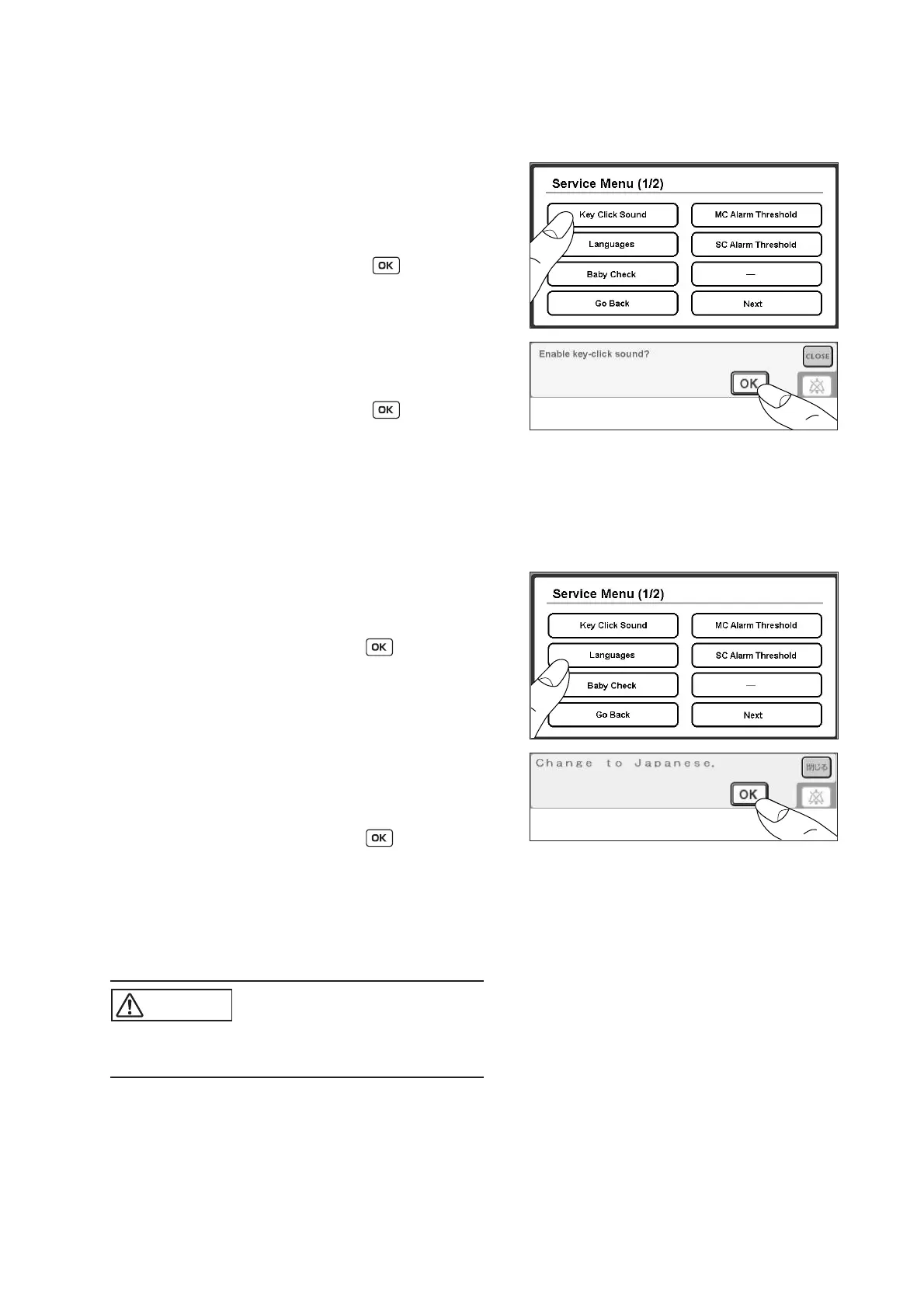
2-4-2-1. Setting the Key Click Sound
(1) Touch [Key Click Sound] on the Service Menu
screen (1/2).
(2) When the key click sound has been disabled before-
hand, a message to confirm whether to enable the
key click sound will appear. Touch , and the key
click sound will be enabled. To cancel this proce-
dure, touch [CLOSE]. The key click sound will re-
main disabled.
(3) When the key click sound has been enabled before-
hand, a message to confirm whether to disable the
key click sound will appear. Touch , and the key
click sound will be disabled. To cancel this proce-
dure, touch [CLOSE]. The key click sound will re-
main enabled.
2-4-2-2. Setting the Language and the Unit to Be Displayed on the Screen
(1) Touch [Languages] on the Service Menu screen (1/
2). When Japanese has been selected beforehand, a
message to confirm whether to change it to English
will appear (in English). Touch , and the lan-
guage to be displayed on the screen will be changed
to English (the units of the temperature and the
weight will become selectable). To cancel this pro-
cedure, touch [CLOSE]. The language to be dis-
played on the screen will remain Japanese.
(2) When English has been selected beforehand, a mes-
sage to confirm whether to change it to Japanese
will appear (in English). Touch , and the lan-
guage to be displayed on the screen will be changed
to Japanese (the units of the temperature and the
weight will become selectable). To cancel this pro-
cedure, touch [CLOSE]. The language to be dis-
played on the screen will remain English.
CAUTION
쎲 Check the infant’s condition periodically even
when the baby check alarm is disabled.



 To Next Page