Cleaning and Disinfection
56
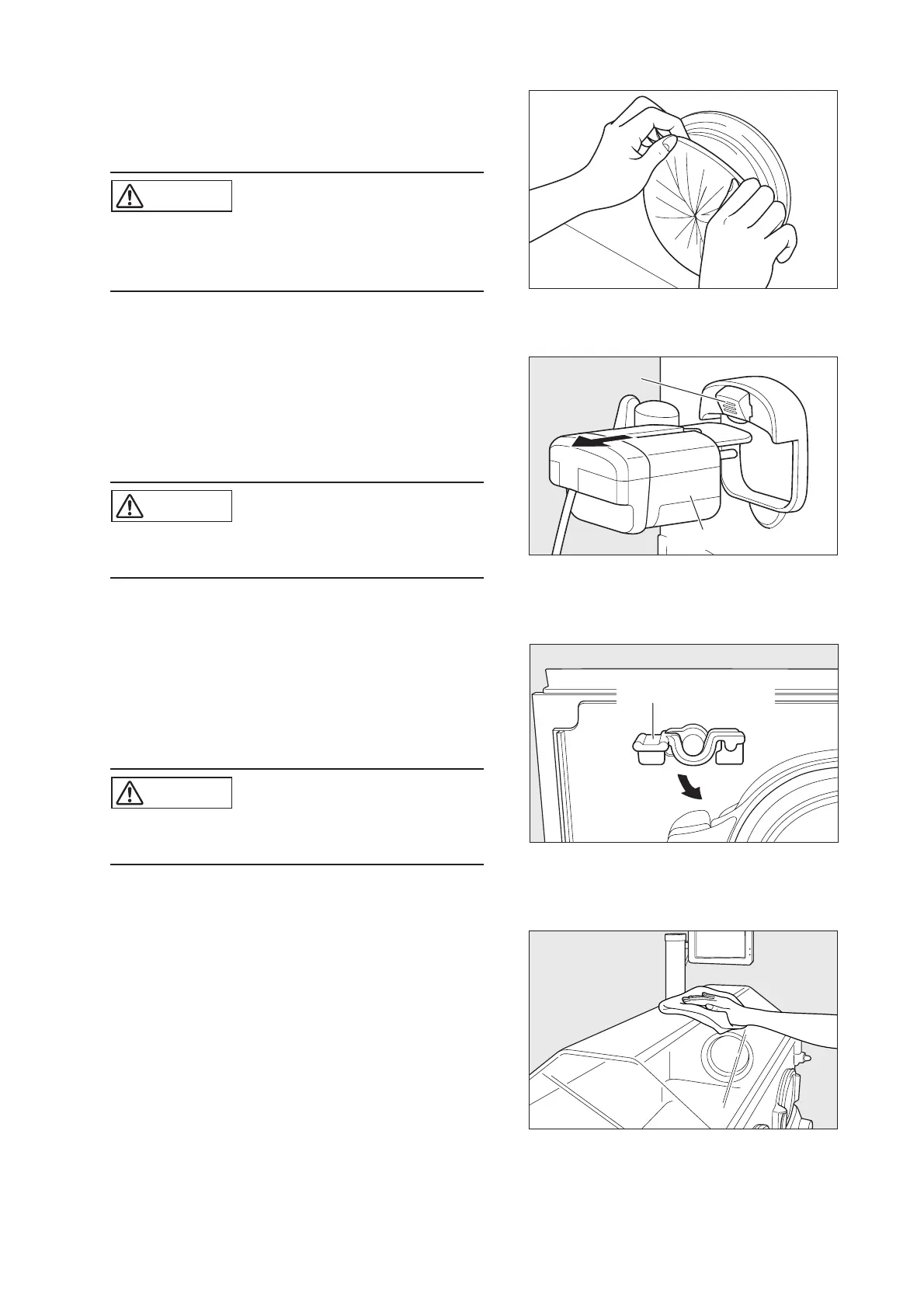
• Access port cover
Remove all the access port covers. Immerse and clean them
in a disinfectant solution.
CAUTION
쎲 Spare access port covers should always be on
hand. A dirty cover should be replaced immedi-
ately with a new one.
• Sensor module
Remove the connector of the sensor module from the rear of
the main body and pull the sensor module out of the hood.
Clean the sensor module with a soft cloth dampened with a
disinfectant solution and wrung out sufficiently.
CAUTION
쎲 Do not immerse the sensor module in water. Im-
mersing it in water may cause it to malfunction.
• Inner wall
Open the admittance panel. Push down the inner wall levers
and pull the inner wall away from the hood. Clean the inner
wall with a soft cloth dampened with a disinfectant solution
and wrung out sufficiently.
CAUTION
쎲 The inner wall panel cannot be removed from the
hood.
• Hood
Clean the inside and the outside of the hood with a soft cloth
dampened with a disinfectant solution.
❋ Replace all the removed parts to their former positions.
Make sure that they are attached correctly.
Sensor module
Lever
Inner wall panel lever



 To Next Page