Page 45Aviom A640 Personal Mixer User Guide
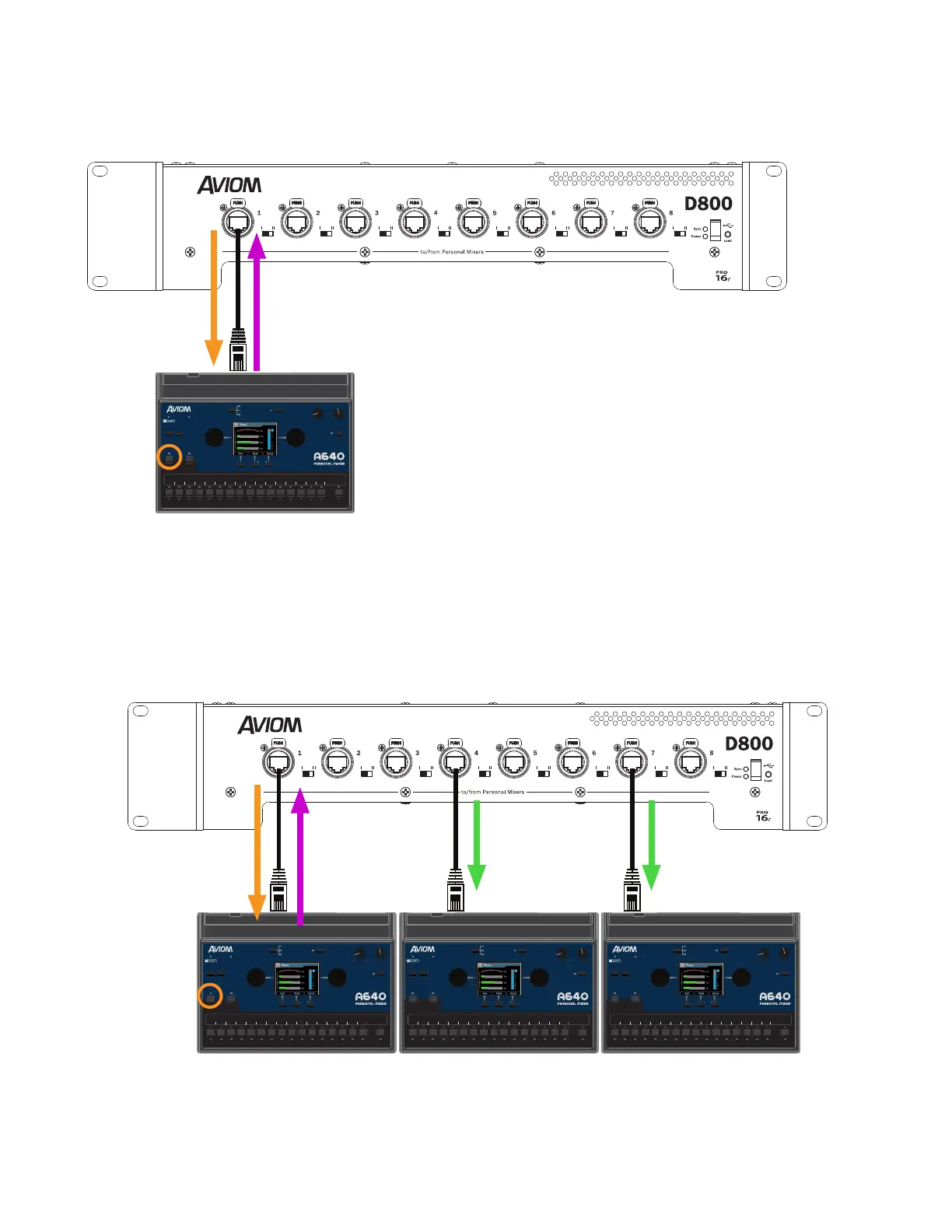
While the Intercom is active, the local mic on the A640 picks up the user's voice and transmits it as
digital audio back to the D800 (shown in the illustration below with a purple arrow).
AmbienceIntercom
Save Recall
Signal/Clip
Aux Volume Master Volume
Master EQ
Channel
Mix
Names
Trim All
View Mixer Setup
1 2 3 4 5 6 7 8 9 10 11 12 13 14 15 16 Favorite
A-Net Network
Slots 1-64
Intercom
transmission
The local Ambience mic transmits Intercom audio to the D800 A-Net Distributor
The D800 seamlessly merges the Intercom audio from the user's local mic into the A-Net digital data
stream (on the designated Broadcast Slot) and then distributes it to all connected A640 Personal
Mixers along with the other audio sources making up the monitor mix (illustrated with green arrows
below).
AmbienceIntercom
Save Recall
Signal/Clip
Aux Volume Master Volume
Master EQ
Channel
Mix
Names
Trim All
View Mixer Setup
1 2 3 4 5 6 7 8 9 10 11 12 13 14 15 16 Favorite
AmbienceIntercom
Save Recall
Signal/Clip
Aux Volume Master Volume
Master EQ
Channel
Mix
Names
Trim All
View Mixer Setup
1 2 3 4 5 6 7 8 9 10 11 12 13 14 15 16 Favorite
AmbienceIntercom
Save Recall
Signal/Clip
Aux Volume Master Volume
Master EQ
Channel
Mix
Names
Trim All
View Mixer Setup
1 2 3 4 5 6 7 8 9 10 11 12 13 14 15 16 Favorite
All users hear intercom audio sent from A640 #1 when its Intercom button is pressed.



 To Next Page