7‐7
3. Setting the Sub-Soft Limit
The machine software allows 3 embroidery areas to be programmed to limit the movement of
the Pantograph. This feature is called the Sub-Soft Limit.
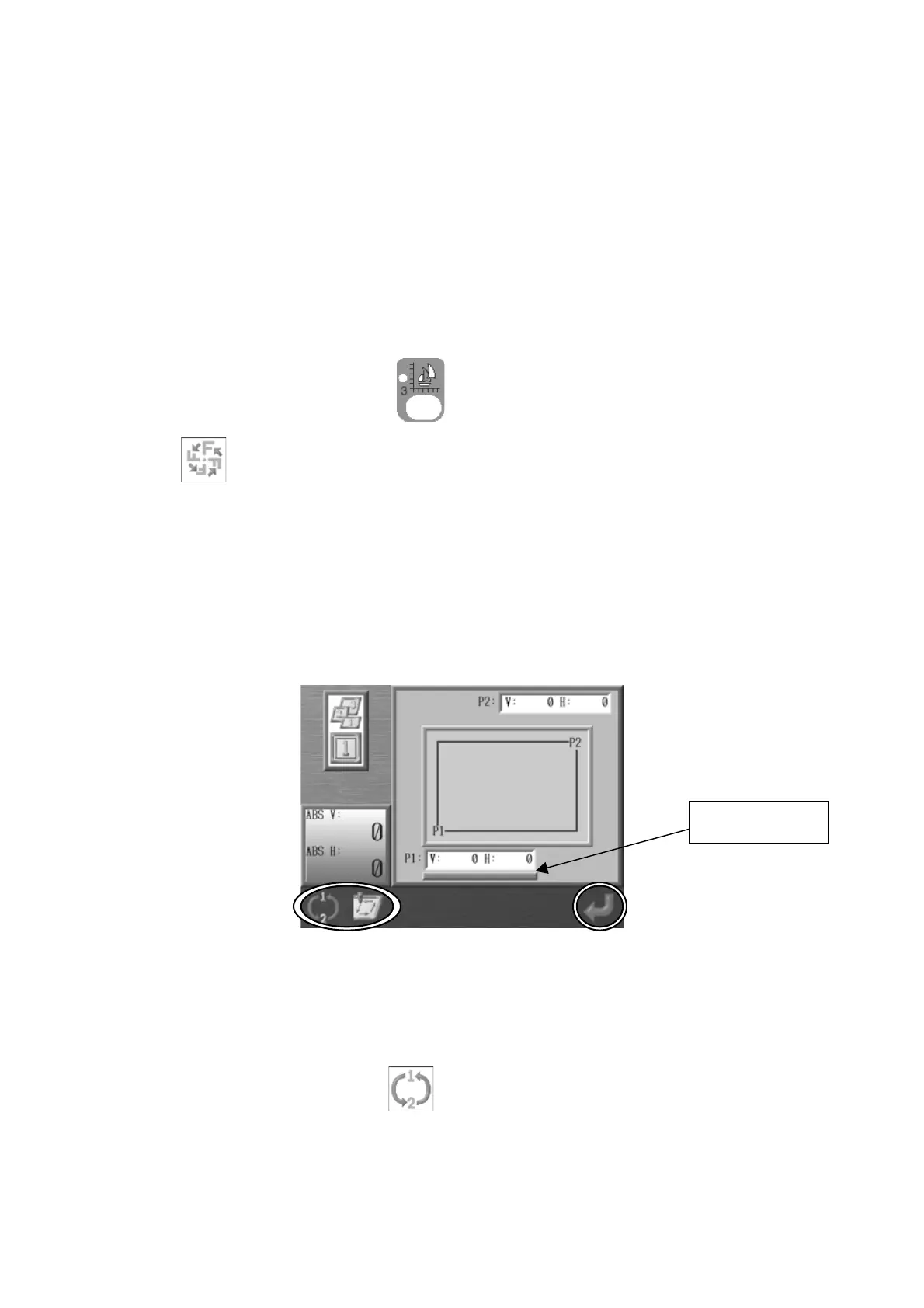
Program the lower left corner (P1) and the upper right corner (P2) for each area.
The pantograph movement will be limited to the rectangular area created by these 2 corners.
*Programming the 2 corners is done by moving the pantograph using the Jog keys.
*The area for the Sub-Soft Limit cannot be larger than the Soft Limit Area set in the Machine
Condition Parameters (MC).
1. Press the Design Edit Key,
and select a design and press the B-key below the
icon.
2. Use the Jog keys and select item 14 Frame Type.
3. It is inactive when it’s set at 0. *The value can be changed from 1 to 3.
4. Press the Origin key to open the Setting screen.
5. Program 1. Use the Jog keys and move the Pantograph to find the lower left corner of
the area. *When the P1 (V, H display) value is selected, it will have a Bold Underline
under it as shown above.
If P1 is not selected, press
to change it to P1. Press this key to toggle back and
forth between the P1 and P2 settings.
Bold Underline



 To Next Page