3‐11
6. Information Screen
6-1. Design Information screen
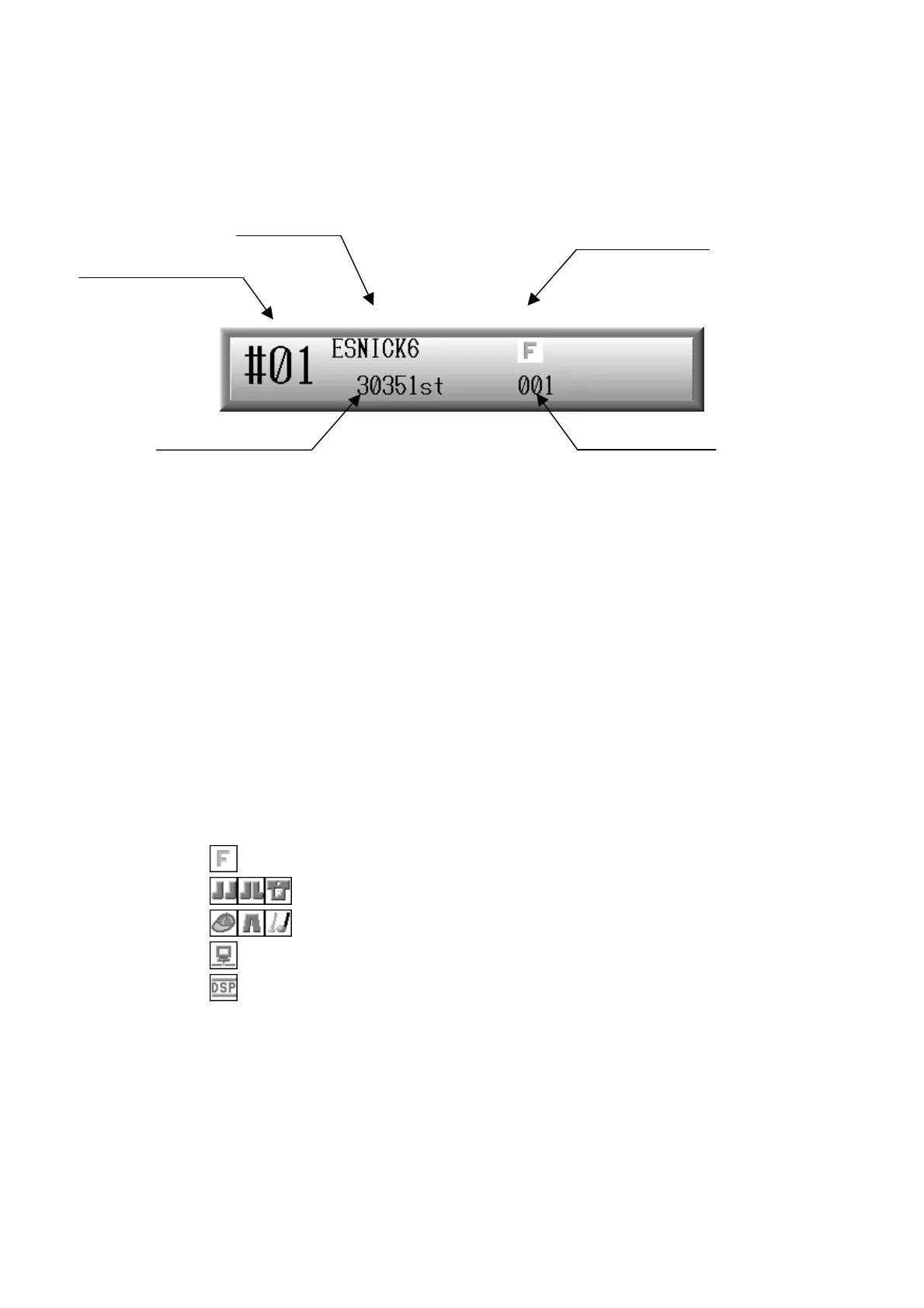
Shows the information of the design selected.
Design memory No.
Shows the number of the design memory location.
Design name
Shows the name of the design.
Total stitch number
Shows the total stitch number of the design selected.
Design condition
Shows one of the icons shown below to indicate special conditions of the design.
:This is shown when MC #3 is changed. *1
:These are shown when MC #6 is changed. *1
:These are shown when MC #13 is changed. *1
:This is shown when the design was downloaded from the network. *2
:This is shown when the design was edited by DSP. *3
Design repeat No.
Shows how many times this design has been sewn.
*1: Refer to
Chapter 7 2. Program List
*2: Refer to
Chapter 9 6. and 7. Downloading
.
*3: Refer to
Chapter 10 4. DSP. (Design Stitch Processor)
Design memory No.
Design name
Total stitch number
Design condition
Design repeat No.



 To Next Page