5‐21
7. Loading through the COM port
A COM connector is located on the back of the BEXS Automat. Designs can be loaded from
a device connected to the COM port. Devices using RS-232C can be connected and used.
*Note: Please use a (null modem) crossover cable for the connection.
7-1. Loading a New Design through the COM port.
1. Press the Design Loading/Downloading key, .
2. COM Mode. Press the B-key to change the machine to COM Mode, if not already
selected
*Refer to
1. Before Loading/Downloading Designs.
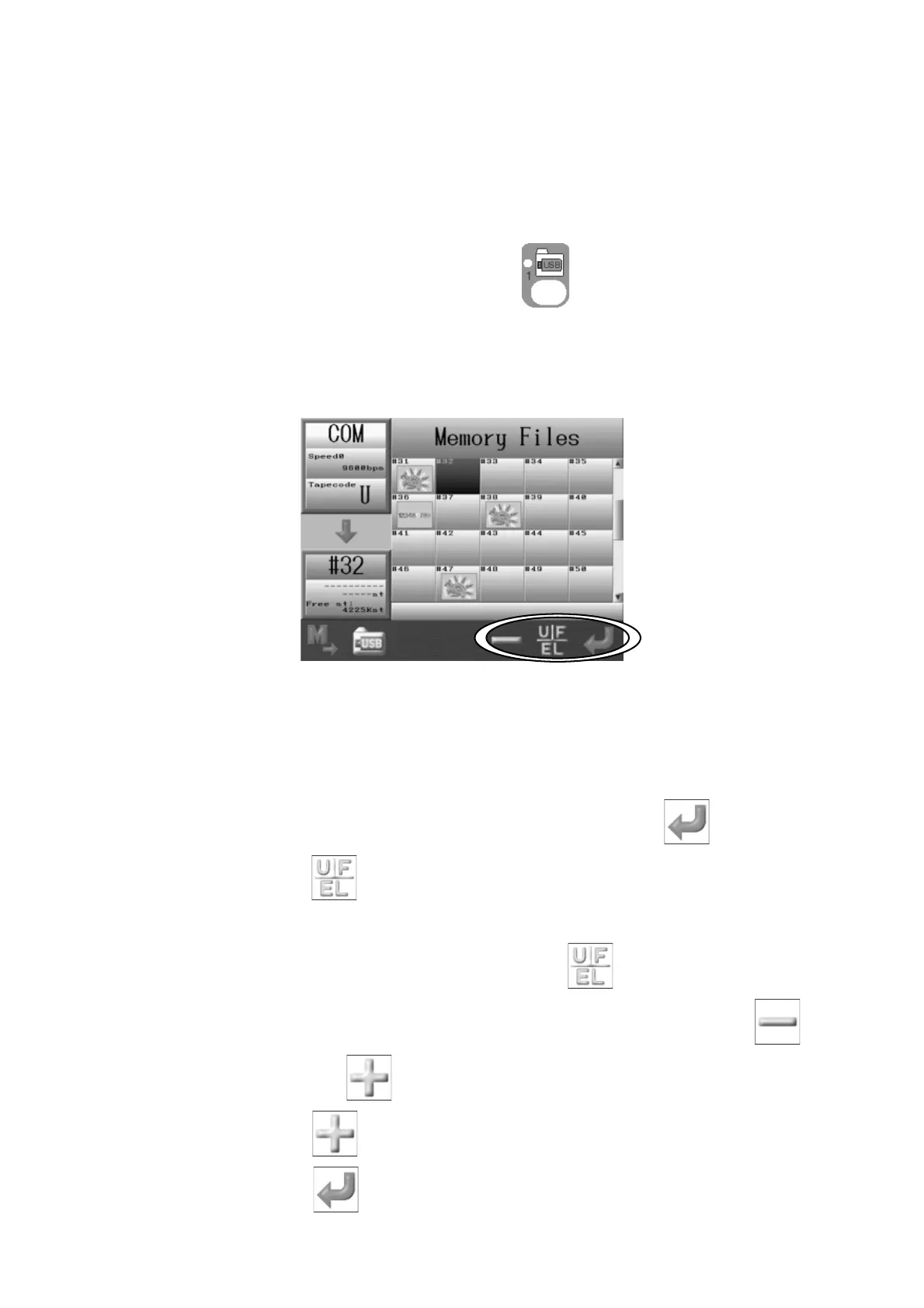
3. The Memory design list will display.
4. Use the Jog keys to select an empty Memory location.
*If there are no empty memory locations, you will need to delete some designs from memory.
Refer to Chapter 6 5. Deleting Designs from Memory.
*If you select a Memory location that already has a design, the Enter key, will not appear.
5. Press the F-key,
if needed, to change Tape Codes.
*There are 3 types of Tape code: U / F / EL
The Code changes each time you press the F-key,
from U→F→EL→U.
6. Changing loading speed (BAUD rate), if needed. Press and hold the E-key,
and
the icon changes to a
, to allow you to change the loading speed.
7. Press the E-key,
to change the loading speed.
8. Press the G-key,
to ready the machine for the download.



 To Next Page