Appendix 01 - 2
PIN Lock Warning
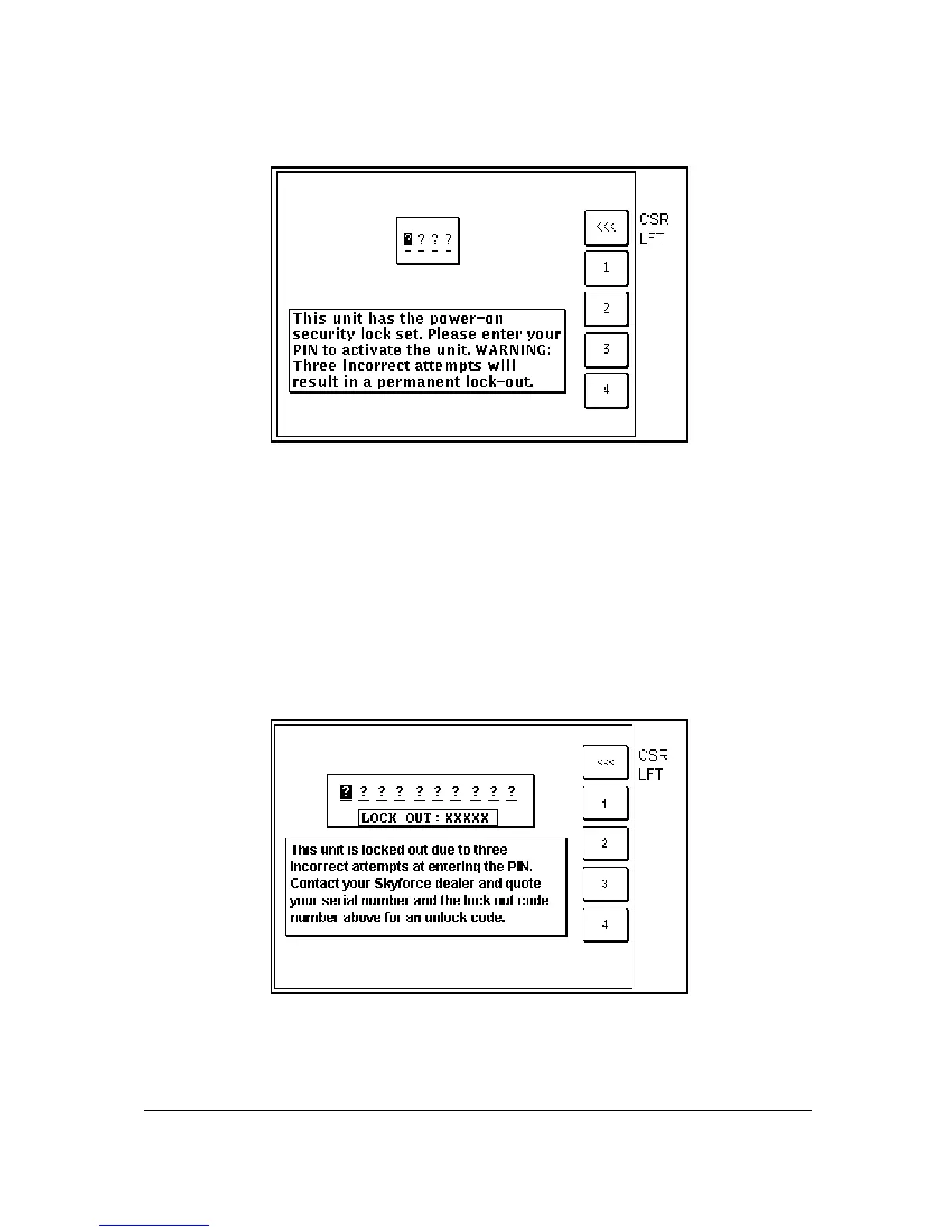
Screen 54: Power On Security PIN Entry Screen
If the Auto Power-On Lock function has been activated on Screen 26, this Screen will be called during
initialisation. You must then input the correct PIN before you are allowed to move back to Screen 1
with full access to all functions.
If an incorrect PIN is entered, Screen 25 will appear and Key 1 will revert to this Screen. If an incorrect
PIN is entered on three consecutive attempts, even if the unit has been switched off and back on
again between attempts, Screen 55 will appear. The number of incorrect attempts that have been
made is stored in NVM and increased with each incorrect attempt or cleared down once you have
managed to enter the correct PIN.
As the PIN is entered, asterisk characters are displayed in place of the question marks. Key 1 can be
used as a Back-Space Key.
Lock Out Warning
Screen 55: Lockout Screen
This Screen will only appear after three incorrect PIN's have been entered on Screen 54 (or if when
you switch the unit on the NVM is found to have accumulated three unsuccessful PIN input attempts).
The LOCK OUT number is a random five digit number that the unit generates. This is held in RAM
and does not change until an unlock number is entered. The unit can be switched off and on with this
Screen showing but the LOCK OUT number will remain the same.



 To Next Page