11-3
Direct-To
The Direct-To function allows you to perform a short cut whilst flying a flight plan by skipping over
intermediate legs and flying directly to a point further along your planned flight plan. Once the selected
point is reached, the normal flight plan is automatically resumed.
A black cursor bar is hidden behind the Magenta bar which is highlighting the current destination
waypoint. The black cursor is used to select the point to go Direct-To. This cursor can be moved up and
down the active flight plan with the joystick.
If a waypoint further down the flight plan is selected then the DIRECT TO key is hit, the unit will return to
the map with a pseudo DIRECT TO running on top of the flight plan to the selected point. The CDI will be
centred and the FROM-TO box will be replaced with a ‘direct to’ box. Once the selected point is
reached, the normal flight plan is automatically resumed.
This function is very useful if you have been forced off your planned flight plan and wish to take the flight
plan up again at a later turning point.
Arrival at an En-route User Waypoint
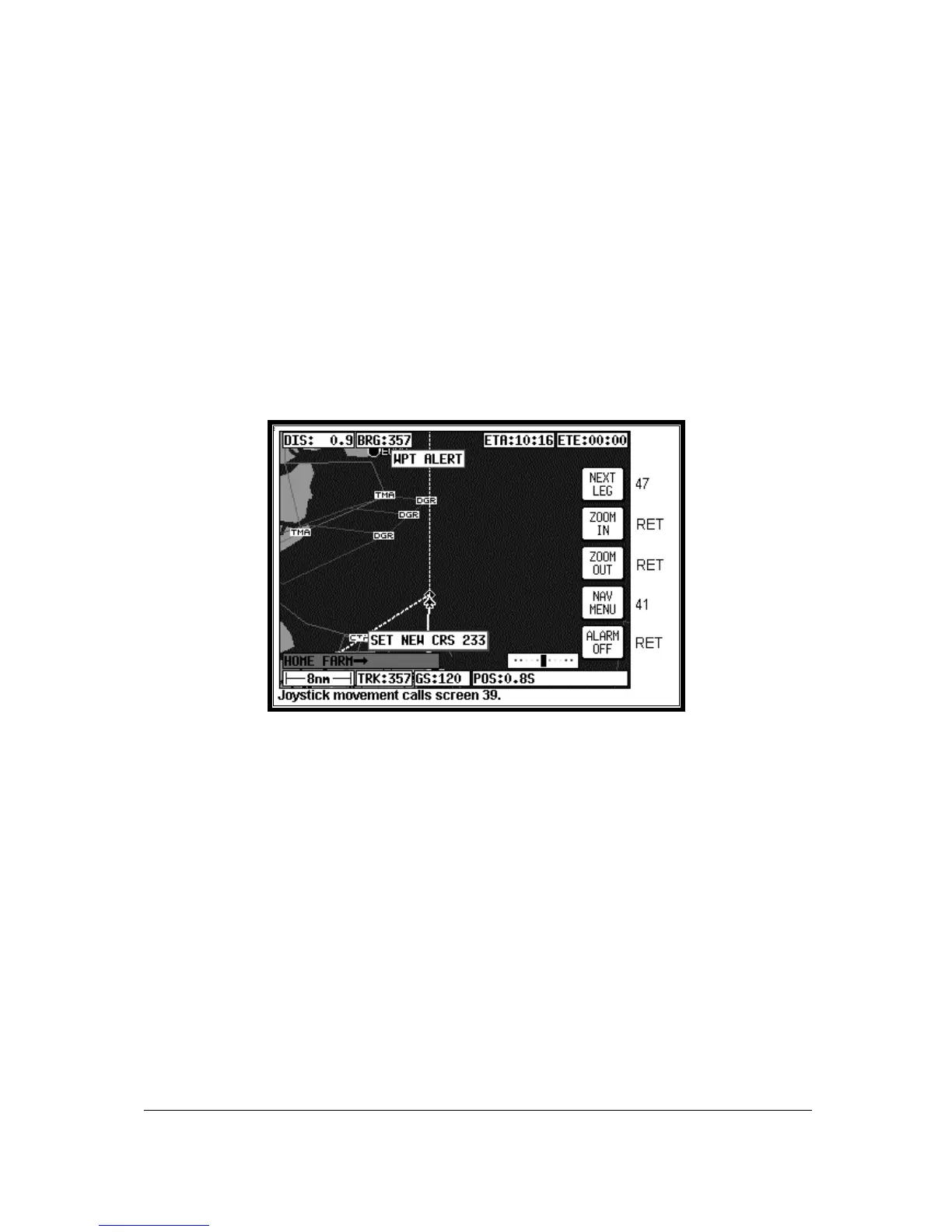
Screen 48: NAV Information and WPT ALERT Flags Showing – En-route Screen
To set the radius for the Arrival Alarm you should refer to the data on Screen 23, NAV Mode
Customisation Screen. When the distance remaining to run to an en-route user waypoint falls below
the Arrival Alarm value, the [WPT ALERT] flag is displayed and the internal and external alarms (if
switched on) beep at a rate of 2Hz for 5 seconds. To make the change to NEXT LEG you have to
press Key 1 and if you wish to quieten the alarm before the 5 seconds are up, simply press Key 5, the
label of which has meantime changed to ALARM OFF. When the alarm is switched off automatically
after 5 seconds, Key 5 will go blank and have no function for 2 seconds. It will then revert to DIRECT
TO. This is a safety measure to prevent you from inadvertently selecting DIRECT TO mode by
pressing the Key just as it is cancelling automatically.
Once you have pressed Key 1 to select the next leg, Screen 47 re-appears showing all the relevant
information for the new leg. The next leg of the flight plan will now be displayed as a solid magenta
coloured line.
If you pass the waypoint the flag will change to [WPT PASSED]. If the unit has been set up for AUTO
NEXT LEG in Screen 23, then as the waypoint is passed the unit will automatically revert to Screen 47
with all the new leg information. Key 1 will go blank and inactive for two seconds. It will then revert to
MAIN MENU.



 To Next Page