14-5
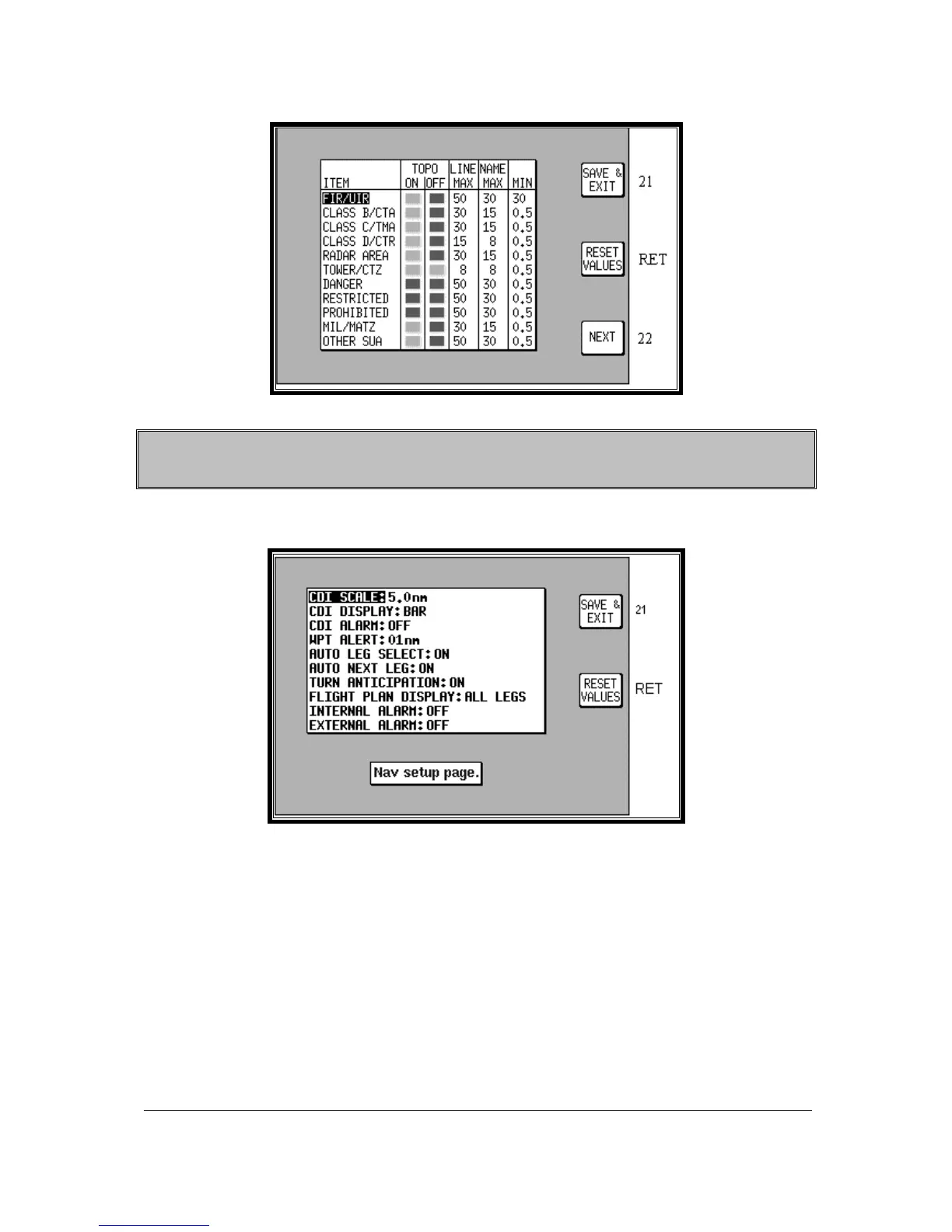
Screen 22C: Airspace Data Class Setup Screen
Please think carefully before altering any of the settings on these screens. You may
inadvertently switch off an important data class (such as obstacles), which could compromise
your situation awareness.
NAV Mode Setup
Screen 23: NAV Mode Customisation Screen
When you first enter this Screen the current settings are displayed with a cursor over the words CDI
SCALE. You then have to use the joystick to move the cursor up or down. Once the cursor is over
the heading you wish to alter, moving the joystick to the right will move the cursor over to the set of
options available for that heading.
The various settings available for each heading are listed below. The default settings are those shown
in the illustration above. To reset the values on this screen to their defaults, press Key 3 RESET
VALUES. This will reset the values on the displayed screen only. In order to reset all user defined
data globally, see the Clear Memory screens later in this section.
CDI SCALE: 0.3 / 1.0 / 2.5 / 5.0 nm.
CDI DISPLAY: bar / numeric / off
CDI ALARM: on / off.
WPT ALERT: 1 / 2 / 3 / 4 / 5 / 6 / 7 / 8 / 9 / 10 / 11 / 12 / 13 / 14 / 15 / 16 / 17 / 18 / 19 / 20 nm.
AUTO LEG SELECT: on / off.



 To Next Page