11-6
TOPO ON / TOPO OFF CDI (Pseudo HSI) Mode:
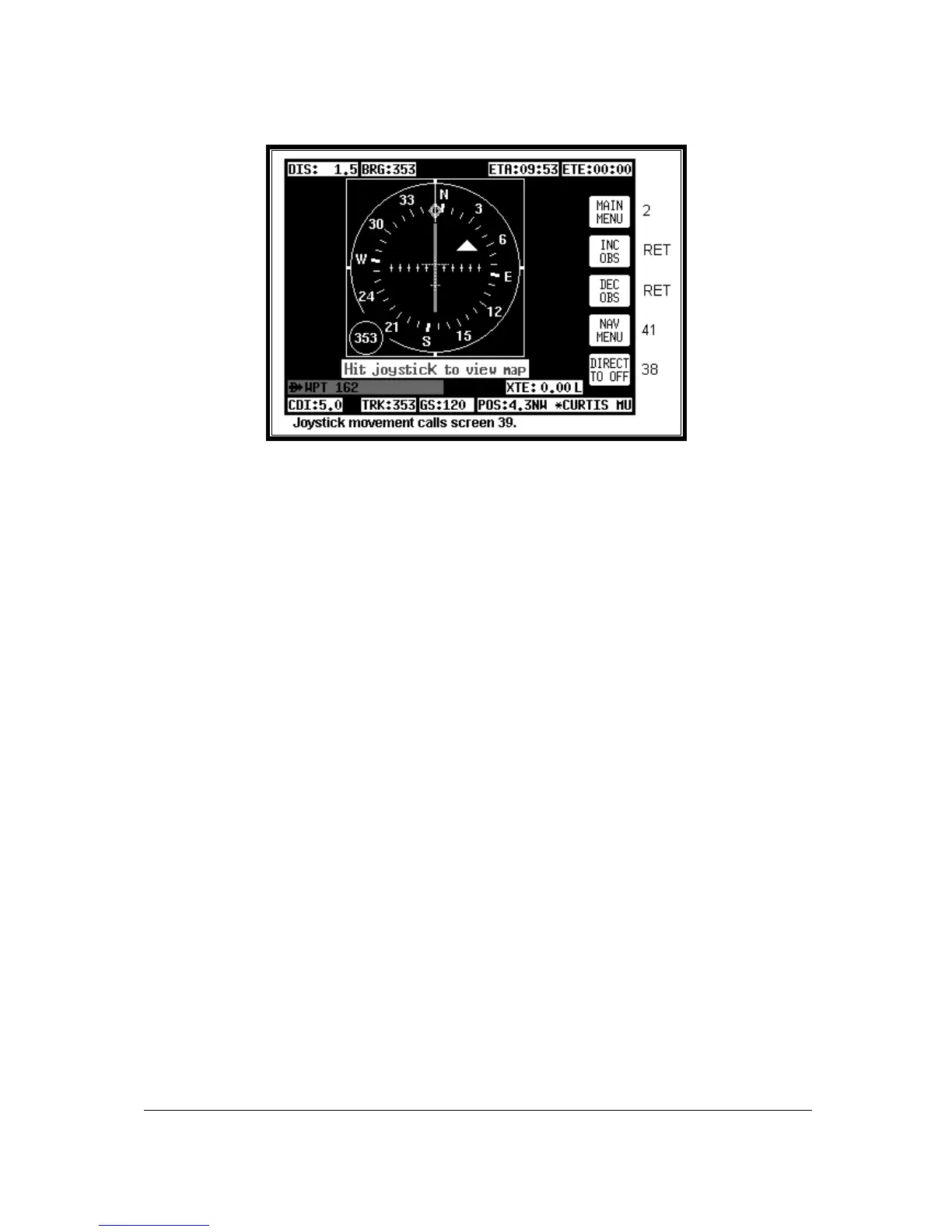
Screen 47B: CDI (Pseudo HSI) NAV Information Screen
This Screen presents numeric navigation information in small text but instead of a map display, shows a
pseudo CDI complete with OBS knob. The aircraft icon in the center of the CDI will remain static and the
outer ring represents the desired magnetic track between the start waypoint and the destination waypoint
(i.e. magnetic bearing to waypoint if you were on track). On entering NAV Mode or activating a new flight
plan leg or a DIRECT TO, the outer ring will show the desired track to the active waypoint.
A GPS TRACK bug, which rotates with the aircraft’s actual track, is positioned on the CDI outer ring.
This indicates the actual magnetic track of the aircraft. There is also included a conventional TO / FROM
flag.
Flying with the pseudo CDI is very similar to flying with a conventional VOR indicator. Off track error
(XTE) is represented by a bar that moves left or right of center. The center of the scale represents the
aircraft's position. As with a conventional CDI or VOR indicator, to correct your track error, fly towards the
bar. The full scale deflection or scale of the CDI can be selected on Screen 23, NAV Mode
Customization Screen.
In order to gain, and remain on the desired track, adjust your aircraft heading until the CDI bar is
centered. Once the CDI bar is in the center of the display indicating no cross track error (XTE), adjust
your aircraft heading in small increments until the track bug, which rotates around the outer ring, is at the
top of the display.
Once the CDI is centered and the track bug is aligned at the top of the display you are flying precisely
along your desired track. If the track bug is aligned at the top of the display but the CDI bar is not
centered, this indicates you are flying parallel to your desired track by however far the XTE is indicating.
If whilst flying a flight plan you need skip to another waypoint in the flight plan, press key 5 (DIRECT TO)
followed by key 3 (DIRECT TO) in exactly the same way as described earlier in this section.
The TO / FROM flag will normally point up to indicate you are flying TO the waypoint. When you pass
your destination waypoint, the TO / FROM flag will point down to indicate you have passed the waypoint
and you are now flying away FROM your destination. As you pass your waypoint and the FROM flag
appears, the desired track ring will remain fixed at the original desired track and the CDI will continue to
show track error left or right of the extended leg line.
If whilst en-route to a destination you decide that you would like to approach that destination point from an
angle other than that displayed on the CDI by the desired track ring, you can alter the desired track
setting by pushing the INC OBS (increment OBS) or DEC OBS (decrement OBS) Keys.



 To Next Page