13-3
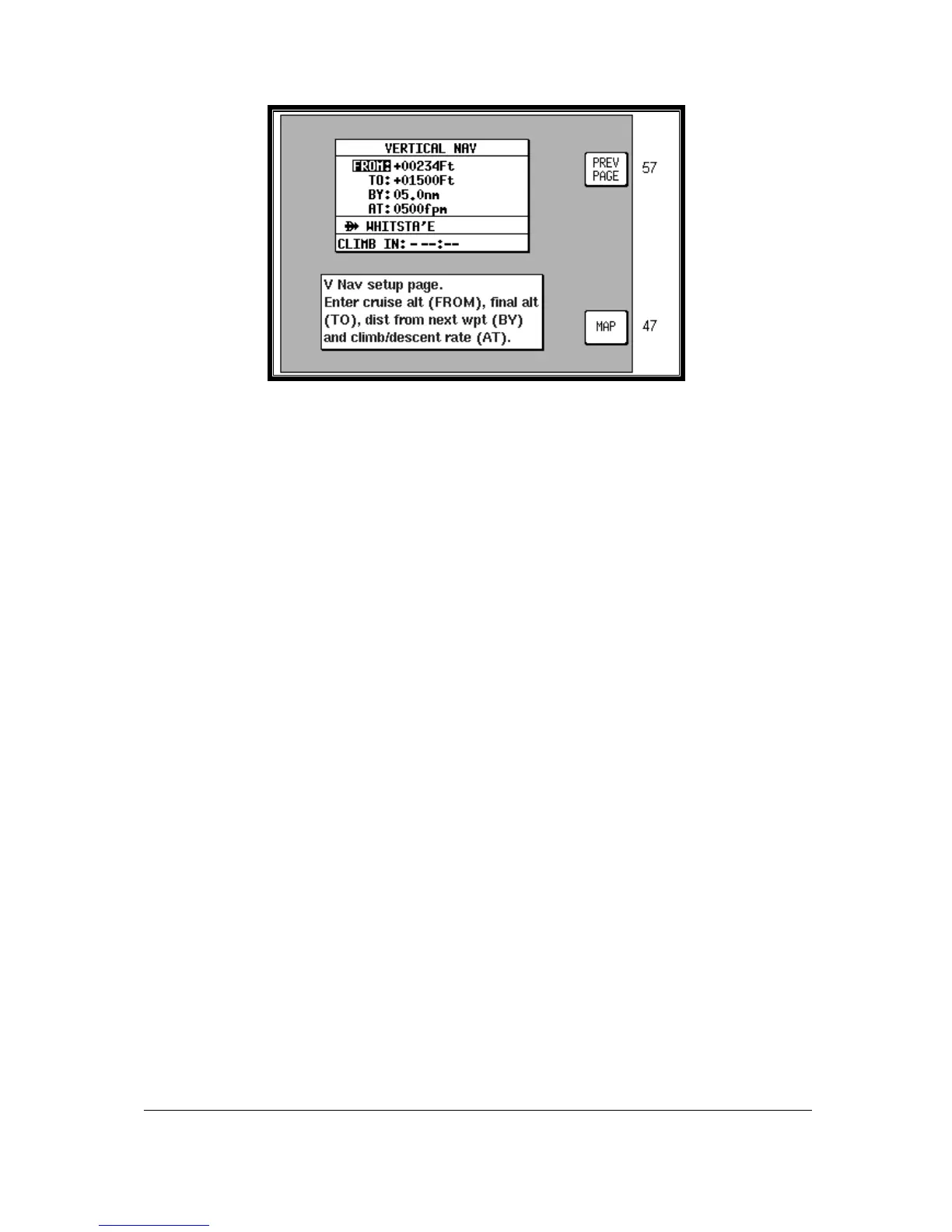
Screen 59: V NAV Setup Screen
On entry to Screen 59, if there is no active user waypoint the DESTINATION box will read NO WPT. You
must have an active user waypoint in order to activate VNAV Mode. If there is an active user waypoint
the destination user waypoint name will be shown.
Once in the VNAV Screen you must enter the cruise altitude (the altitude FROM which you will descend),
the final altitude (the altitude TO which you want to descend), the rate of descent (in FPM feet per minute)
and the distance before the upcoming user waypoint that you want to achieve the new level BY.
On entry to this Screen, the FROM value will default to GPS altitude if your unit is a Skymap IIIC or to
5000 feet if your unit is a Tracker IIIC (or the last set value). The TO value will default to 1500 feet (or the
last set value). The BY value will default to 5.0nm (or last set value) and the AT value will default to
500fpm (or last set value).
The DESCEND IN box will show an active countdown of the time left before you should start your
descent and will be recalculated if you change any of the four variables (FROM, TO, BY or AT).
If Screen 59 is entered then exited by pressing Key 1, VNAV mode is not activated, the values are simply
retained for use later in the flight.
If Screen 59 is entered then exited by pressing Key 5, Screen 47, 47A or 47B (NAV Mode) Screen will be
displayed with the following changes.
1. Key 5 will now read VNAV OFF and there is a new VNAV message box.
2. If the DESCEND IN counter is greater than 00:00, the new message box will show DESCEND IN with
the counter value.
3. When the DESCEND IN counter reaches 00:00, the alarm will sound and a message will be displayed
across the Screen saying START DESCENT NOW. Key 5 will change to ALARM OFF then back to
VNAV OFF. Once Key 5 is hit or the alarm times out, the START DESCENT message will disappear
and the VNAV message box will now show ADVISORY ALT: XXXXX ft and count down. The descent
angle will be fixed at this point to prevent changes in ground speed from altering the descent profile.
When the advisory altitude is within 500 feet of the TO altitude, the alarm will sound again and a
message will be displayed across the Screen saying FINAL ALT IMMINENT. Key 5 will change to
ALARM OFF then back to VNAV OFF. Once Key 5 is hit or the alarm times out, the advisory altitude will
continue to count down until it reaches the TO altitude. VNAV mode will then cancel automatically.
Should you wish to perform a DIRECT TO or select a new flight plan the VNAV Mode will need to be
cancelled.



 To Next Page