10-3
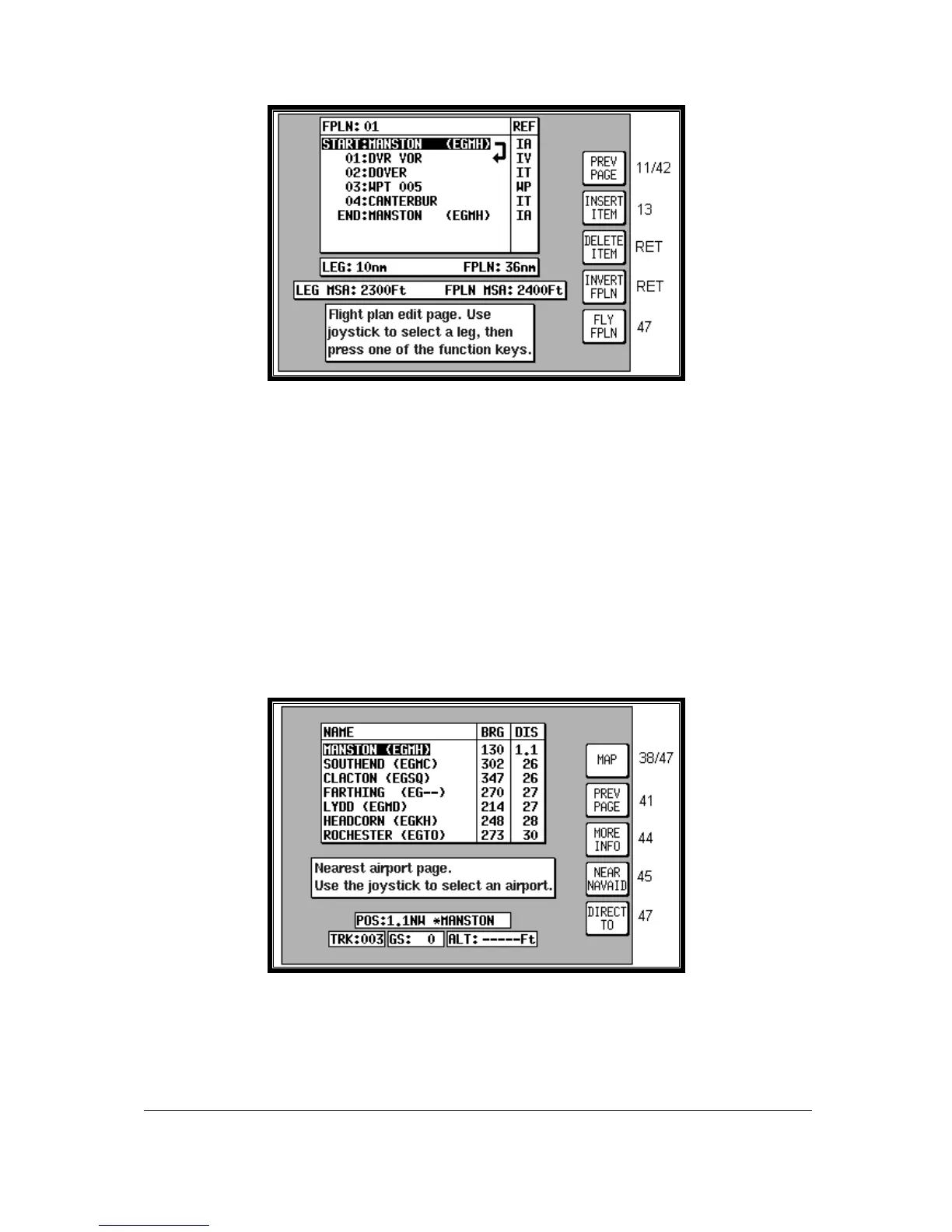
Screen 12: Flight Plan Program/Edit Screen
In order to select a flight plan to fly, bring up the desired Flight plan Number with the joystick and press
Key 2, SELECT, in Screen 42, Flight Plan Selection Screen. This will call Screen 12 from which you
can choose to edit the flight plan, reverse the flight plan or activate the flight plan. In order to activate
the flight plan, simply use the joystick to select the desired leg then press Key 5, FLY FPLN. If you
have highlighted a leg other than Start or 01 you will be prompted with the following message, “Do you
want to fly the first leg of the flight plan or the currently selected leg?” Three possible responses are
available, Key 1, ABORT will cancel the fly flight plan action, key 3 FIRST LEG to fly from the first leg,
or key 5 SEL’D LEG to fly from the highlighted leg.
NOTE: If you have activated AUTO LEG SELECT on Screen 23, NAV Mode Customisation Screen,
the nearest leg to your present position will automatically be selected for you as soon as you
enter Screen 12.
Ten Nearest
Airports
Screen 43: Ten Nearest Airports Screen
This Screen is accessed by pressing Key 3, NEAR APTS, on Screen 41, NAV Menu Cover Screen,
and dynamically shows the range and bearing of the ten nearest airports. When this Screen appears
you will find a cursor over the first airport in the list.



 To Next Page