14-13
Data In/Out
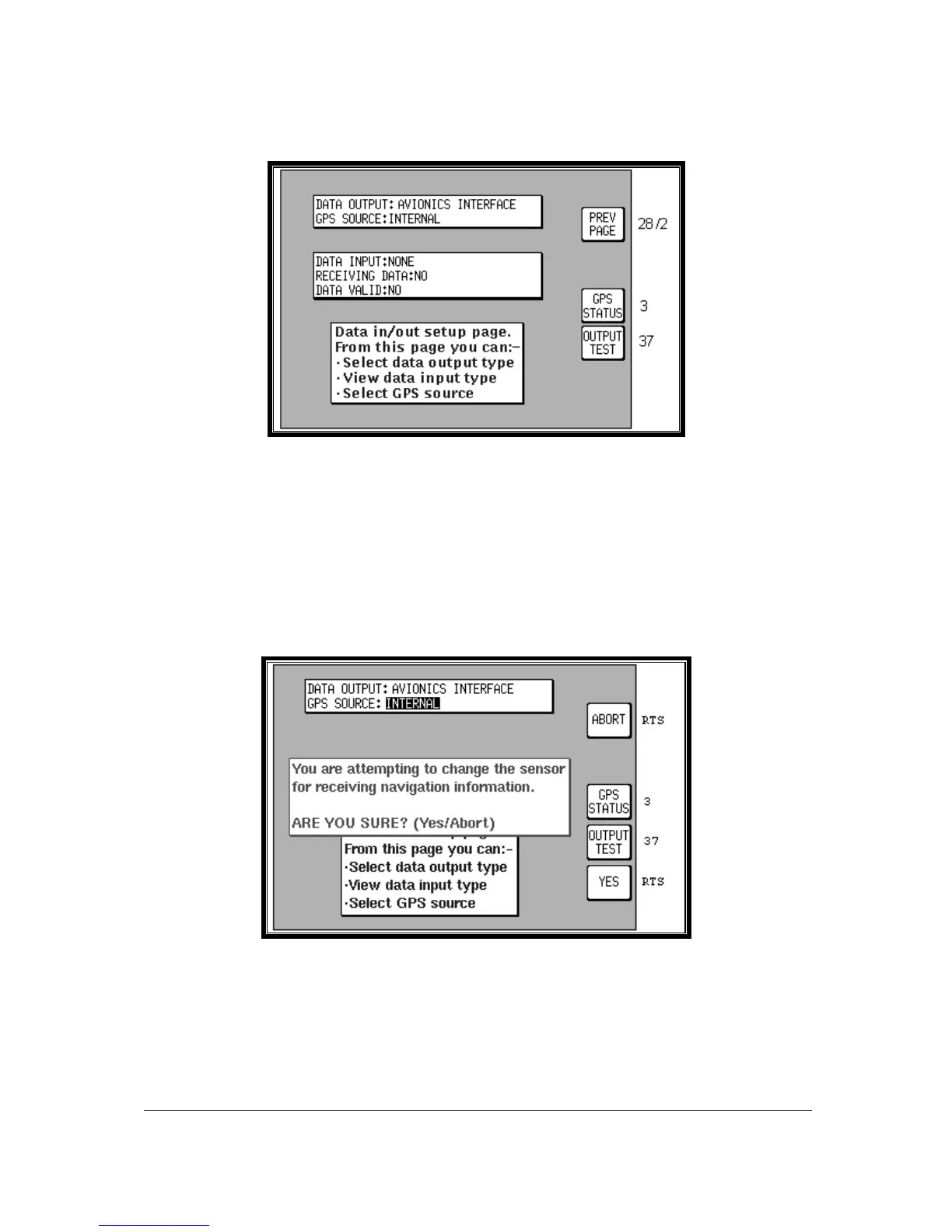
Screen 35: Data Input/Output Setup and Test Screen
On entry to this Screen details of the current settings for data output and GPS Source are displayed in
the top box. Settings can be toggled by using the joystick and the options available are as follows.
(The default settings are listed first.)
Tracker IIIC: DATA OUTPUT: OFF / ECHO INPUT.
Skymap IIIC: DATA OUTPUT: OFF / RS232 (AR NAV) 9600 BAUD / NMEA 0183 4800 BAUD /
AVIONICS INTERFACE.
The GPS SOURCE allows you to use your Skymap IIIC as a Tracker IIIC. When you move the cursor to
the right of this field the following Warning / confirmation request shall be displayed:
Screen 35B: GPS Source Change Warning Screen
If you press ABORT the GPS source remains unchanged. If you press YES, you can use the joystick to
toggle the GPS SOURCE between INTERNAL and EXTERNAL. When set to INTERNAL, the internal
GPS receiver will be used, and key 3 will be displayed, to allow access to the GPS Status screen. When
set to EXTERNAL, the Skymap IIIC will enter Tracker Mode and use data generated by an external GPS
receiver in the same way as a Tracker IIIC does. If you have a Tracker IIIC and select INTERNAL, an
error message will be displayed because an internal GPS receiver will not be found.



 To Next Page