14-1
14 SETUP SCREENS
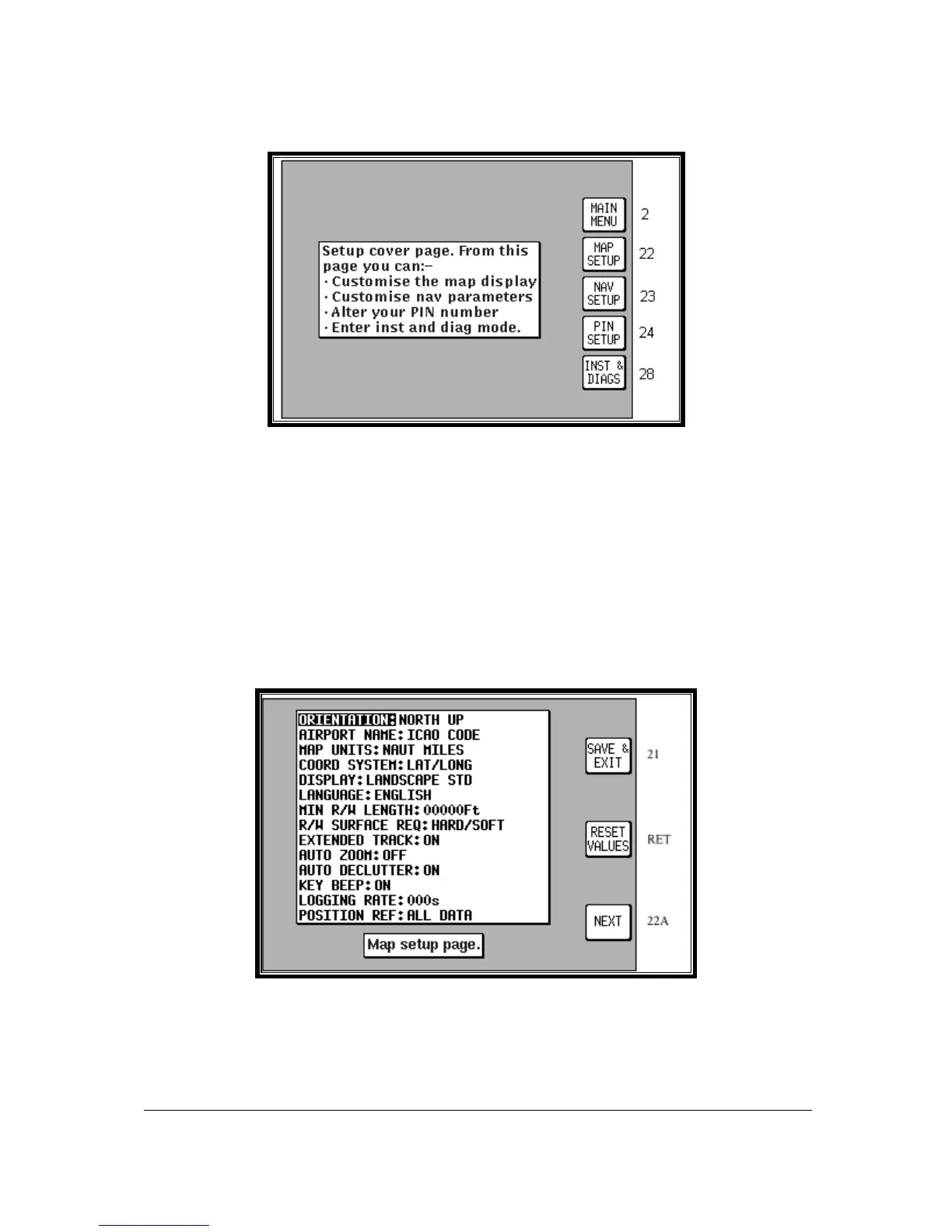
Screen 21: Setup Cover Screen
Your Bendix/King unit allows you a great deal of flexibility to customise it to suit your own wishes and
requirements. It also contains a high level of automatic self-testing and diagnostics. All customisation
and diagnostic functions are grouped together in this Setup section.
To access Screen 21, Setup Cover Screen, press Key 4, SETUP, in Main Menu.
Key 1 returns you to Screen 2, Main Menu
Key 2 gives access to Screen 22, Map Customisation Screens.
Key 3 gives access to Screen 23, NAV Mode Customisation Screen.
Key 4 gives access to Screen 24, Personal Identification Number (PIN) Setup Screens.
Key 5 gives access to Screen 28, Installation and Diagnostic Screens.
Map Setup Screens
Screen 22: Map Customisation Screen
To access Screen 22, Map Customisation Screen, presses Key 4, SETUP, in Main Menu, followed by
Key 2, MAP SETUP, in Screen 21, Setup Cover Screen.
When this Screen first appears you will always see the current settings with a cursor over the words
ORIENTATION. You can then use the joystick to move the cursor up and down the list of headings.



 To Next Page