14-4
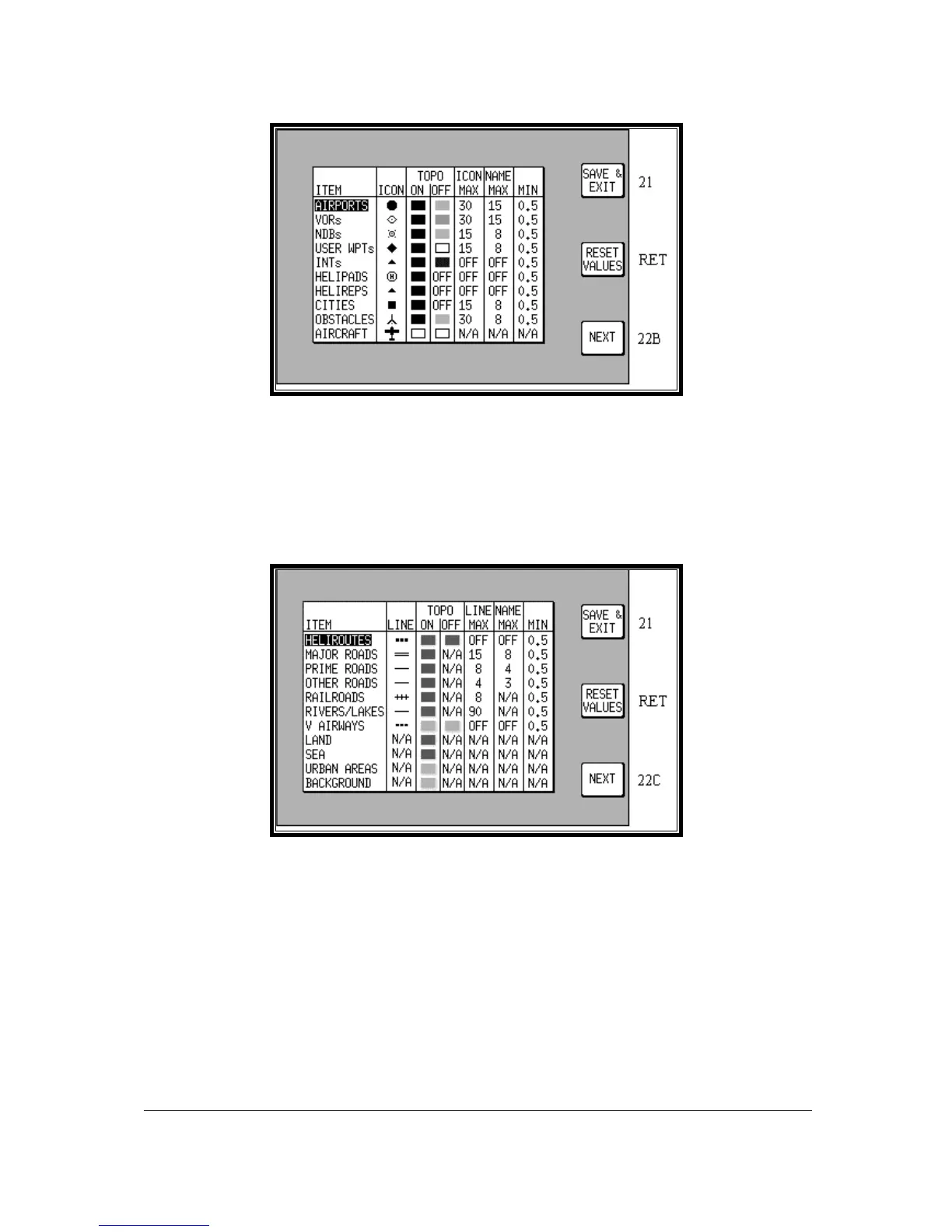
Screen 22A: Point Features Data Class Setup Screen
Screens 22A, 22B and 22C, the Data Class Setup Screens are accessed by repeatedly pressing Key
5, NEXT. It is impossible to include every item from the database within the graphic map display,
especially when zoomed out to the smaller scale maps. The Data Class Setup Screens allows you to
choose the level of zoom at which you wish each of the classes of data to become visible and at which
level of zoom you want their corresponding labels to become visible. You can also set the icon or line
style for many of the data classes and set their display colours for both TOPO ON and TOPO OFF
display modes.
Screen 22B: Line Features Data Class Setup Screen.
To do this you have to select for each database class an ICON or LINE style, A TOPO ON Mode
colour, an TOPO OFF Mode colour, an ICON or LINE MAX zoom level (the maximum zoom level at
which the icon or line will be displayed), a NAME MAX zoom level (the maximum zoom level at which
the name label will be displayed) and a MIN zoom level (the minimum zoom level at which both the
icon/line and name will be displayed. The default levels are those shown in the illustrations.
You will notice that there is a limited choice of icon styles for some data classes, this is intentional in
order to keep the important data (such as airports) displayed in a recognisable form. You will also
notice that some settings have N/A in their columns and are not adjustable. These are items that have
fixed values and are not user adjustable. A good example of this is that you cannot set up a colour for
the land in TOPO OFF Mode because no cartography is displayed in TOPO OFF Mode.
Not all data classes shown in the illustrations are available for all geographic areas. Details of the data
classes available on the data card you have installed are available from Honeywell.



 To Next Page