14-8
Bendix/King unit. Should you have the misfortune to forget your number, keep trying; there are only
256 permutations!
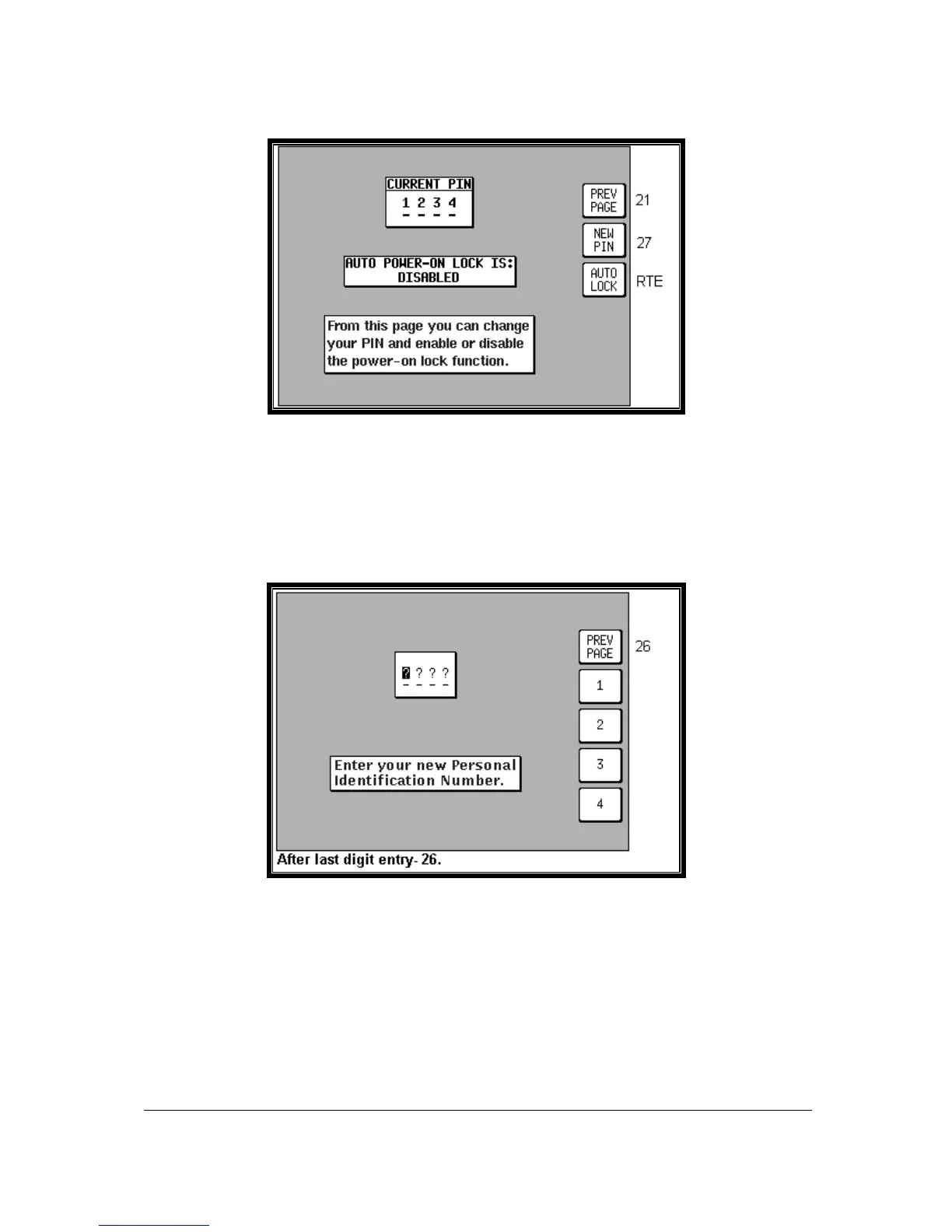
Screen 26: PIN Change & Power-On Lock Enable Screen
If you have managed to get the PIN correct then you move straight to Screen 26 as illustrated above.
On entry to this Screen, the current PIN is displayed and the status of the AUTO POWER-ON LOCK is
displayed. The default selection for this is DISABLED. If you wish to activate this power-on lock,
pressing Key 3, AUTO LOCK, will change the setting to ENABLED.
Pressing Key 1 returns you to Screen 21, the Main Setup page.
Pressing Key 2 takes you into Screen 27 (see below) where you are able to change the PIN.
Screen 27: PIN Change Screen
When you access this Screen the cursor will be sitting over the first question mark. This represents
the first digit of the PIN. Your new PIN can be entered from here by pressing Keys 2,3,4 or 5 (now
labelled 1,2,3, and 4 in the illustration above). The numbers you enter will replace the question marks
as they are entered and the cursor will step to the right.
When the fourth digit has been entered, the new PIN will automatically be transferred to the unit's Non
Volatile Memory (NVM) and Screen 26 will be displayed, showing the newly entered PIN. If you wish,
you may press Key 1 at any time and this will take you straight to Screen 26 without making any
change to the original PIN.



 To Next Page