2-3
MAP This is the primary operating mode of the unit.
NAV MENU Accesses all navigation functions and MSA information. Joystick toggles
NAV Mode.
FLIGHT PLAN Allows a flight plan to be selected and edited.
NEAR APTS Allows emergency search of 10 nearest airports,
providing information and DIRECT TO capability.
Includes Jeppesen and user defined airports which
satisfies the minimum runway length and surface
requirements.
NEAR NAVAID Allows emergency search of 10 nearest beacons (VOR's
and NDB's), providing information and DIRECT TO
capability.
SAVE WPT Allows your present co-ordinates to be saved in the next
available user waypoint number.
DIRECT TO Allows the user to perform a “goto” or DIRECT TO any point in the
internal or user defined database. It may also be used to obtain
information on any point in the database.
There are short cuts, which allow you to get to the primary operating mode, MAP mode, more easily;
but in general if you wish to get to a specific function in another branch of software, work your way
back up the present branch to MAIN MENU by pressing either the SAVE & EXIT, PREV PAGE or
MAIN MENU key. Then select the branch of software that contains the desired function you wish to
access.
Memory Locations
In the function descriptions, three types of memory, EPROM, RAM and NVM, are mentioned. You may
find it useful to know where various types of information are stored in order to make best use of the
equipment. The EPROM’s (Erasable Programmable Read Only Memory) are in the memory card and
are used to hold the operating system and the database. The memory card can be replaced periodically
in order to upgrade the operating system and update the database. The RAM (Random Access Memory)
is built into the unit and is used to store all user-defined data such as User waypoints and Flight plans.
The RAM is maintained by battery power from an internal Lithium cell, which should be replaced by your
Bendix/King dealer every three years to prevent loss of user-defined data. The NVM (Non Volatile
Memory) is also built into the unit. It stores initialisation data, serial number, PIN number and
performance log details. This memory is non-volatile which means it is retained even if the memory
battery is removed. If you choose to activate the PIN number security feature (similar to that available on
many car radios) the non-volatile nature of the NVM ensures your PIN cannot be tampered with or
erased.
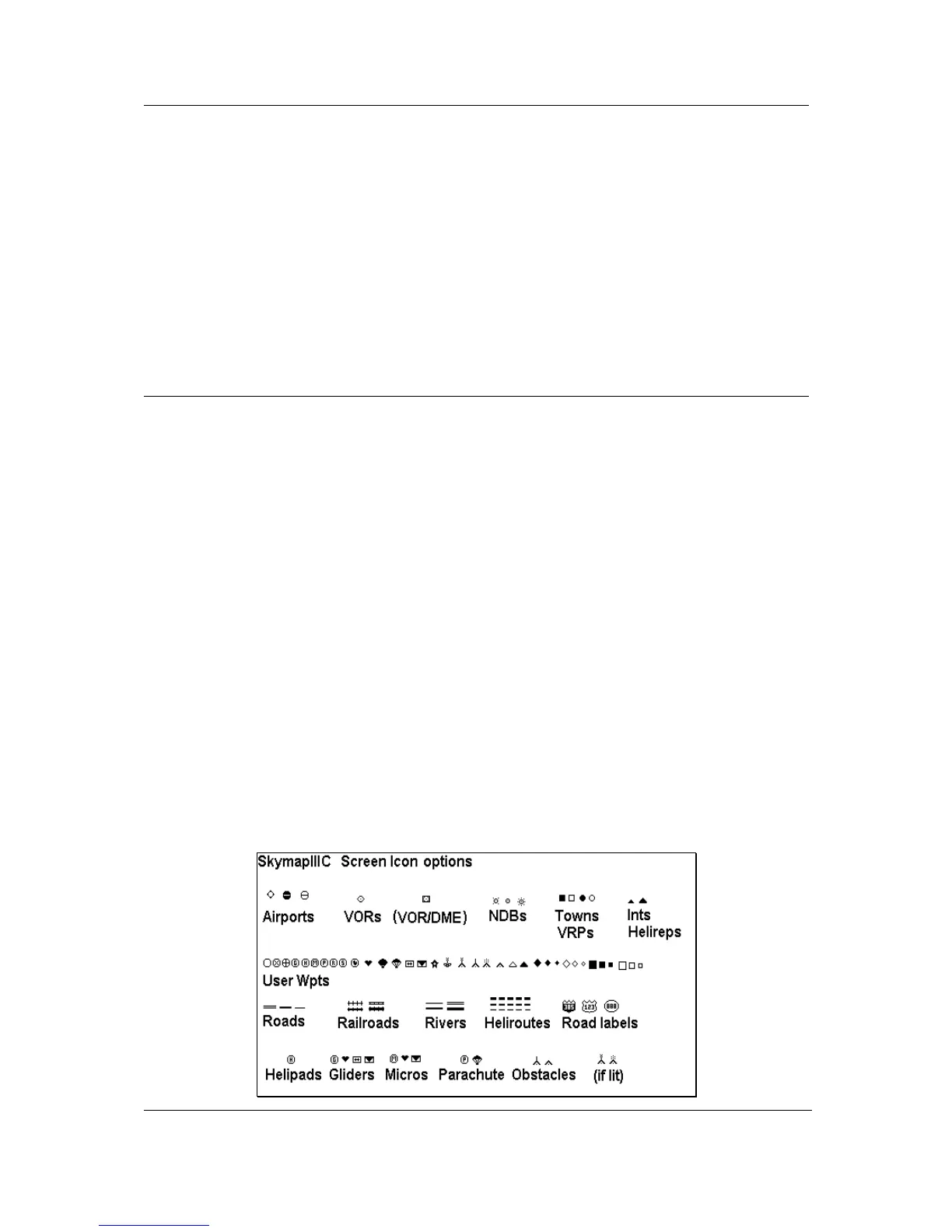
Screen Icons
When showing any map screen - airports, beacons, towns, intersections, user waypoints and many other
data classes are represented by symbols or icons, many of which are user selectable in the Map Setup
Screens. Please refer to the Setup Screens Section of this Manual for further details.



 To Next Page