USE
MAINTENANCE
3
3.7.2 - Real time parameters view
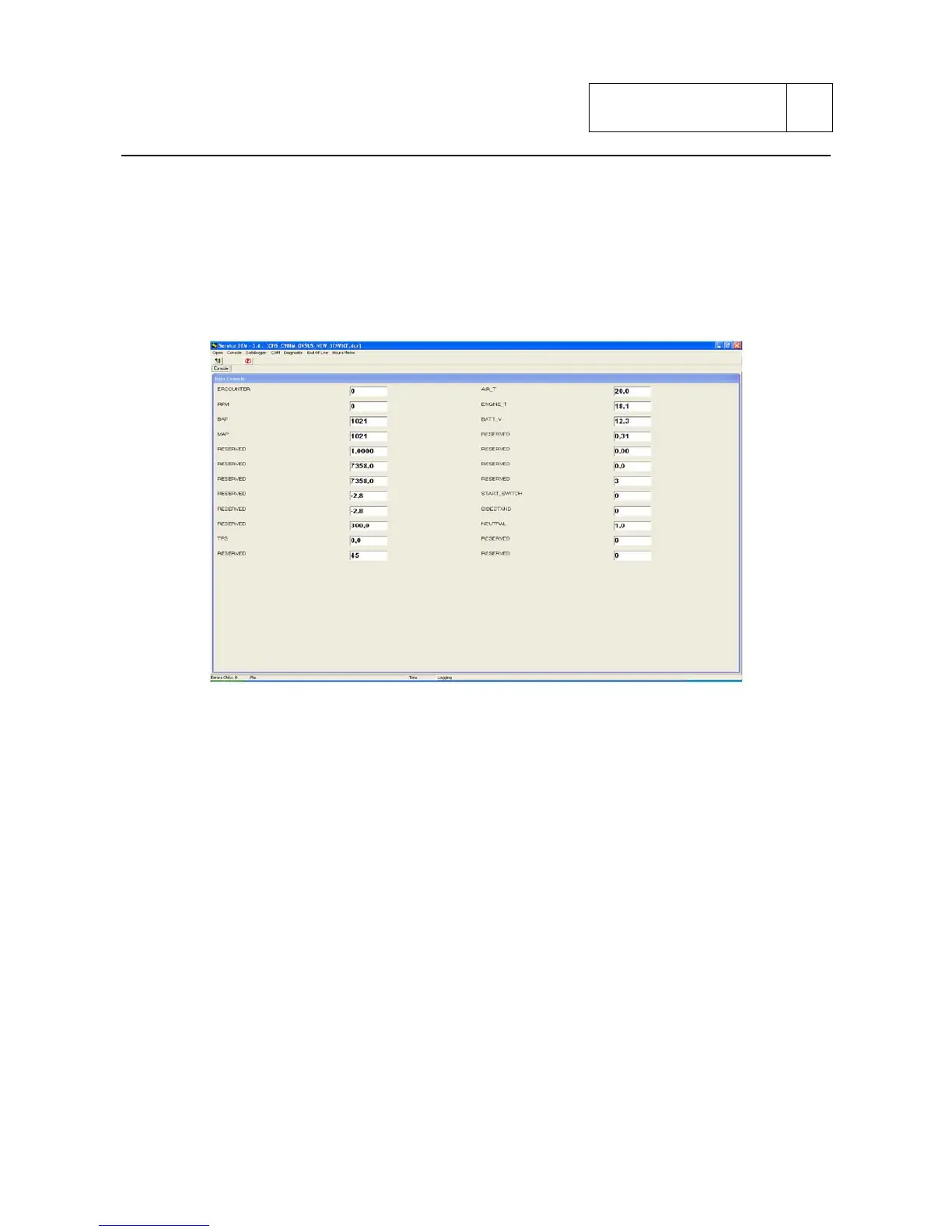
To display the parameters on real time it is necessary to “start the console” by clicking directly on
the “hammer” icon or selecting start from the console menu.
This operation must be carried out with key ON and diagnosis cable connected to PC.
From the console menu it is always possible to know the type of control unit connected.
This operation must be carried out with key ON and diagnosis cable connected to PC.
Here after explanation of each single item:
- ERCOUNTER: Crank shaft r.p.m.
- RPM: r.p.m.
- MAP: atmosphere pressure
- TPS: throttle position sensor
- AIR_T: air temperature
- ENGINE_T: engine temperature
- BATT_V: battery voltage
- START_SWITCH: start switch
- SIDESTAND: side stand switch
- NEUTRAL: neutral
The communication with the control unit can be interrupted by clicking on “prohibition” icon, or
selecting stop on console menu.
Sub 3-55


 To Next Page