100
Practical applications of the BR-532
Lengthening a portion within the
song after recording is finished
(Example 4)
Increasing the number of times a
verse part is repeated
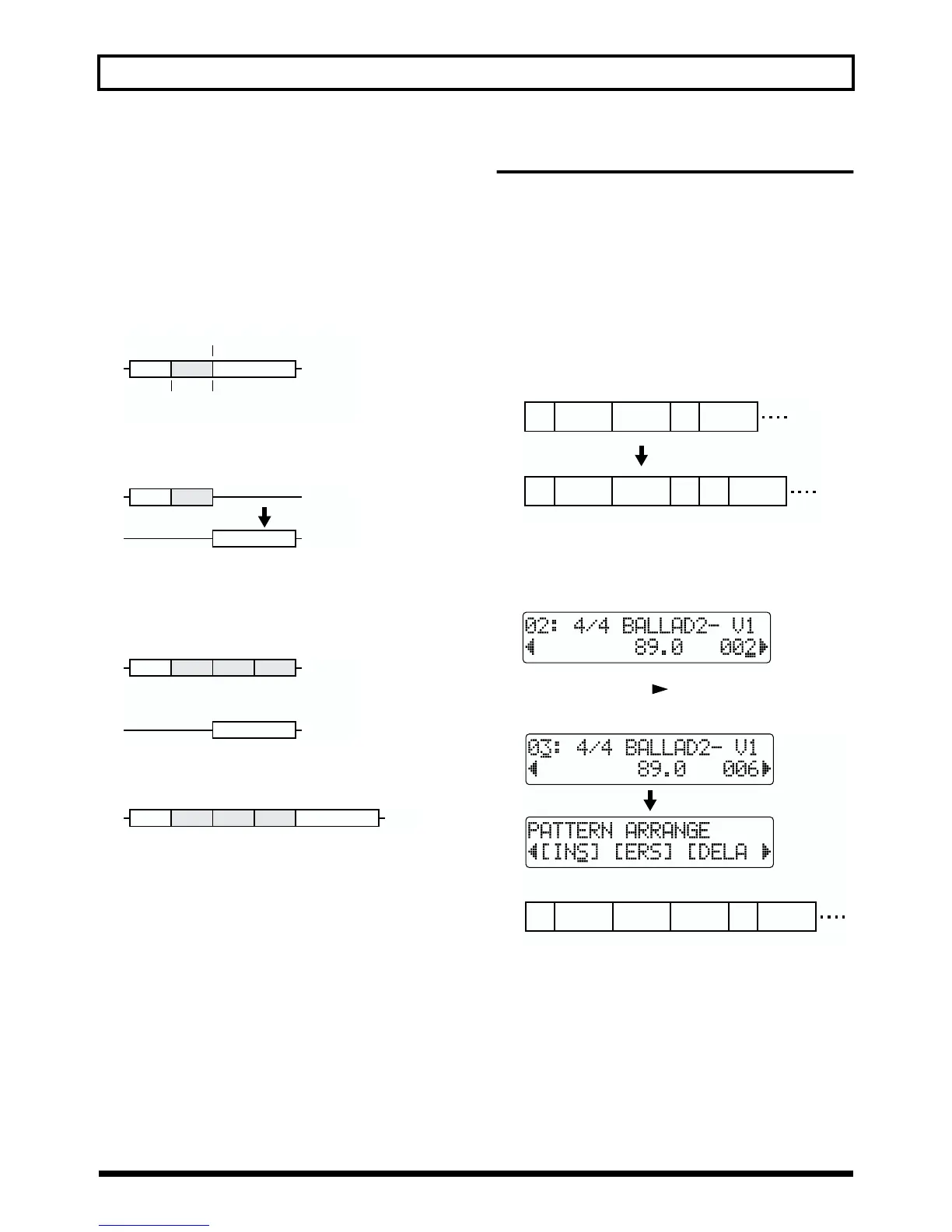
1. Register the verse part to Repeat A and B, and register
the end point for the verse to the locator.
fig.S05-09
2. Transfer (move) the data occurring after this locator to
the locator position on Track 1-2.
fig.S05-10
3. Specify Repeat B on Track 1-1 as the AB Copy
destination, and repeat the copy.
Also, specify the end of the copied data as a locator
position.
fig.S05-11
4. Use the Move function to return the data on Track 1-2
to the part marked by the locator on Track 1-1.
fig.S05-12
* Setting “AB QUANTIZE: ON” (p. 39) makes it easier to edit
in terms of measures.
How to use the Rhythm Guide
Changing the development of the
song
(Display is just a sample.)
(Example 5)
Changing the number of repetitions of
Verse 1 (two measures) from two to
three times, then adding a fill-in
during the third repeat
fig.S05-13
1. Lengthen the duration of the song.
1-1.Move to the screen for step that was used for verse 1
setting.
fig.S05-14
1-2. Press PARAMETER [ ] several times to display the
Pattern Arrange screen, and insert a step (p. 64).
fig.S05-15
Track 1-1
Verse
Locator
Repeat
B
Repeat
A
Track 1-1
Verse
Track 1-2
Track 1-1
VerseVerse
Copy
once
Copy
twice
Verse
Track 1-2
Trac
VerseVerseVerse
Verse
1
124679
Intro Verse
1
Verse
2
Fill
1
Verse
1
12467 10
Intro
Verse
1
Verse
2
Verse
1
8
Fill
1
Verse
1
12468 11
Intro Verse
1
Verse
1
Verse
2
9
Fill
1



 To Next Page