18
Panel Descriptions
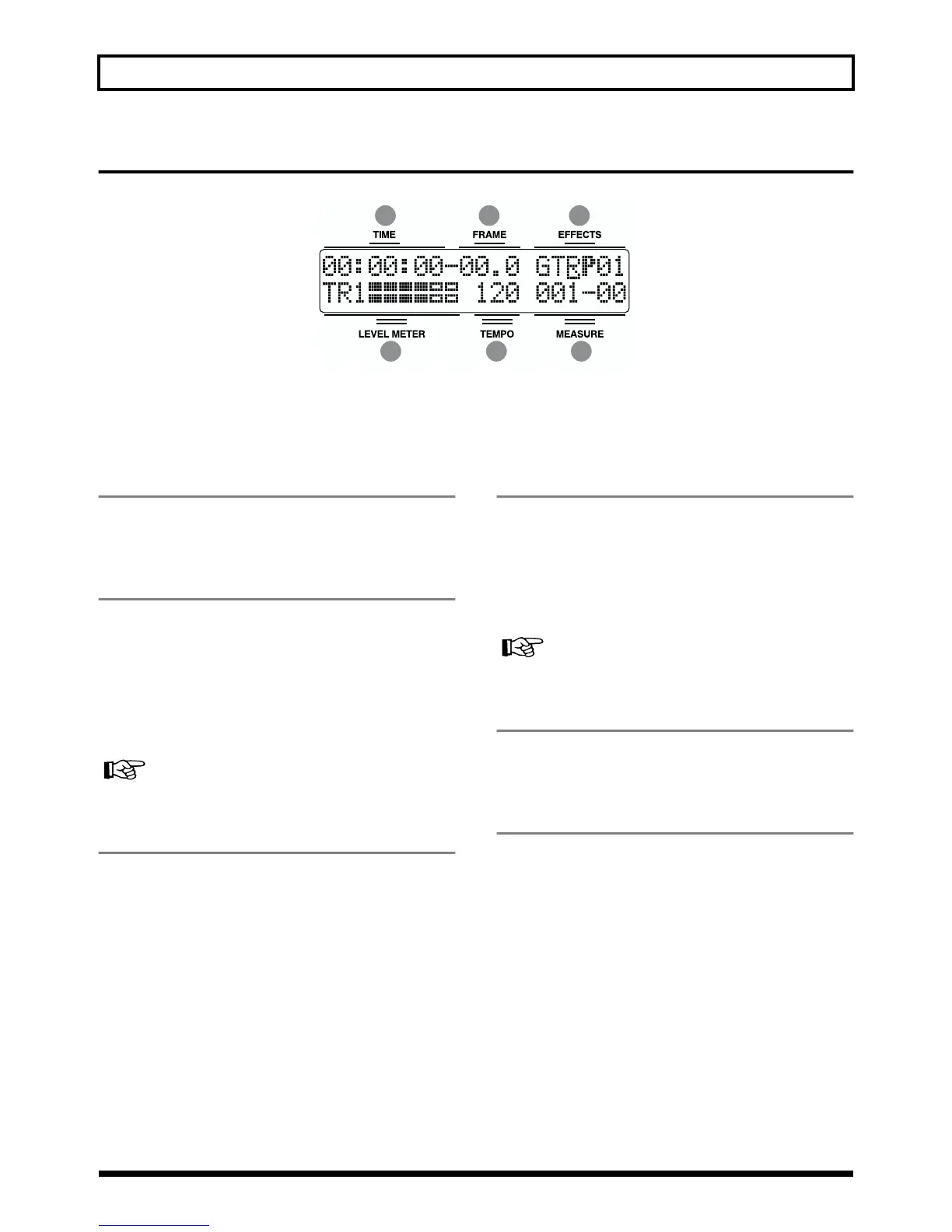
Display
fig.00-04
Displays the menu screen, parameter setting screen, or other information,
depending on the type of settings being made.
If the screen is difficult to view, see “Adjusting the Display Contrast” (p. 24).
1 TIME
Displays the time of the current position of the song (hours-
minutes-seconds).
2 FRAME
Displays the frame number of the current position of the
song.
At the factory settings, one second is set to 30 frames (non-
drop).This is one type of a specification known as MTC
(MIDI Time Code), and when you use the BR-532 to play in
synchronization with another MIDI device, you will need to
set both devices to the same MTC type.
Synchronizing playback with a MIDI sequencer (p. 69)
3 EFFECTS
Displays the effect bank and patch number.
4 LEVEL METER
During play mode, the volume levels of instruments being
input, and volume levels of each track are displayed.
The levels displayed are the levels after the adjustments are
made with the INPUT LEVEL knob and TRACK fader (i.e.,
post fader). You can select the level meter to display each
type of level being set.
Select the level meter to be displayed (p. 30)
5 TEMPO
Displays the tempo. Displays the tempo of the tempo map
during playback that uses a tempo map.
6 MEASURE
Displays the measure number and beat of the current
position within the song. The left number is the measure
number, and the right number is the beat.
1 2 3
4 5 6



 To Next Page