63
Using the Rhythm Guide
Advanced Use
Creating patterns
New patterns are created by simply changing the settings of
the pattern that is currently selected. A total of 999 measures
worth of patterns can be created. After changing the settings,
the new pattern can then be saved as a user pattern or song
pattern.
When editing a preset pattern in order to create a new pattern
(p. 63), you can have the rhythm pattern stop at the end of the
song by clearing the step after the BREAK in which V1 (verse)
is set (p. 64).
1. With playback stopped on the BR-532, press
[PATTERN ARRANGE].
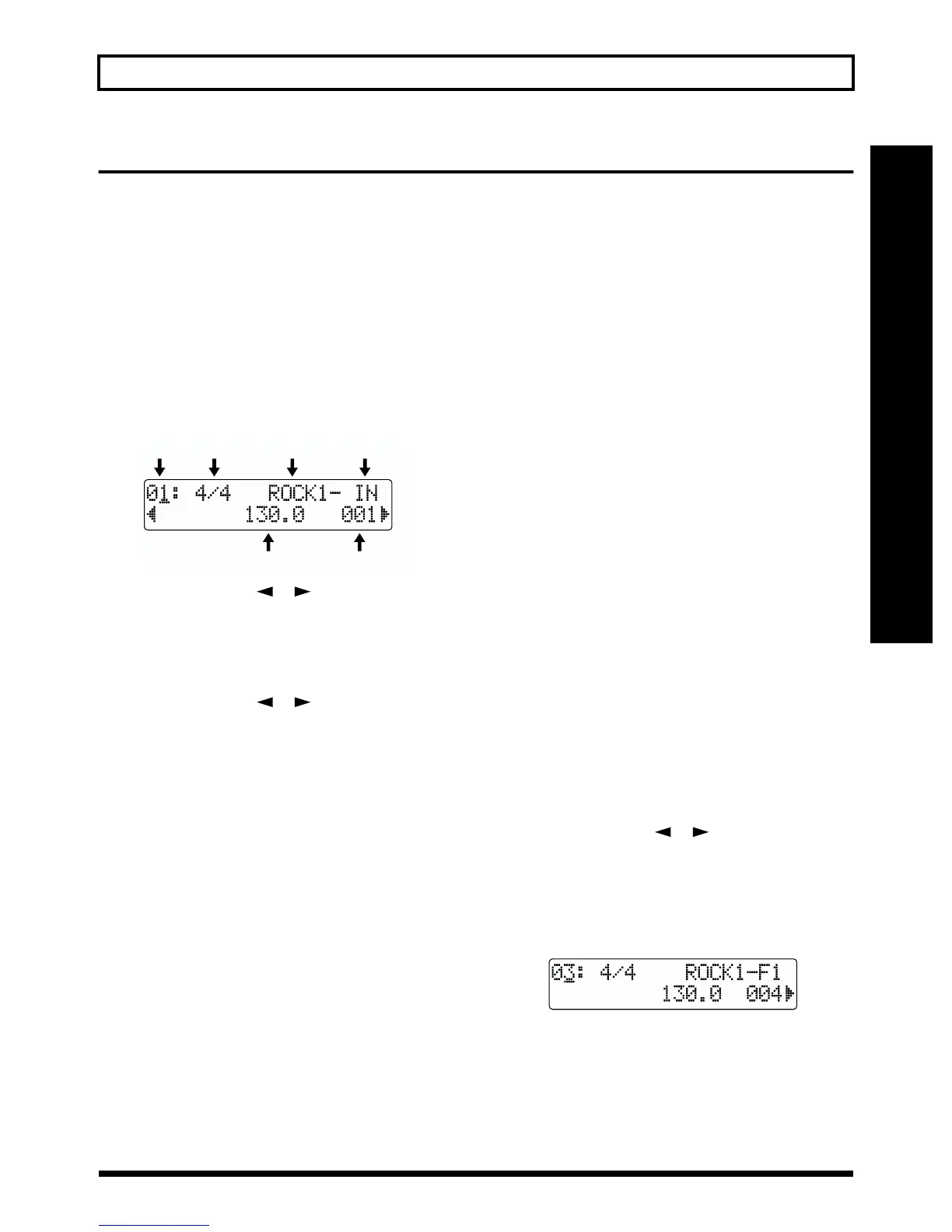
The Step Entry screen appears.
fig.R12-02
2. Press PARAMETER [ ] [ ] to move the cursor to
“Step,” and turn the TIME/VALUE dial to select the
step to edit.
* Press [REW] to move to the previous step and [FF] to move to
the next step.
3. Press PARAMETER [ ] [ ] to move the cursor to
the parameter that you want to edit and turn the TIME/
VALUE dial to change the setting.
* Press [AUTO/ON/OFF] of the RHYTHM GUIDE to light the
indicator and start playing the currently selected step.
Time signature
Set the time signature of the form that is selected by the
current step.
* To change the style/form, set the time signature to 4/4 time. If a
setting other than 4/4 is set, the
“Metro (metronome)”
is set
to start playing.
Valid Settings: 1/1, 2/1, 3/1, 4/1, 5/1, 6/1, 7/1, 8/1,
1/2 to 8/2, 1/4 to 8/4, 1/8 to 8/8
Tempo
Set the tempo of the form that is selected by the current
step.
* The tempo as indicated in the Play screen is rounded off at the
decimal point (however, the actual tempo is the same).
Valid Settings: 25.0–250.0
Starting measure
Set the measure where the form that is selected by the
current step will start playing.
* The starting measure for step 1 is always set to “001.” This
cannot be changed.
* You cannot set a starting measure that is equal to, or earlier
than the starting measure that is set for the previous step.
* You cannot set a starting measure that is beyond the starting
measure of the next step.
Style
Select a style that is suitable for the kind of music you are
creating.
* If you set the time signature to a setting other than 4/4, the
“Metro (metronome)”
will be set to start playing
automatically.
Valid Settings: ROCK 1–6 HdRck 1–5
HEAVY 1–5 POP 1–8
BALLAD 1 and 2 BLUES 1–4
R&B 1–5 JAZZ 1–3
FUSION 1 and 2 HipHop 1 and 2
FUNK HOUSE
Cntry 1 and 2 OTHER 1–3
* To insert the whole rest, set the BREAK. You can set the same
time signature as “Metro.”
Form
Select a form type that fits in with its placement in the
pattern.
Valid Settings: IN, V1 and 2, F1 and 2, and END
* You can only enter form settings when the time signature is set
to 4/4.
4. Press PARAMETER [ ] [ ] to move the cursor to
“Step,” and turn TIME/VALUE to select the next step.
* When you select the step that is not edited totally, the display
shows “-” beside step number. Please move a cursor to other
than step number then turn the TIME/VALUE dial one click.
You will find the data of previous step.
fig.R12-03
5. Repeat steps 3 and 4 above to complete the pattern as
desired.
* You can set up to a maximum of 50 steps.
Step Time signature Style Form
Tempo Starting measure



 To Next Page