99
Practical applications of the BR-532
Appendices
Utilizing the V-Tracks
Mixing a song using four tracks
down to a single track
(Example 2)
When you want to add chorus and
record a lead guitar after recording of
Tracks 1-1, 2-1, 3-1, and 4-1 is finished
Track 1-1: Rhythm guitar
Track 2-1: Bass
Track 3-1: Vocal
Track 4-1: Piano
1. Bounce Track 2-1 and Track 4-1 to a blank V-Track (for
example Track 4-2), then record the lead guitar to Track
2-2.
Track 1-1: Rhythm guitar
Track 2-2: Lead guitar
Track 3-1: Vocal
Track 4-2: Piano & Bass
2. Bounce Track 1-1 and Track 2-2 to Track 1-2, then
record the chorus to Track 2-3.
Track 1-2: Lead/rhythm guitar
Track 2-3: Backing Vocal
Track 3-1: Vocal
Track 4-2: Piano & Bass
3. Bounce Track 2-3 and Track 3-1 to Track 3-2.
Track 1-2: Lead/rhythm guitar
Track 2-3: Backing Vocal
Track 3-2: Vocal & Chorus
Track 4-2: Piano & Bass
4. While playing back Tracks 1-2, 3-2, and 4-2 along with
the Rhythm Guide, adjust the overall balance.
5. When you have the balance adjusted correctly, bounce
Tracks 1-2, 3-2, and 4-2 and the Rhythm Guide to Track
1-3.
How the V-Tracks are used after editing
In this manner, you can use the V-Tracks to check the
sounds in all parts, and while leaving the source data as
is (see note), assemble all of the parts on a single track.
(Note) When little free space remains on the memory
card, delete the data on the bounce-source
track to secure more memory. Alternatively,
back up the song on your PC before you begin
editing (p. 102)
Correcting a mistake occurring
only in one portion of a
recording
(Example 3)
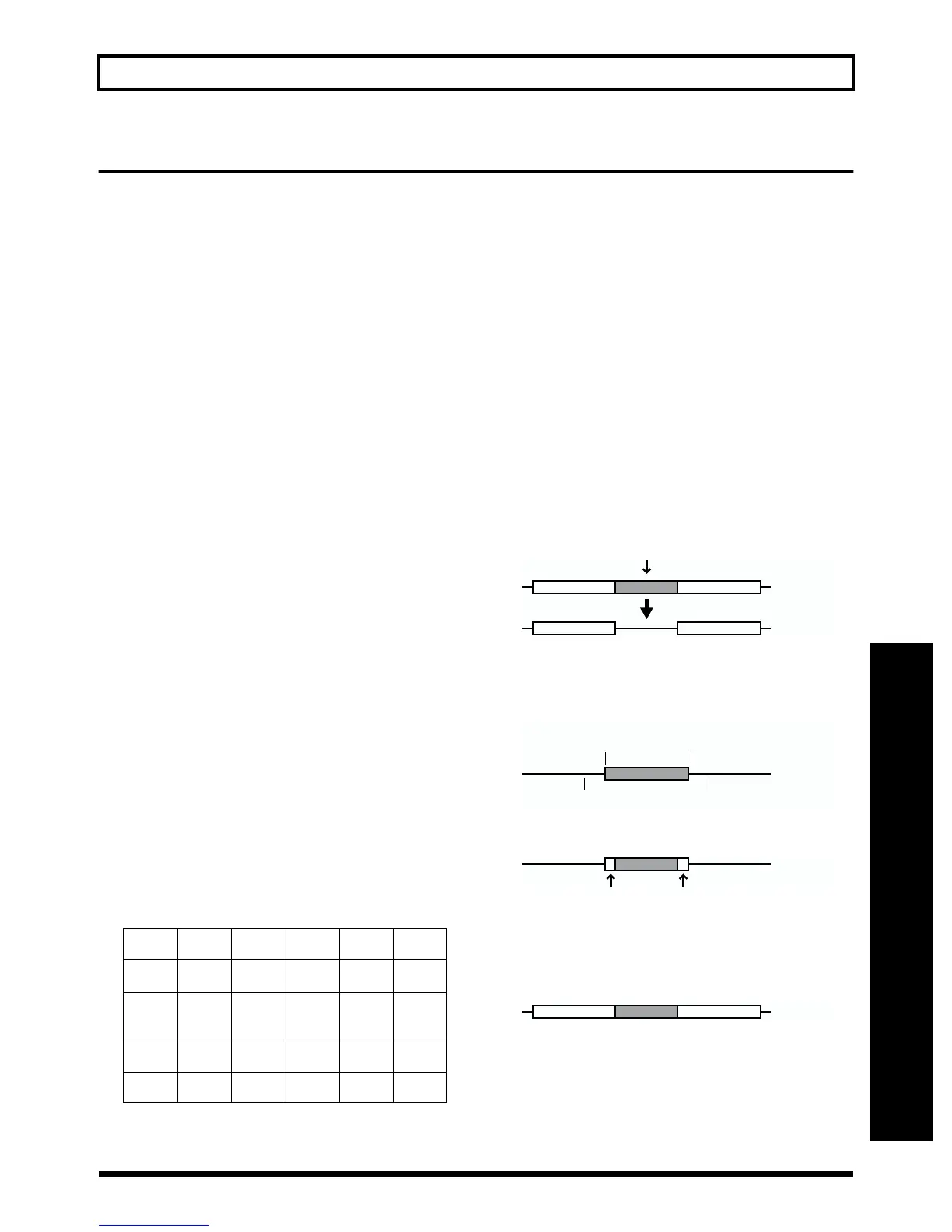
Recording over a poor take on Track 1
1. Edit Track 1.
Clear the part containing the mistake (p. 55).
fig.S05-05
2. After adjusting the recording level while comparing it
to the level on Track 1, use punch in/out (p. 45) to
record the problem section to Track 2-1.
fig.S05-06
3. Edit Track 2 as needed.
fig.S05-07
For example, using scrub, you could find the location
immediately after the start of recording where picking
noise occurs, and remove the noise.
4. Bounce Track 1-1 and Track 2-1 to Track 1-2.
fig.S05-08
Edit the data remaining from the preceding operation so that
the splice is not noticeable.
Track 1 2 3 4 Rhythm
Guide
V-Track
1
Rhythm
Guitar
Bass Vocal Piano
V-Track
2
Lead/
Rhythm
Guitar
Lead
Guitar
Vocal &
Chorus
Piano &
Bass
V-Track
3
Final
Bounce
Chorus
V-Track
4
Track 2-1
Punch
In
Repeat A
Repeat B
Punch
Out



 To Next Page