11
Introduction to the BR-532
Features
Simple operation
The BR-532 is designed to be operated as easily as a cassette
tape recorder, even by beginners.
Whether you are simply preparing a demo tape, or are
getting ready to go to master with your first album, the
simple operation of the BR-532 allows you to create digital
recordings the very day you take it out of the box.
Two-way power supply allows
you to record anywhere
The BR-532 can also be powered by dry-cell batteries (six AA
batteries). And, thanks to its built-in microphone, you can
make recordings anywhere and anytime you desire.
Digital audio workstation
All processes are fully digital
In addition to a digital mixer and digital recorder, the BR-532
contains two digital effects processors.
It is possible to perform all steps needed for recording,
including editing, bouncing tracks, using effects, and mixing
down, entirely within the digital realm, so there is no
deterioration in the signal quality. In addition, by connecting
digital devices like DAT recorder, MD recorder and CD
recorder, you can do recording your data with full digital
processing.
Equipped with V-Tracks
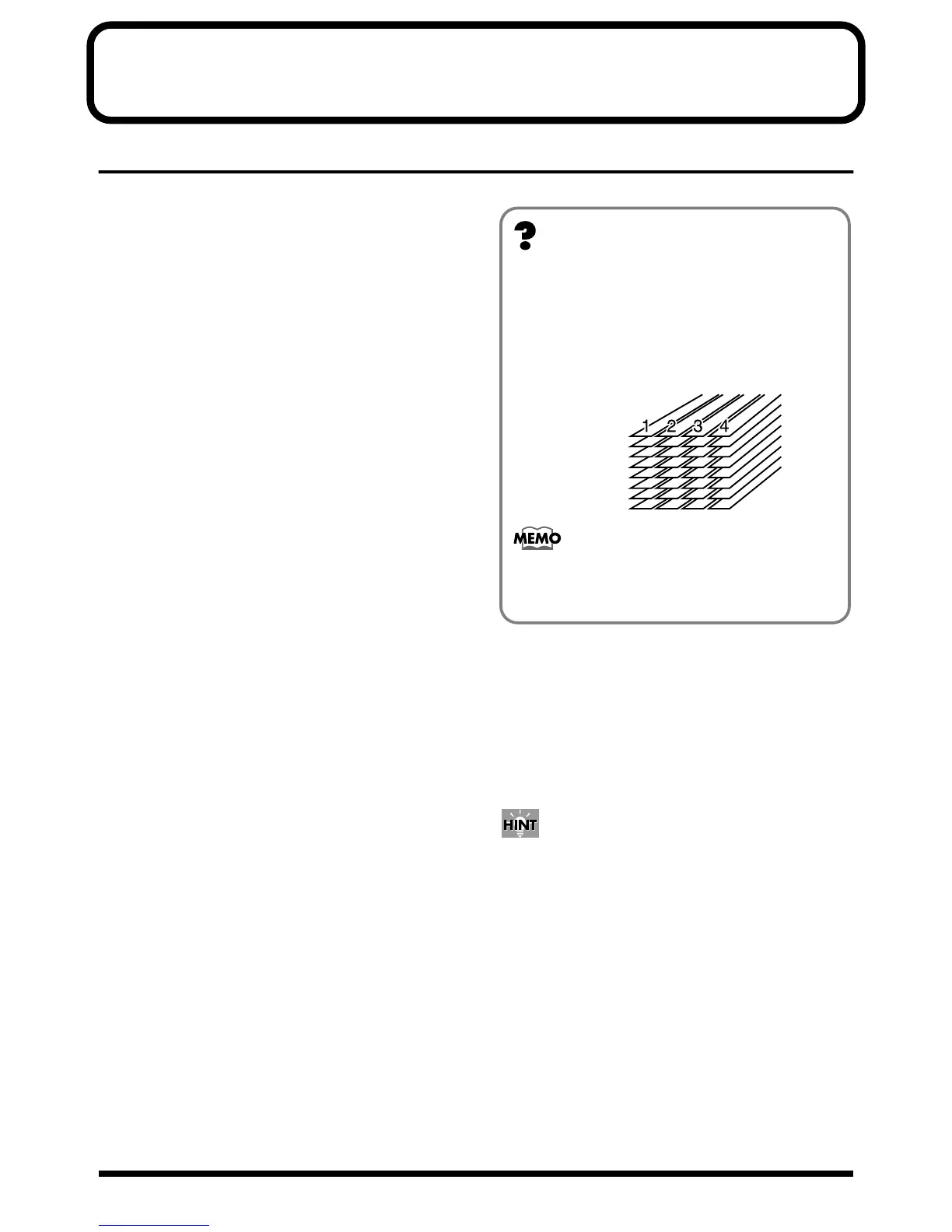
The BR-532 has four audio recording tracks, which provides
for simultaneous recording on two tracks, or simultaneous
playback from four tracks. Moreover, each track incorporates
eight virtual tracks, called “V-Tracks,” for a total recording
capability of 4 x 8 = 32 tracks! This increased versatility
allows you to do things such as record numerous takes of a
guitar solo, which you can later choose from when putting it
all together. Also, while playing back four tracks, you can
use the bounce mode to bounce to a V-Track and perform
stereo bouncing without needing to erase any data.
Rhythm Guide function
The “Rhythm Guide function” makes it easy to capture
phrases or musical ideas that come to mind. (p. 62) Simply
select an appropriate rhythm pattern, and set the tempo. You
can create your own original patterns by combining rhythm
patterns.
By recording using the Rhythm Guide function, editing
one measure at a time is greatly simplified.
What are V-Tracks?
Each track consists of eight virtual tracks, and you can
choose any one of these tracks for recording or playback.
his means that you can record to up to a maximum of 32
tracks, and then select any four of them to play back.
These virtual tracks that make up the actual tracks are
called “V-Tracks.”
fig.00-01
A “Track Sheet” is provided at the rear of this
manual (p. 122), which you can make copies of, and
fill in when recording music to V-Tracks.
V-Track 2
V-Track 1
V-Track 3
V-Track 4
V-Track 5
V-Track 6
V-Track 7
V-Track 8



 To Next Page