81
Using the insert effects
Advanced Use
Saving insert effects settings
(Write)
Follow the procedure below to enter a name (patch name) for
an effect that you’ve modified, and save it as a new effect
patch.
* You cannot save an effect patch during the recording or
playback of a song.
1. Entering the patch name.
* If you do not need to change patch name, go to “4.”
At the Edit Effect screen, press PARAMETER [ ]
[ ] to move the cursor to “NAME,” and press
[ENTER].
The Patch Name Setting screen appears.
fig.R18-06
2. Press PARAMETER [ ] [ ] to move the cursor,
and turn the TIME/VALUE dial to enter the patch
name.
3. After you have completed entering the effect settings
and patch name as desired, press [EXIT] to return to the
page (Effect Edit page) two screens previous.
4. Press PARAMETER [ ] [ ] to move the cursor to
“WRITE,” and press [ENTER].
The Write screen appears.
fig.R18-06a
5. Turn the TIME/VALUE dial to select the number to
which to write the new effect patch.
6. After you’ve selected the destination, press [ENTER].
After the save has been completed, you are returned to
the Play page.
Changing the insert effect
connections
By default, the insert effect is inserted immediately after the
input source. The reason for this is to allow for the effects-
processed (wet) sound to be recorded and monitored.
However, sometimes you want to change the connection
order.
Your BR-532 allows you to change where insert effects are
connected. Follow the procedure below to change where
insert effects are connected.
1. Press [UTILITY].
2. Press PARAMETER [ ] [ ] to move the cursor to
“EFX,” and press [ENTER].
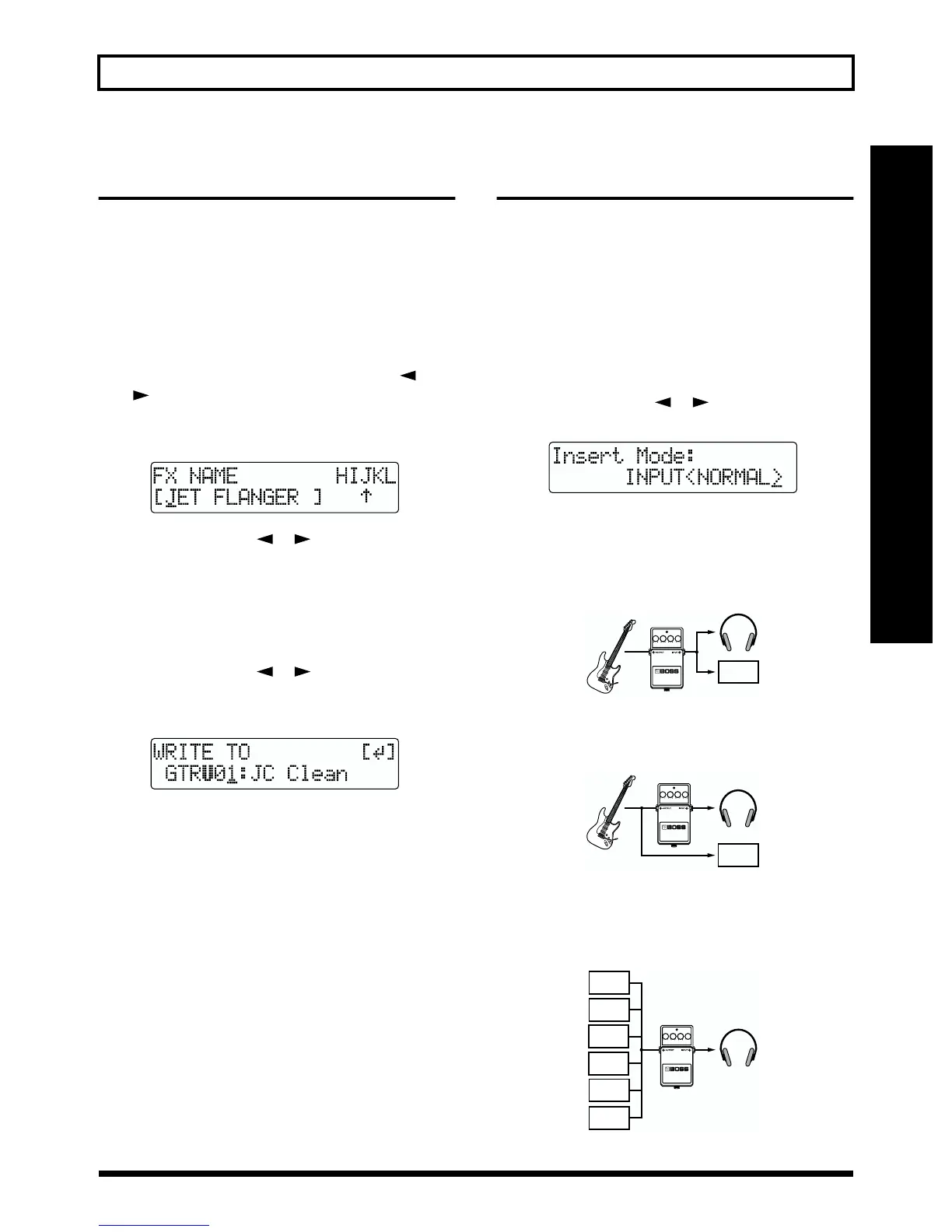
fig.R18-08
3. Turn the TIME/VALUE dial to switch the “Insert Mode.”
INPUT (NORMAL):
The sound is monitored and recorded after it passes
through the insert effect. Normally you will use the BR-
532 with this setting.
fig.R18-09
INPUT (REC DRY):
The sound is monitored through the insert effect but is
recorded without the effect (dry).
fig.R18-10
MASTER:
For applying effects to all sounds to adjust the sound
quality when mixing down, achieve a special effect from
an effect, or perform similar operations.
fig.R18-11
4. Press [EXIT] several times to return to the Play page.
TRACK 1
(REC)
TRACK 1
(REC)
TRACK 1
(PLAY)
INPUT
TRACK 2
(PLAY)
TRACK 4
(PLAY)
Rhythm
TRACK 3
(PLAY)



 To Next Page